Key takeaways:
- Most GDPR problems at corporate events don’t start with hackers. They start with ordinary workflow habits: free-text registration questions, spreadsheet exports for catering, and invitations sent outside the official flow.
- Staying compliant comes down to four decisions you make once and repeat for every event: what you collect, how guests consent, where copies of the data go, and which system enforces deletion.
- InviteDesk helps event teams keep guest data in one controlled place instead of scattered spreadsheets, show privacy statements during registration, control which fields sync to the CRM, and delete sensitive event data automatically. Data is hosted in the EU.
When people think about event data risk, they usually picture something like the 2024 Ticketmaster breach: names, addresses, phone numbers and payment details pulled from a database and put up for sale.
But headline breaches aren’t where most event teams get into trouble. The dangerous data is smaller and easier to overlook: a guest’s diet and allergies. These are, in fact, medical data. And they become a serious liability the moment they move into catering spreadsheets, supplier files, CRM records and shared drives without adequate protection.
We’ve spent more than a decade working with corporate event teams at banks, manufacturers, consultancies, and public institutions, and GDPR comes up in almost every conversation. We’ve heard of the allergy list that ended up on a shared drive, the dealer who’s no longer allowed to register his own customers, the tool evaluation that spent months inside a data protection review.
These stories put corporate teams in a dilemma: how do you collect what catering genuinely needs without holding health data you can’t justify keeping? How do you invite guests without breaking consent rules? And can you do any of it without turning every event into a legal project?
This guide covers the four decisions that answer those questions: what guest information to collect, how to invite people compliantly, where each copy of the data may go, and what to demand from your event software.
But first, let’s clarify exactly why GDPR compliance is so frustrating for event teams today.
Planning a compliant corporate event? Use InviteDesk’s Corporate Event Planning Checklist to keep the operational details in one place before your next event.
Why GDPR Compliance Is So Frustrating for Corporate Event Teams
Each time we talk to event managers and the same four problems come up, whatever the industry. If any of these sound familiar, the rest of this guide is written for you.
Tracking sensitive data after the event is harder than collecting it
Collecting a guest’s allergy information takes one form field. Accounting for that information three weeks after the event is the hard part.
A single event registration answer rarely stays in one place. The catering team gets an export. The check-in staff keep a list. Someone downloads a spreadsheet to use on-site. A supplier receives a partial copy by email.
After the event, nobody can say with confidence where every copy lives or who is responsible for deleting it. Teams running events across spreadsheets, mail tools and forms feel this worst, because every event multiplies the copies nobody owns.
The old ways of inviting guests are no longer allowed
For years, a dealer could register fifty of his customers for a factory event, and a relationship manager could sign a client up over the phone. Under GDPR, neither works: every guest has to consent personally, which means every guest has to register themselves.
This usually produces one of two outcomes.
Either the registration process becomes clumsy for exactly the guests you most want to impress, or people route around it. A sales rep invites a client by phone or personal email, the client shows up, and there is no consent record and no entry on the guest list. Marketing stays blind to who was actually invited.
Nobody can tell you exactly how long you may keep what
GDPR sets no fixed retention periods for event data. Your organisation has to decide how long each category of data is needed and justify that decision.
Without a clear rule, teams swing between two failure modes. Some hoard everything, keeping allergy notes and accessibility requests in systems for years. Others delete so aggressively that next year’s re-invite list is gone, along with the attendance history that made event follow-up possible.
Every new event tool has to survive your own data protection review
Even when the event team loves a tool, it still has to pass the data protection officer and IT security. Event managers at large organisations have told us the same thing in different words: once data protection and IT security get involved, with the processing agreement and the security questionnaire and the hosting questions, the first months are gone.
That review exists for good reasons. But it means the compliance posture of the vendor you pick decides how long procurement takes, sometimes more than the price does.
How to Stay GDPR Compliant Without Slowing Your Events Down
None of these problems is solved by reading the regulation more closely. Instead, we suggest resolving workflow design: deciding once, per field and per audience and per system, what happens to guest data, then letting that decision repeat across every event.
The four steps below follow the life of your guest data, from the registration form to the tool review.
Step 1: Decide What to Collect, How to Collect It, and What You’ll Keep
Every GDPR risk at your event traces back to what you put on the registration form. You can’t lose, over-retain, or wrongly share data you never collected. Most guides treat compliance as a consent-form problem; in our experience it’s a collection problem first.
Classify every field before you build the form
GDPR doesn’t treat every event field the same way. Some data is ordinary personal data: names, business emails, company names, and job titles. You still need a lawful basis and a clear purpose for collecting it, but it’s usually covered by the normal administration of a corporate event.
Other fields deserve closer review, because the answers may reveal sensitive information that could expose an attendee to harm if it leaked.
| Event data | Why you collect it | GDPR concern | Better collection decision | How to apply it |
|---|---|---|---|---|
| Dietary requirements | To brief catering | Some answers may reveal health information or religious belief | Use structured meal options where practical and avoid broad free-text prompts | Offer options such as standard, vegetarian, vegan, halal, kosher, gluten-free, and other. Avoid asking guests to explain their diet unless catering genuinely needs that detail. |
| Allergies or medical requirements | To prevent unsafe food exposure or provide appropriate support | This may involve health data | Ask only for the information needed to protect the guest | Use a separate allergen field such as: “Please list any allergen the catering team must know.” Do not ask for medical history or unrelated health details. |
| Accessibility requirements | To prepare access, seating, or other assistance | A response may disclose disability or health information | Ask what adjustment is needed, not for a diagnosis | Use practical options such as step-free access, reserved accessible seating, hearing support, or other assistance. Avoid asking the guest to name or explain their condition. |
| Plus-one details | To manage capacity, entry, and hospitality | You may collect another person’s personal data before they interact with you directly | Limit the data requested and provide appropriate privacy information | Ask only for the plus-one’s name and any information needed for entry or catering. Make sure the guest or plus-one can access the relevant privacy notice. |
| Photo or video permissions | To record whether a guest agrees to specific photography or filming | Creates a permission or consent record that may need to be retained | Keep it separate from unrelated registration choices | Use a separate photography or filming permission field. Don’t bundle it with marketing consent, dietary questions, or general event terms. |
| Check-in and engagement data | To manage entry and report on participation | Can become long-lived event or CRM data | Decide whether you need the record after the event and for how long | Keep attendance data if it supports reporting, relationship follow-up, or audit needs. Set a retention rule instead of leaving check-in records in the event platform indefinitely. |
The practical test is simple: what will your team do differently because it has this information?
If the answer doesn’t affect catering, accessibility, security, communication, or another defined event purpose, reconsider collecting it.
Collect only what you can explain
Data minimisation under Article 5(1)(c) of the GDPR doesn’t mean collecting as little data as possible. It means collecting enough data to fulfil a clear purpose, but no more. The UK Information Commissioner’s Office (ICO) explains that personal data should be adequate, relevant, and limited to what is necessary.
In practice, that means your team shouldn’t ask questions because the information might be useful someday. Avoid broad prompts like “Tell us about any dietary or medical requirements,” and use structure instead:
- Meal choice (dropdown): standard, vegetarian, vegan, halal, kosher, gluten-free, other.
- Allergen information: please list any allergen the catering team must know.
- Accessibility support (dropdown): step-free access, reserved accessible seating, hearing support, other.
Structured options don’t remove GDPR obligations. Halal or kosher selections may still reveal religious belief, allergen information is still health data, and accessibility answers may still disclose a disability.
But structure reduces over-collection. Guests give you exactly what the event needs without volunteering detail about their health or religion. It also makes your privacy notice easier to write, because you can explain why you need the answer to each question.

Write consent copy next to the field it explains
Consent copy should sit close to the field it explains. A general “I agree to the privacy policy” checkbox won’t explain why you need to know a guest’s allergies or accessibility needs, or what you’ll do with photo permissions.
For each sensitive field, state four things:
- What you’re collecting
- Why you need it
- Who will use it
- Whether it will be kept after the event
For example:
| Field | Better copy |
|---|---|
| Allergy information | “We’ll share this with the catering team so they can serve you safely.” |
| Accessibility support | “We’ll use this to prepare venue access, seating, or other support for this event.” |
| Photo/video permission | “We may use event photos and videos for (specific purpose). You can opt out below.” |
If a field may reveal health, disability, or religious information, ask your DPO whether you need explicit consent under GDPR Article 9 and the ICO’s special-category data guidance.
Separate what expires from what you keep, before the event
GDPR doesn’t prescribe a standard retention period for event data. Article 5 sets out the storage limitation principle: personal data shouldn’t be kept in identifiable form for longer than the purpose requires.
The ICO states that organisations must decide and justify retention periods based on their purposes. Saying “we keep every event record for six months” isn’t enough on its own; you need to explain why six months is necessary.
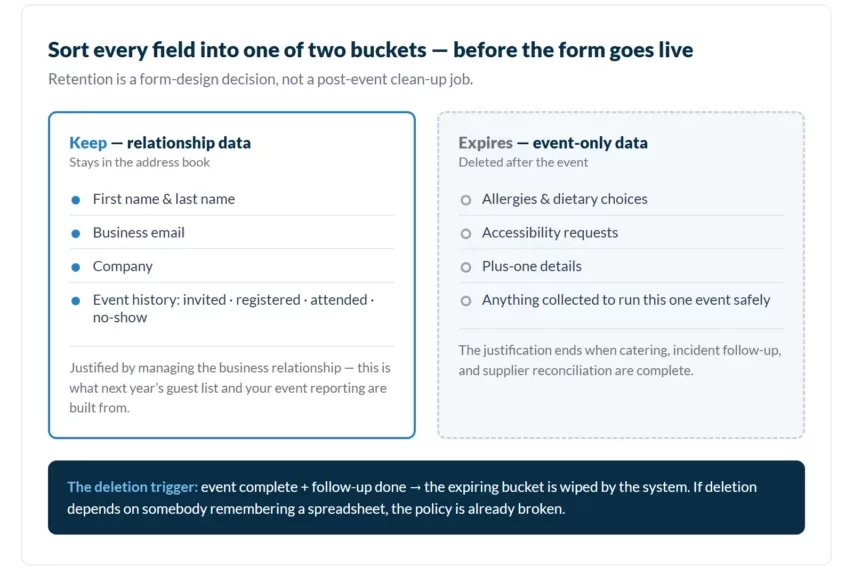
A practical way to make this decision is to split every registration field into two buckets while you’re still building the form:
- Relationship data you may keep: name, business email, company, and the guest’s event history — invited, registered, attended, no-show. This is the data that makes next year’s guest list and your event reporting possible, and you can usually justify keeping it as part of managing the business relationship.
- Event data that must expire: allergies, dietary choices, accessibility requests, plus-one details, and anything else that only exists to run this one event safely. Once catering, incident follow-up, and supplier reconciliation are complete, the justification for holding it is gone.
For each category, record why you still need it, what triggers the retention period, what happens when the period ends, and which system enforces deletion.
Enforcement is where most event processes fail. A retention policy is weak if somebody still has to remember to delete old spreadsheets after every event.
Manual clean-up is easy to procrastinate, especially when the same team is already planning the next event. Whatever tool you use, deletion should be enforced by a system, not by somebody’s memory.
Step 2: Invite People Without Breaking Consent Rules
Registration forms are only half the consent story. The other half is how people end up on your guest list in the first place.
Let guests register themselves, and pre-fill what you already know
The compliant pattern is self-registration: each guest completes their own registration and accepts the privacy terms personally. Consent given by a colleague, a dealer, or an account manager on the guest’s behalf isn’t the guest’s consent.
Self-registration adds friction, and your most senior guests are the least willing to retype their details into a form. Pre-population removes most of it: when you already hold a guest’s name, email, and company legitimately, their personal invitation link pre-fills those fields, so registering takes seconds.
Self-registration applies when you change platforms, too. You can’t bulk-import guests into a new system and assume they would have accepted its privacy terms. Each guest confirms their own registration, which is manageable with a hundred contacts and genuinely painful with eight hundred. So plan migrations outside your busiest event season.
For partner and dealer events, pass the registration, not the data
Some of your most important events are full of guests whose data you don’t own: your dealers’ customers, your partners’ clients, your members’ colleagues. Asking the intermediary for a list of names and emails puts data in your hands that those people never gave you.
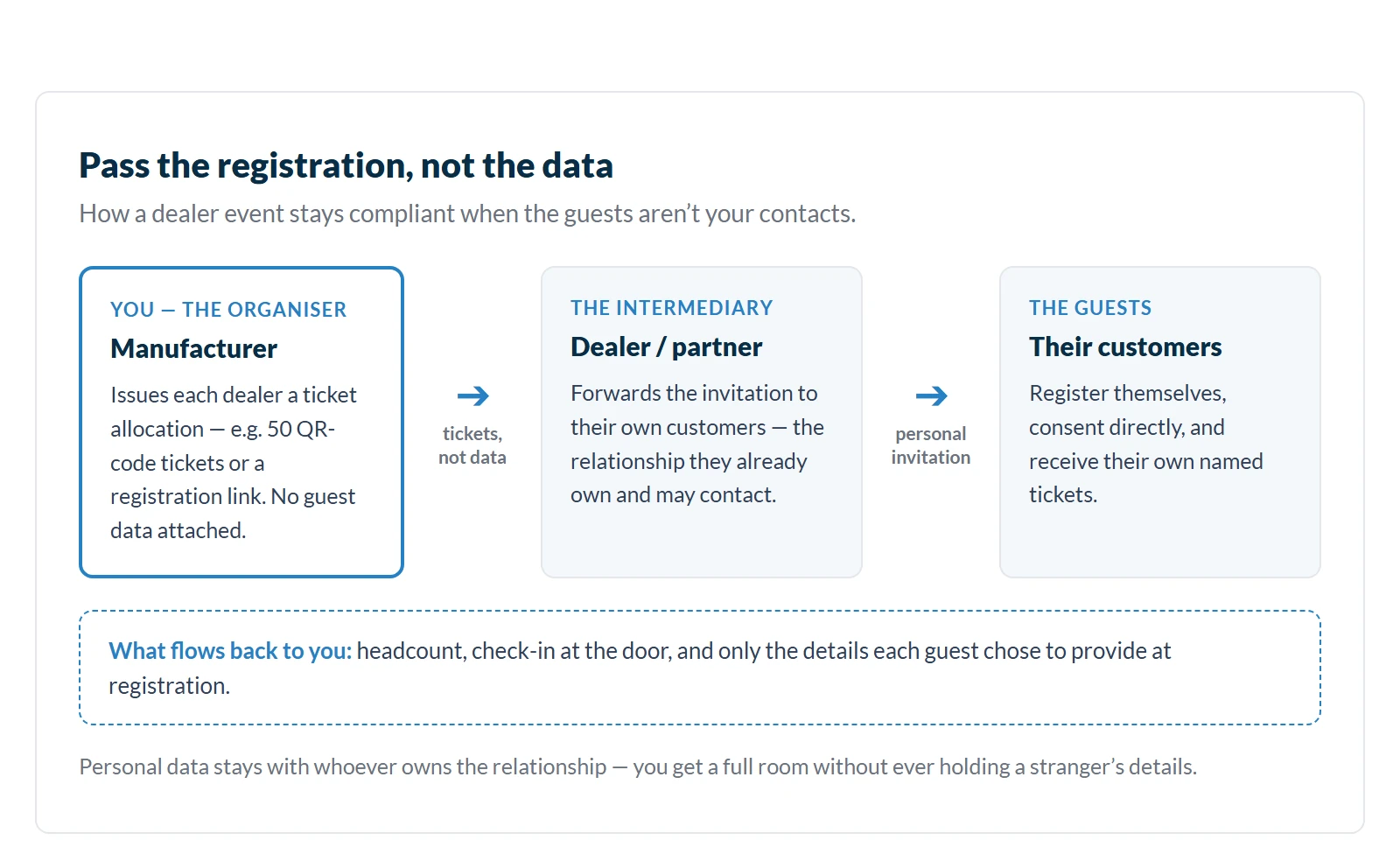
The cleaner pattern is to pass the registration instead. Give each partner an allocation of tickets or their own registration link. Their guests register themselves, consent directly, and receive their own tickets, while the personal data stays with the party that owns the relationship. You get accurate headcounts and compliant check-in without ever holding a stranger’s details.
For example, a manufacturer running a customer day for its dealer network can hand each dealer a quota of tickets. The dealer forwards the invitation, each end customer registers personally, and the manufacturer sees numbers and names only where guests chose to provide them.
Keep sales invitations inside the registered flow
The most common consent leak isn’t a form problem. It’s a salesperson inviting a client by phone or personal email because the official process feels slow and corporate. The guest arrives with no consent record, no registration, and no trace in marketing’s numbers.
Reps route around any flow that makes them look bureaucratic in front of a client, so the fix has to make the compliant path the personal one. Invitations that go out in the individual host’s name, through a system that records the consent and feeds the central guest list. The rep keeps the personal touch that made them bypass the process; marketing keeps the record that makes the event compliant and measurable.
Treat mass invitations like the marketing emails they are
An invitation sent to three hundred people is a mass mailing under data protection law, however personal the salutation reads. That has two practical consequences.
First, every bulk invitation needs a working unsubscribe option. Second, keep consents unbundled: the privacy policy acknowledgment, any marketing opt-in, and photo or filming permission are separate decisions, and each needs its own checkbox. A guest who wants to attend but doesn’t want to appear in your event photos must be able to say both things.
Step 3: Control Where the Data Goes, and Account for Every Copy
After the form goes live, the risk shifts from what you asked to where the answers are copied. The same allergy note can end up in supplier emails, staff spreadsheets and CRM fields. Compliance now depends on knowing who has each copy and when it gets deleted.
Map every copy before the event, not after
A single registration response can create several copies. The event platform keeps the original record. The catering team gets an export. Check-in staff keep another list. Badge suppliers, venue teams, email tools, and post-event survey tools may all receive part of the record, and someone on your team may download a spreadsheet to use on-site.
Knowing where each copy is stored means you can explain why you shared it, who can access it, and who is responsible for deleting it later.
A temporary spreadsheet becomes a long-term compliance problem the moment someone saves it locally, forwards it by email, or leaves it in a shared drive after the event. And the failure can be as simple as one email sent incorrectly: in 2024, the UK Conservative Party reportedly referred itself to the data protection watchdog after over 300 email addresses were exposed in a message about its annual conference, copied without blind carbon copy (BCC).
For each system or supplier that keeps a copy of attendee data, document:
- The data they received;
- Why they need it;
- Who can access it;
- Where it’s hosted;
- What retention rule applies.
Export the minimum, and restrict access by role
If your catering team needs allergy information, send them only what they need to serve guests safely. Avoid exporting the full registration record when a shorter catering list will do. The same applies to badge production, security teams, venue staff, and external suppliers.
Apply the same minimum-necessary logic inside your own organisation. The person scanning badges at the door doesn’t need export rights over the full guest database, and the intern updating the seating plan doesn’t need the allergy column. If your event tooling supports roles and permissions, use them to match access to tasks. If it doesn’t, you’re relying on everyone’s discipline with every spreadsheet, at every event.
Decide field by field what syncs to your CRM
A retention rule in your event platform doesn’t control copies stored elsewhere. That matters most when event data flows into Salesforce, HubSpot, Dynamics, or another CRM or marketing automation tool.
The risk is that temporary event details become permanent customer data. A dietary or accessibility field is useful for one event, but a CRM contact record can live for years. If those fields sync along with email, job title, and company, information collected for a short-term operational purpose quietly becomes part of a long-term customer record, exactly the over-retention you designed the form to avoid.
Before enabling a sync, check:
- Which registration fields will move into the CRM;
- Whether you need them there;
- Who can access them after the event;
- Which retention rule applies inside the CRM; and
- Whether deleting the record from the event platform also removes the CRM copy.
The safe default: sync the relationship data (contact details, attendance, follow-up status) and leave the expiring event data behind, where your event platform’s retention rules can delete it.
Keep the records legal will ask for
A GDPR review becomes difficult when the event team can explain its process but can’t show evidence. Legal will usually want to see how you collect guest data, where it’s stored, who can access it, and when it’s removed.
At minimum, be able to show:
- The purpose for each important registration field;
- The lawful basis for ordinary personal data;
- The Article 9 condition for special-category data, where relevant;
- The privacy notice shown to guests;
- Which systems and suppliers receive the data, and the retention rule for each;
- Evidence that deletion controls exist and are used.
None of this documentation needs to be produced from scratch per event. Decide it once, document it once, and reuse it. After all, that’s the whole argument for building these controls into your standard event workflow rather than treating each event as a new legal project.
Step 4: Choose an Event Tool That Makes Compliance the Default
What you collect, how guests consent, and where copies go, every one of those decisions gets easier or harder depending on the software you run events with. It also decides how long your own data protection review takes. A vendor that can answer the DPO’s questions on day one gets approved in weeks, and a vendor that can’t stretches the review across months.
Every question below applies to any event platform you evaluate.
Where does guest data live, and where do the sub-processors live?
GDPR doesn’t require every event platform to host data inside the EU, but data transfers outside the European Economic Area (EEA) need a proper legal route under GDPR Chapter V. A platform with EU hosting removes the transfer question entirely. Either way, your DPO will want the sub-processor list: the email service, the hosting provider, and any analytics tools the platform itself uses, and where each of them processes data.
Can the vendor hand you the compliance paperwork on day one?
Ask for the data processing agreement (DPA), the security documentation, and any certifications, such as ISO 27001, the international standard for information security management, before commercial discussions get serious. A vendor that sends the full pack immediately lets your legal and IT review run in parallel with your evaluation instead of after it. A vendor that has to assemble these documents on request is telling you something about how often they pass reviews like yours.
Does the platform delete data on its own?
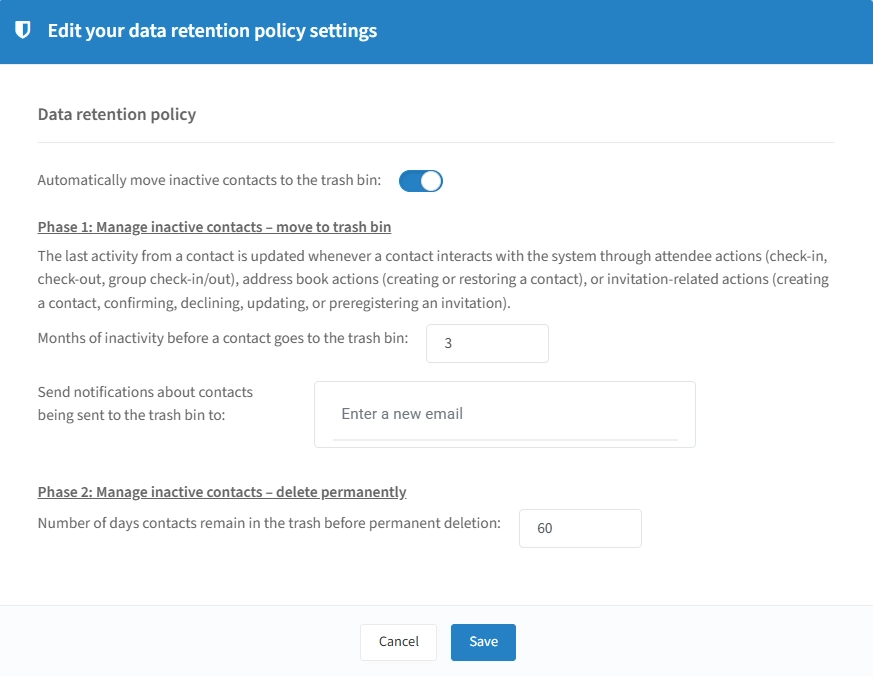
Manual clean-up is the failure mode of every retention policy, so ask what the platform deletes automatically and on what schedule. Can sensitive registration answers (allergies, dietary needs) expire after the event while relationship data stays?
Can you configure retention rules for contacts that go inactive? If deletion depends on an administrator remembering to run it, the platform would only move the problem into the spreadsheet instead of solving it.
Is your organisation’s data kept in its own separate environment?
Ask whether your guest data is stored in an environment dedicated to your organisation, separated from the vendor’s other customers, and whether access within your own team can be controlled by role. Single sign-on (SSO) through your company’s identity system belongs on this list too; your IT department will ask for it regardless, so it’s cheaper to ask first.
Can the platform show who did what?
In regulated industries, “we control the data” has to be provable. Audit trails, such as records of who viewed, exported, changed, or deleted guest data, turn that claim into evidence your compliance team can actually use.
How InviteDesk Builds These Controls Into the Event Workflow
Your organisation still decides what to collect, why it’s needed, who has access, and how long data is kept. What InviteDesk does is apply those decisions consistently, so compliance stops depending on manual discipline.
InviteDesk is a B2B event management platform built for marketing and sales teams that run events as a revenue driver, such as client dinners, seminars, dealer days, and conferences where the guest list matters more than the ticket count. The compliance controls map directly onto the four steps above:
- One controlled record instead of scattered spreadsheets: Guest and registration data stays inside the platform, where authorised teams work from the same event record. User rights control who can view, manage, export, or report on attendee data, so access matches roles instead of habits.
- Privacy-ready registration forms: Every registration form carries a privacy opt-in, and you can include your own privacy statements and disclaimers, plus separate consents such as photo and filming permission, so guests see the relevant data-use information at the moment they register.
- Compliant invitations that stay personal: Guests register themselves, but personal invitation links pre-fill the details you already hold, so self-registration doesn’t feel like data entry. Invitations can be sent in the name of the guest’s own account manager while remaining tracked on the central guest list, and ticket allocations let partners and dealers invite their own guests without handing you their data.
- Retention that runs itself: Sensitive registration answers, dietary needs, allergies and similar event-only data, are deleted automatically after the event, while the relationship data you’re entitled to keep stays in the address book. You can also configure contact-level retention rules: inactive contacts move to trash after a set period and are permanently deleted after a second one.
- Field-level control over CRM sync: The CRM Connector lets you choose exactly which registration fields sync to Salesforce, HubSpot, or Dynamics. That way, attendance and follow-up data flows into your CRM, and expiring event data doesn’t.
- The review pack, ready on day one: InviteDesk provides a formal Processing Agreement establishing that your organisation owns the guest data and InviteDesk processes it on your behalf. Data is hosted in the EU, and the platform is ISO/IEC 27001:2022 certified, the documentation your legal and IT teams need to start their review immediately, rather than negotiating from scratch.
That means, with InviteDesk, you can:
- Collect only the guest data each event needs, with consent captured at registration;
- Invite guests personally — including through sales reps and partners — without losing the consent record;
- Keep every copy of guest data where you can see it, instead of in spreadsheets and inboxes;
- Sync the right fields to your CRM and keep the sensitive ones out;
- Let stale and sensitive data delete itself instead of waiting for a clean-up that never comes;
- Hand your DPO the processing agreement and certification evidence on day one.
None of this removes your legal responsibility. It removes the manual work that makes compliance fail in practice.
Want to run GDPR-ready events without managing guest data across spreadsheets and disconnected tools?
Make GDPR Compliance for Corporate Events Easier to Repeat
GDPR compliance for corporate events isn’t a one-time form review. Every new event creates another set of registration fields, supplier exports, CRM decisions, and retention questions.
The goal is to make those decisions repeatable. Decide what each field is for before you collect it. Keep sensitive answers out of systems that don’t need them. Invite people through flows that carry their consent with them. Set deletion rules before the event ends, not weeks later when everyone has moved on.
If your team is still managing guest data across forms, spreadsheets, supplier emails, and CRM records, that’s the process to fix first.