Marketing has the registration export. Two account managers have replies sitting in their inboxes, and a customer changed their attendance in a phone call that nobody wrote down. This is a scenario, most B2B event managers recognise: you can’t say with confidence who still needs a reminder. Every event communication you send from that point is a guess.
Collecting responses across spreadsheets, shared tools and personal conversations takes a lot of effort for one event. When your team runs ten or twenty events a year, the same patching work comes back every time, and the workarounds start to break.
The root cause is fragmentation. Marketing owns the guest list and the email flow, while relationship managers own the guests. Each side holds part of the picture, so invitations go to the wrong people, confirmed guests get chased to register, and someone spends the last week before the event sending “did they reply to you?” messages. You need one coordinated process where the guest’s current status decides the next message.
This guide shows you how to build that process. You’ll set up a communication plan, run your messages before, during and after the event, and measure what worked. The result is a repeatable process with clear owners, accurate guest information and a sensible next step for every guest.
What you’ll learn
- Build an event communication plan with clear audiences, channels, responsibilities and timing.
- Coordinate invitations, reminders, arrival updates and follow-up using each guest’s current status.
- Measure responses and attendance, spot communication problems and improve your next event.
Why event communication matters
Duplicate emails, outdated details and generic messages all leave guests confused. A customer who gets two invitations from two senders wonders which one counts. A guest who receives last week’s venue address goes to the wrong building. A generic “Dear guest” message tells a long-standing client that nobody thought about them.
That confusion has three practical consequences:
- Guests can’t decide or prepare with confidence. If the invitation doesn’t explain why the event is relevant, or the arrival details conflict, guests hesitate or skip it.
- Marketing and relationship managers lose sight of responses. Replies that land in personal inboxes don’t reach the guest list, so neither side knows the real status.
- The event manager becomes the repair desk. Hours go into correcting records, merging duplicates and chasing updates instead of improving the event.
Resource pressure makes this worse. In Oniva’s 2026 survey of 781 participants, 44% named time and resource constraints as their biggest event-organising challenge (Oniva, 2026). A coordinated process gives that time back. Your team decides once who owns what, which status triggers which message and where updates go. After that, the plan runs the routine work and people handle the exceptions.
How do you build an event communication plan?
Before you write a single email, agree on four things: the audience, the guest record, the owners and the plan itself.
Define the event objective and the guests you need to reach
The event’s business purpose decides whom you invite and what you tell them. Take a customer seminar. If the goal is a real conversation with selected decision-makers about a new service, twenty of the right people beat eighty registrations from anyone with a company email. That goal changes the guest list, the invitation copy and how you judge success afterwards.
Relationship managers supply the context: which contact is evaluating a renewal, who asked about the topic last quarter, and which reason to attend will resonate.
Define guest groups using information your team can maintain: relationship owner, interest or role, preferred language and invitation eligibility. These attributes stay fairly stable. RSVP status changes daily, so track it separately.
Example: Two contacts work for the same customer. One leads their finance team; the other works in HR. Your seminar covers finance risk, so the finance lead gets an invitation that names the topic and the decisions it supports. The HR contact waits for an event that fits their role.
Agree who owns guest relationships and communication tasks
The sender the guest recognises and the person who runs the communication flow are often two different people. Your account manager can sign the invitation while marketing schedules it, maintains the details and tracks responses.
Name an owner for approving invitees, maintaining event details, recording personal replies, resolving unanswered invitations and handling day-of questions. Tell relationship managers what marketing needs from them and when: nominations by a fixed date, personal replies the same day.
A personal reply should travel like this:
- A relationship manager receives an acceptance by phone.
- They record it in the agreed system, or tell the named person who updates the guest list.
- That person corrects the guest’s status.
- The guest becomes eligible for the right confirmation and arrival information.
If you still need details such as dietary needs or session choices, collect them before you mark the guest as fully registered.
Event work spans roles. Oniva’s survey found that people with the official Event Manager title handle 45% of event management (Oniva, 2026). The rest falls to marketers, assistants and sales teams, so ownership needs writing down.
Shared visibility cuts the back-and-forth. Steven Peetermans, Sales & Marketing Director at Tectum Group, described their experience of marketing-sales coordination in InviteDesk: “It saves us a lot of emails and phone calls” (Tectum case study).
Establish a central guest record and choose channels by purpose
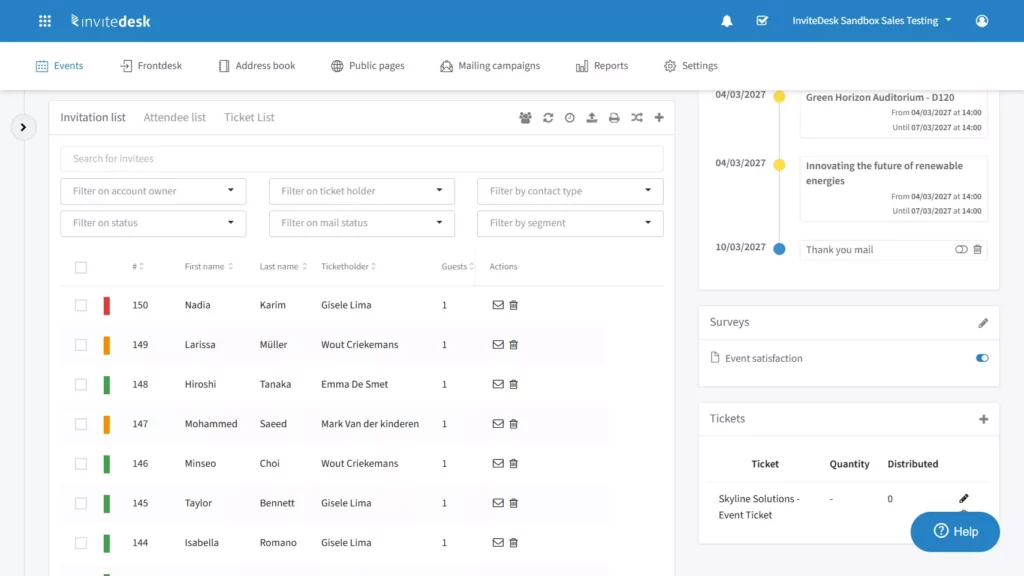
Your plan needs one maintained record per guest: identity, relationship owner, current response status, event choices, and communication history. Agree who can update it, and how replies from personal emails or calls reach it.
Example: Marketing and two account managers all nominate the same contact. Merge the nominations into one record, agree which account manager owns the relationship for this event, and send one invitation. The other account manager stays informed, so nobody sends a second invite.
Choose each channel by the job it needs to do:
- Email carries invitations, confirmations and detailed instructions.
- The event page holds the maintained version of the details.
- A personal call or message from the relationship manager suits a sensitive follow-up.
- For urgent changes, use a channel affected guests can reach quickly, with a fallback.
When you update the event page, also contact the affected guests. Guests don’t reread a page by chance.
An attendee app such as LineUpr suits multi-session events where guests need a personal agenda and live updates. Check your organisation’s communication policies before you add a new channel.
Create a communication plan with owners and intended actions
Turn those decisions into a plan. The table below is populated for a B2B customer event. As you adapt it, keep the sender the guest sees separate from the internal owner of each task.
| Audience or status | Message purpose | Timing or trigger | Channel | Owner | Intended action |
|---|---|---|---|---|---|
| Approved invitees | Explain relevant value and request a decision | Once details and list are approved | Email from the agreed sender | Marketing, with relationship owner input | Accept or decline |
| Invited, no response | Resolve the unanswered invitation | Agreed interval after invitation | Email or selected personal contact | Marketing; relationship manager for exceptions | Respond |
| Confirmed guests | Confirm arrangements and support arrival | Registration, then practical information timing | Email and maintained event page | Marketing | Save details and prepare |
| Staff and relationship managers | Agree reception roles and escalation | Before event day | Internal briefing | Event manager | Know whom to contact and how to update records |
| Recorded attendees | Share useful resources and invite feedback | After attendance is reconciled | Marketing | Access resources or provide feedback | |
| Guests with an agreed next action | Continue the relevant conversation | At the promised follow-up time | Relationship owner contact | Account manager | Complete the agreed next step |
This table sets out responsibilities and decision points. The next section fills in the message content, timing and workflow rules.
What should you communicate before the event?
Your plan now turns into a guest journey. Each response a guest gives changes what they should receive next.
Send invitations that make the value and next action clear
Before deciding, a guest needs to know why the event is relevant to them, what to expect, the date and location, what you’re asking them to do, and the response deadline.
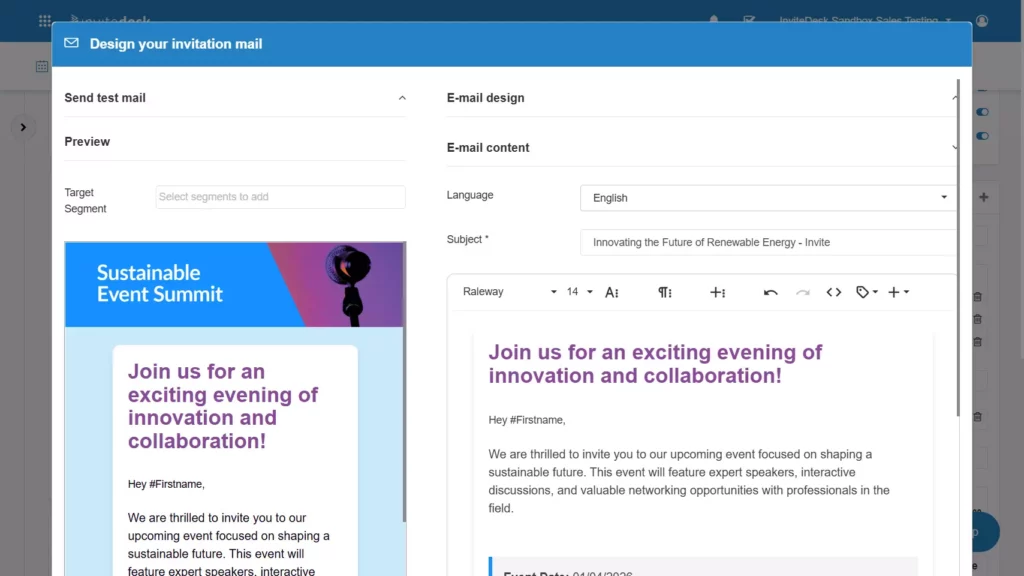
An invitation from the customer’s own account manager fits the existing relationship. One from a generic marketing address reads like a newsletter. InviteDesk’s On Behalf Of feature combines both: marketing maintains the flow, and the invitation goes out with the right relationship manager as sender. The InviteDesk invitations page describes custom senders and email flows you plan in advance.
Example invitation, annotated:
From: Sarah Janssens, your account manager
Subject: Finance risk in 2027: a round table for finance leads
Hi Tom,
On 19 November, we’re hosting a round table on treasury risk for finance leads at our Antwerp office. You’ll compare approaches with eight peers from other companies and hear from our head of risk.
It runs from 16:00 to 18:30, followed by drinks.
[Accept or decline]
Please let us know by 5 November.
- Sender: the account manager the guest knows, so the email reads as part of the relationship.
- Subject: names the topic and audience, so the guest can judge relevance from the inbox.
- Peer element: states the connection opportunity the event offers.
- One button: a single accept/decline route, visible on a phone without scrolling.
- Deadline: a reason to answer now.
Keep your corporate branding, and make the requested action the most visible element.
Spell out networking value when it’s real. Encore and Boldpush’s May 2026 research with 447 event professionals found that 49% rank peer networking as the most important factor in event success (Encore/Boldpush, 2026). That’s planner opinion across corporate, agency, association and independent planners, and a useful prompt: if guests will meet relevant peers, say so.
The Daikin demo shows this principle at work: each guest’s relationship manager appears as sender, while one central flow handles the timing.
Separate unanswered-invitation reminders from attendance reminders
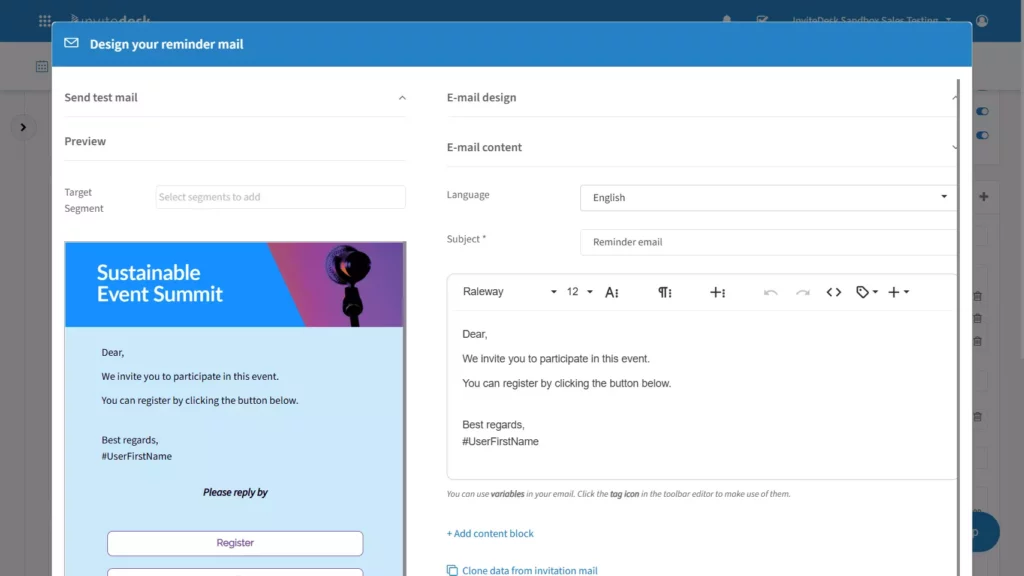
An RSVP reminder asks an invited person to decide. An attendance reminder helps a confirmed guest prepare and arrive. They go to different people and ask for different actions. Stop asking guests to register once they have, and remove declined or cancelled guests from the attendance-reminder audience.
Time reminders by each guest’s journey as well as the event date. A guest invited three weeks ago and one added last Tuesday shouldn’t get their RSVP reminder on the same day. Space reminders so they don’t feel like nagging, and send them before the RSVP deadline. If a key account still hasn’t answered after one reminder, the relationship manager takes over with a personal call.
RSVP reminder (status: invited, no response):
Hi Tom, we’d still love to have you at the treasury risk round table on 19 November. Can you let us know by 5 November? [Accept or decline]
Attendance reminder (status: confirmed):
Hi Tom, see you tomorrow at 16:00. Use the Kaai entrance; parking is in the visitor car park next door. Can’t make it anymore? [Change my registration]
The timings below are an illustrative starting point for a local B2B event. Travelling guests and busy seasons call for earlier invitations; a shorter planning window compresses the whole sequence.
| Communication | Eligible recipients | Illustrative timing | Goal |
|---|---|---|---|
| Save the date, if useful | Approved target guests | Four weeks before | Reserve time; state whether registration is open |
| Invitation | Approved guests not already invited | Three weeks before | Explain relevance and request a response |
| RSVP reminder | Invited guests still without a response | Five to seven days after their invitation, subject to deadline | Resolve the unanswered invitation |
| Confirmation | Newly registered guests | After successful registration | Confirm their actual booking and useful details |
| Practical-information message | Currently confirmed guests | Two to three days before | Explain arrival and provide a route for changes |
| Attendance reminder, if warranted | Currently confirmed guests | The day before | Surface essential details without another registration request |
| Late addition | Newly approved guest near event day | A shortened, reviewed sequence | Provide relevant invitation and arrival information without unnecessary intermediate messages |
Confirm registration and remove uncertainty about arrival
A confirmation tells the guest the registration worked, shows the choices you recorded, and says where to find or change the details. Include the date, start and finish times (with time zone if guests travel), location, a calendar option, a contact person and any ticket or entry information.
If details are still being finalised, send the confirmation straight away and a targeted practical update once they’re fixed. The event page stays the maintained source. When arrangements change, update the page, the calendar description and the next message together, so guests don’t see three versions.
Example: A guest accepts and receives a confirmation with a calendar option. Two days before the event, they receive the entrance address and parking guidance. If they cancel instead, you update their record and the arrival reminders stop.
Give guests accessible arrival instructions, realistic timings and a named contact. Ask only for information this event needs. A breakfast briefing doesn’t need a job-title field and three dropdowns.
Automate the sequence and review exceptions as guests respond
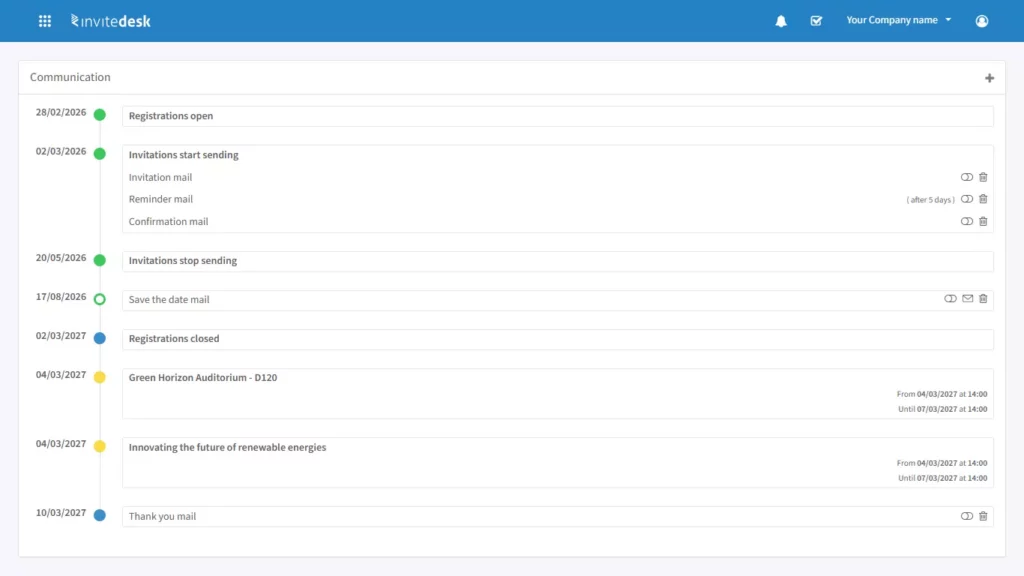
Automation works when you write the rules first. The sequence runs in this order:
- Approved record: the guest is approved and has a relationship owner.
- Invitation: sent from the agreed sender.
- Response check: before each send, the system checks the guest’s current status.
- Reminder or confirmation: unanswered guests get an RSVP reminder; registered guests get a confirmation.
- Arrival information: confirmed guests only.
- Final attendance record: updated at check-in.
Each send updates the guest’s communication history. The event manager keeps the judgement calls: approving guest selection, checking event details, resolving conflicting records and handling sensitive relationship situations.
In InviteDesk, you define the whole communication flow before the event and schedule invitations, reminders and follow-ups in advance, while keeping the option to make last-minute changes and resend invites manually (invitations feature page). Reminders go only to guests who haven’t responded, so registered guests don’t get chased.
Worked exceptions:
| Exception | Record update | Next eligible message | What must stop |
|---|---|---|---|
| A confirmed guest cancels | Status set to cancelled | Cancellation confirmation | Practical-information and attendance reminders |
| A new invitee is added close to the deadline | Approved record with owner | Invitation, then a shortened reminder sequence | Save-the-date and any messages already past |
| An email address bounces | Address flagged; owner informed | Personal contact by the relationship manager, then a resend to the corrected address | Further sends to the bad address |
| A guest replies directly to their account manager | Account manager records the reply or tells the named updater | Confirmation or decline acknowledgement | RSVP reminders |
| A full event gains a free place | Capacity checked; next guest on the waiting list approved | Invitation or offer to the replacement guest | Attendance instructions until the replacement’s place is confirmed |
In Momentus’s Q1 2026 survey of venue and event leaders across 20+ countries, 42% said manual coordination across teams is the first thing they would eliminate (Momentus, 2026). Explicit status updates and handoffs remove much of that coordination.
Test the guest journey before launching the sequence
Before launch, run a short test with four records: an invitee who doesn’t respond, a guest who confirms, a guest who declines and a late addition. Check that each one receives the right messages and nothing else. Small mistakes are visible to guests. A wrong personalisation fallback sends “Hi ,” to your best customer. A link left over from a cloned event registers guests for last year’s edition. An old venue address in the calendar entry contradicts the email.
Each message should serve the guest’s current need, a principle Creative Group describes well. If you can’t name what a message helps the guest do, drop it.
Pre-send checklist
- ☐ Sender name and reply-to address are correct
- ☐ Personalisation fallback reads naturally
- ☐ Language matches each guest’s preference
- ☐ Date, time and time zone match the event page
- ☐ Location and entrance are correct
- ☐ Registration link points to this event
- ☐ Calendar details match the email
- ☐ Recipient conditions match the plan
- ☐ Logo, colours and tone follow your brand
- ☐ Email reads well on a phone
How do you keep guests and your team informed during the event?
On the day, reception, organisers, relationship managers and guests all need the same information at the same time.
Help guests arrive and find the information they need
Arriving guests should find the correct entrance, the check-in point, the start time, the programme and a person who can help without asking twice. Signs and reception instructions use the same approved details as your emails and event page.
Example: Your customer event takes place in a building with two entrances. The arrival email names the Kaai entrance and includes a photo. A sign at the main entrance points guests round the corner, and reception staff redirect anyone at the wrong door. If a guest can’t open their email or ticket, reception checks their name and photo ID against the guest list.
Match the tools to the event. A small breakfast needs clear signs and informed staff. A multi-session event may need an attendee app such as LineUpr, the event app in the InviteDesk suite, which handles personal agendas, live polls and push notifications. InviteDesk itself covers invitations, registration and event communication.
Coordinate reception and relationship managers through the guest record
Reception records the arrival, and the responsible relationship manager needs to hear about it. Make that handoff reliable, with a named human fallback for when a notification fails or the owner is unavailable.
- The guest arrives.
- Reception verifies their identity and records the arrival.
- The relationship manager is notified through the agreed route.
- The relationship manager welcomes the guest.
And when the guest isn’t on the list:
- Reception contacts the designated organiser.
- The organiser checks identity and eligibility.
- The organiser makes the authorised update, or approves adding the guest on the spot.
- The organiser informs affected staff, including the relationship manager.
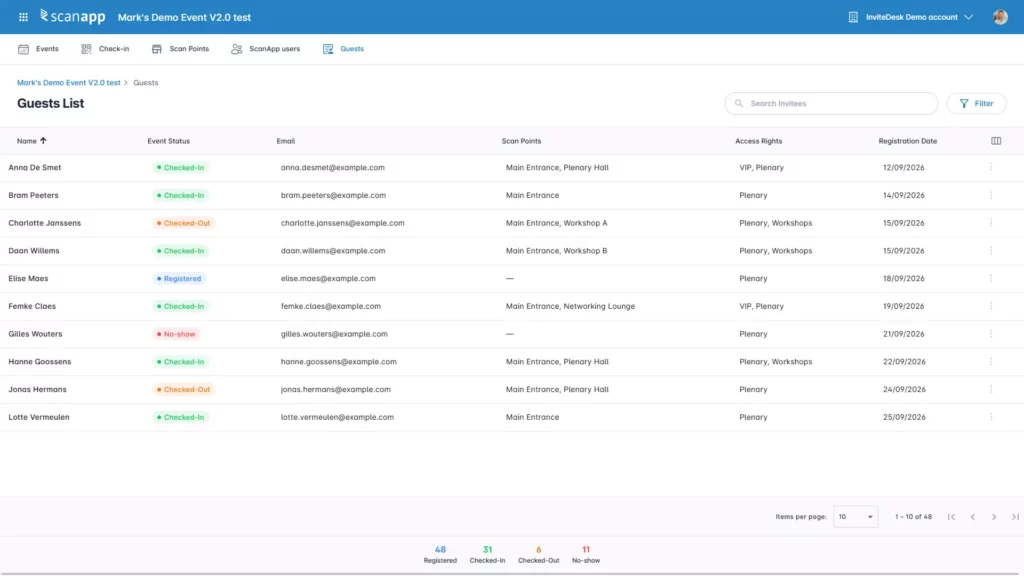
ScanApp supports this handoff. Reception scans the guest’s QR code on a smartphone or tablet, the check-in appears in real-time attendance data, and you decide which staff can scan or add guests on the spot. InviteDesk can notify the account manager when their key account checks in, so they reach the guest before the guest reaches the room. Give every relationship manager a named colleague who greets their guests if they’re unavailable.
As Splash notes in its guidance on on-site event communication, the door team and sales need a direct line. Decide who needs to know about each arrival, and how they’ll find out.
Communicate changes through a named decision and escalation route
One named person confirms the change, decides who is affected, approves the wording and updates the maintained source. Internal teams get the agreed response first, so nobody improvises a different explanation. The guest message states what changed, what the guest must do and whom to contact.
Example: Your room changes an hour before arrival. You update the event page, the reception briefing and the signs, then contact confirmed guests who haven’t arrived through your urgent-change channel. Staff redirect guests already on site in person or by announcement. A delivered email doesn’t prove a guest read it, so reception should still expect a few people at the old room.
Plan a fallback for when the internet drops or the primary channel fails, with a named contact and route aligned with the venue’s procedures.
How should you follow up after the event?
Follow-up only works if you know who attended. Start with the attendance record.
Reconcile attendance before choosing follow-up audiences
Resolve missed scans, authorised walk-ins and cancellations first. Then sort guests into four groups: recorded attendees, cancelled guests, registered guests absent without cancelling, and invitees who never registered. Check uncertain records with reception or the host before you classify them.
Example: A confirmed guest attended, but reception didn’t scan them because the queue was long. Their account manager spoke to them for half an hour. The organiser checks with the account manager, corrects the record to “attended”, and the guest receives a thank-you instead of an awkward “sorry we missed you”.
The groups decide the messages. Attendees receive thanks and questions about their experience. Absent registrants receive relevant resources without being thanked for coming. Declined guests receive only what fits their relationship and your agreed policy.
Share useful resources and request focused feedback
Each follow-up should give the recipient something: the slides, photos or recording you promised, or material relevant to the topic. Keep feedback requests to a few questions about the experience and communication that you’ll act on.
Attendee message (eligibility: reconciled attendees):
Hi Tom, thanks for joining the treasury risk round table. As promised, here are the slides from our head of risk. Could you answer three quick questions about the session? [Give feedback]
Absent-registrant message (eligibility: registered, absent, not cancelled):
Hi Tom, we’re sorry the timing didn’t work out on 19 November. Here are the slides from the round table, in case they’re useful. Sarah is happy to walk you through them.
Pieter De Scheper, Head of Customer Experience at Bank Nagelmackers, describes InviteDesk as a process that “automates the entire process from the invitations, registration, and confirmation, to and including the satisfaction survey” (Nagelmackers case study).
Give relationship managers the context for the next conversation
The relationship owner needs the guest’s actual attendance status, any interests or questions the guest chose to share, the material you promised, and the agreed next action with its owner.
A follow-up promise should travel like this:
- During the event, a guest asks for a follow-up discussion.
- The person they spoke to records the request and the owner.
- The account manager receives the context in the agreed tool.
- The account manager makes contact at the promised time.
- They mark the action complete.
A forgotten “I’ll call you next week” undoes the goodwill the event created, so track each promise to completion. And don’t assume your records are connected. Swoogo’s 2025 Eventscape survey of 500 event organisers found that 44% had no connection between their event platform and their CRM (Swoogo, 2025). If your systems connect, use that integration route. If they don’t, set up a controlled manual handoff with a named owner and a deadline.
InviteDesk’s Connector links to HubSpot, Salesforce, Marketo and Microsoft Dynamics, and you control which data you synchronise. With a supported integration, relationship managers see event information in the CRM they already use. For more detail, see event management software with CRM integration.
How do you measure and improve event communication?
Measure whether the process helped guests and your team take the intended actions, and where it needs fixing.
Measure responses and attendance with clear denominators
Delivery, response, registration, attendance and follow-up are separate stages that answer different questions. Opens and clicks help you investigate engagement with a message, attendance records show turnout, and follow-up records show whether promised actions happened.
| Measure | Definition | Information needed | Decision it supports |
|---|---|---|---|
| RSVP response rate | Unique invitees who accepted or declined ÷ unique people invited, in the stated period | Invitation list, response statuses | Whether invitations and reminders prompt a decision |
| Registration rate | Unique registered guests ÷ eligible invited population | Registrations, invite list; plus-ones counted consistently | Whether the invitation and audience fit |
| Attendance among expected registrants | Verified attendees from that population ÷ confirmed registrants after the cancellation cutoff | Check-in records, cancellations, walk-ins recorded separately | Whether arrival communication and timing work |
| Unexplained absence | Expected registrants not verified as attended, after reconciliation | Reconciled attendance, cancellation definition | Whether reminders and change routes need work |
| Agreed follow-up completion | Completed promised actions ÷ actions due in the period | Follow-up records with owners and due dates | Whether the sales handoff works |
| Operational effort | Time spent maintaining records, chasing updates, correcting messages and answering guest questions | Team time estimates or logs | Where manual work should be removed |
Define the period, exclusions and counting unit for each measure, and use the same definitions every time you compare events.
Diagnose where guests experienced confusion or the team repeated work
A number on a dashboard only helps when you tie it to a question. If guests keep asking which entrance to use, look at the arrival message and the signs. If registered guests got RSVP chases, check the recipient conditions and how fast replies reached the record. If sales keep asking for status exports, look at who has access and who owns the data.
Example: An illustrative customer event generates a dozen questions about parking, and the team corrects several statuses that came in through personal replies. For the next event, the practical information message gets a parking map and a sentence on overflow parking. Account managers get one named person to forward replies to, with a same-day rule.
Low registrations can come from invitation relevance, audience selection, delivery, timing or reasons outside your control. Low attendance has causes beyond communication too, from weather to a client’s quarter-end. Use response patterns and guest feedback to find likely causes before you change anything.
Improve and reuse the next communication plan
Keep what worked: message structure, clear responsibilities, approved templates and routing rules. Refresh everything event-specific: audience and relationship ownership, event details, dates, deadlines, capacity, links, calendar information, language versions and scheduled messages.
The reuse workflow:
- Review your findings.
- Choose specific changes.
- Update the plan and templates.
- Refresh event-specific information.
- Test with representative guest records again.
- Launch the next event’s flow.
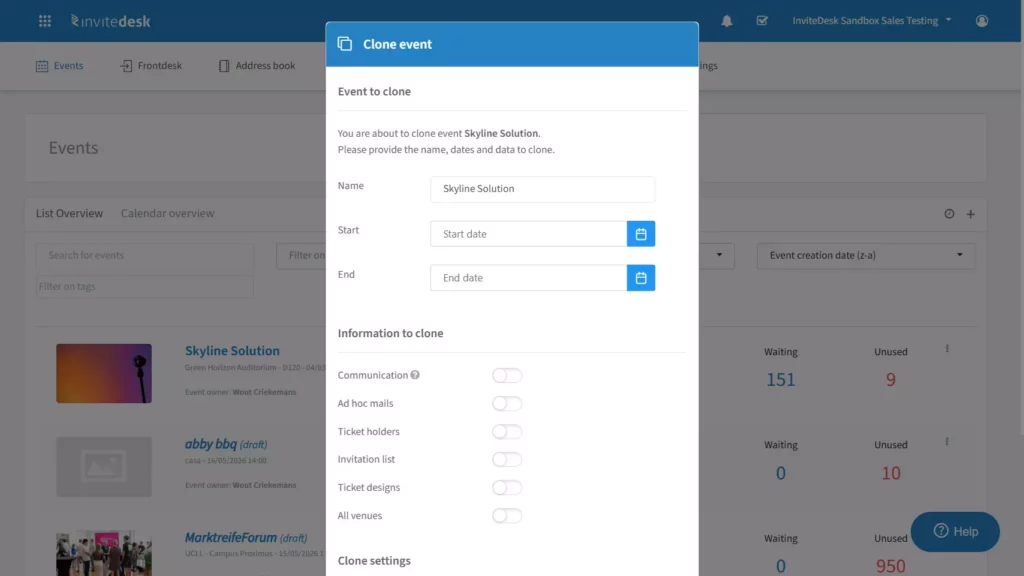
Cloning a previous event in InviteDesk means you start from a working setup instead of a blank page. That saving holds only if you check each date, link and recipient list before launch.
Your next step: take the communication plan table above, adapt it to your next event, and test one complete guest journey from invitation to follow-up before you launch.
If you want one centrally managed communication flow that your sales team can see and send from, InviteDesk’s invitations capability is built for that.
Ready to stop chasing replies across inboxes? See how marketing runs the flow while account managers send the invitations.