Companies spend heavily on corporate hospitality, as a means to strengthen relationships with the customers, prospects and partners that matter most. In 2024 alone, global sponsorship rights fees alone reached $97.5 billion.
But while 75% of company-held tickets go directly to customers 43% of corporate tickets go unused. At an average face value of $154 a seat, that’s close to half the investment gone before anyone asks whether the seats that were filled did their job.
At InviteDesk, we’ve watched this happen from inside hundreds of corporate event programmes — the box that has to be filled every week, the seats released to whoever was easiest to reach, the guest list nobody could confirm until event day. In our experience, the problem is almost never the event. It’s guest management.
If your organisation holds hospitality seats and you’re not confident they’re reaching the right people, you’re in the right place. In this article, we’ll explain why corporate teams struggle to manage hospitality guests, then walk through the full process: deciding who to invite, inviting them through the right relationship owner, and tracking responses early enough to prevent empty seats.
📥 Free e-book: Attracting More Relevant Guests to Your Business Events. If your guest lists keep filling up with the same familiar names, this short e-book goes deeper on the selection side: how to define who your events are actually for, find them, and get them in the room.
Why Corporate Teams Struggle With Hospitality Event Management
Corporate hospitality guest management isn’t the same as managing a normal event guest list. At a seminar or networking event, the job is mostly logistical: register guests, send reminders, check people in. A hospitality seat carries more weight. It’s limited, premium and tied to a specific client relationship your organisation wants to protect or develop.
Four things make it harder than it looks:
- The seats are recurring and perishable. A box that goes empty this Saturday isn’t one you get back next Saturday. And because the seats usually come from a multi-year sponsorship contract, the programme is judged across a season, not a single event — every fixture that passes with a wasted seat is spend nobody can recover.
- Ownership is split by design. Marketing or the events team owns the suite and the ticket allocation, but the relationships belong to sales reps and account managers. Neither side can run the guest list alone: the event team doesn’t know which client should get each seat, and the account manager doesn’t manage capacity, reminders or check-in. Most hospitality programmes struggle not because anyone is careless, but because the process crosses two teams with different systems.
- The invitations are invisible. Account managers invite their clients the way that works: a phone call, a direct email, a WhatsApp message. The personal touch is exactly right — but those invitations never enter a shared system. Guests confirm privately, some never reply, and seats get promised twice. By the time the event team asks for the final list, nobody can say with confidence who is actually coming on Saturday.
- And it’s more than ticket logistics. Distributing the tickets is the easy half of the job. The hard half is knowing which relationship each seat is meant to support — and whether it did. A box can be handed out efficiently, every ticket delivered, and still fail the only question that matters: were the seats offered to the people this programme was meant to reach?
To really solve this problem, the first step is to figure out exactly who you should and should not invite to your next event.
Who to Invite to a Corporate Hospitality Event: How To Find The Right Guest in 4 steps
1. Start With the Relationship Goal
A hospitality guest list should start with the relationship the event is meant to support.
That may sound obvious, but this is where many hospitality programmes lose value. When the starting point is “Who is likely to say yes?” the seats often go to familiar contacts or available colleagues who already attend regularly. That may fill the box, but it doesn’t always move the right relationship forward.
Instead, start with the business reason for the event and the invitation. A seat may be used to:
- Strengthen an account approaching renewal
- Create time with a senior decision-maker
- Bring a late-stage prospect closer to the business
- Thank a strategic partner
- Reconnect with an inactive customer
- Introduce your team to a new stakeholder
- Support a relationship that needs attention before the next commercial conversation
This doesn’t mean you should turn a match or concert into a sales meeting. The guest experience should still feel social and relaxed. The point is that every invitation should have a reason beyond convenience.
2. Prioritise Accounts Before Names
Once the event’s goal is clear, build the guest list from priority accounts that will help achieve the event’s goal. A useful hospitality guest list should help the team understand why each guest was selected, who the relationship owner is, and what next steps should look like after the event.
At minimum, track:
- Account or company
- Guest name and role
- Relationship owner
- Reason for invitation
- Priority level
- Previous hospitality attendance
- Invitation status
- Ticket or package type
- Follow-up owner
This also helps when seats need to be allocated across different teams in your organisation — when multiple teams are in charge of separate accounts. This nuanced view helps ensure that teams get ticket quotas based on the strategic accounts they can invite.
3. Allocate Seats Before Anyone Invites Guests
Before you send invitations, decide how many seats are available, which accounts should be prioritised, how many places each relationship manager can offer, and when unused seats must return to the central pool.
The earlier you make those rules clear, the less likely you are to discover late that ten people were invited for six places, or that several valuable seats were never properly offered at all.
4. Check Previous Invitations Before Approving Guests
Previous attendance should also shape the intended guest list. If the same guests attend every football match, race day or sponsored dinner, the programme may be rewarding familiarity rather than new opportunities.
Review who has already attended, which accounts have been over-invited, which guests often confirm but fail to attend, and which priority accounts have never received an invitation.
That historical context can turn guest selection from potentially biased activity into a repeatable decision and helps you offer each seat to someone who fits the purpose of the event.
How to Manage Guest Invitation for Corporate Hospitality Events
Once the guest list has been prioritised, the next job is to invite people in a way that feels personal without making the event impossible to track. That balance matters because corporate hospitality invitations usually work best when they come from someone the guest already knows.
A client is more likely to open an invitation from their account manager than a general @marketing event email. But when every relationship manager handles invitations privately, the event team loses control of confirmations, reminders, ticket delivery and final attendance.
Here’s what to do:
1. Give Each Guest One Relationship Owner
Every hospitality guest should have one named owner.
That person may be a sales rep, partner manager or executive host. What matters is that they should know why the guest was selected, what relationship the invitation supports, and what should happen after the event.
This avoids the scenario where individual sales reps assume someone else is following up when the responsibility is theirs. Marketing may believe Sales has confirmed the guest. Sales may assume the event team will send the reminder, and there’s no central dashboard to know who is attending until the day itself.
A clear relationship owner should be responsible for:
- Confirming that the guest is still the right person to invite
- Sending or approving the invitation
- Following up when there is no response
- Alerting the event team if the guest cancels
- Hosting or handing over properly on the day
- Recording the next step after the event
This doesn’t mean the relationship owner should manage the entire event process alone. It means every guest has a person accountable for the relationship, while the event team keeps control of the full guest list.
📥 Free download: Increase Your Event ROI With Sales Involvement Getting reps to own their seats is the hardest part of this step. This guide covers five proven ways to turn sales and account managers into active hosts instead of reluctant forwarders of marketing emails.
2. Send Personalised Invitations With Shared Visibility With the Event Team
Just because a personalised invitation can increase open rate doesn’t mean it should disappear into the account manager’s private inbox.
If a relationship manager calls a client or sends a direct email, the invitation may feel personal, but the event team may not know whether the guest has accepted, declined or asked to bring someone else. That becomes a problem when seats are limited.
The better process is to keep the relationship owner visible to the guest while routing the response through one shared event workflow.
The relationship owner can still be the sender of the invite — they can choose the guest, add a personal note and follow up where needed. But the guest should confirm through one official RSVP path controlled by the event team. That may be a shared event platform, a CRM-connected invitation workflow, or, at the simplest level, a central RSVP form that records responses against the guest, account and relationship owner.
That way, the invitation stays personalised. The guest knows who invited them and the event team can see
- Who has confirmed,
- Has declined, or
- Hasn’t responded and
- Which seats are still available.
The relationship owner can also see when they need to follow up, instead of relying on memory or scattered inbox updates.
This is also where a dedicated hosted-event workflow can help. For example, InviteDesk allows invitations to be sent on behalf of the relationship owner while the event team keeps one live view of responses, reminders and attendance.

But the principle matters even if you use another tool: personal ownership should not mean private tracking.
3. Send Tickets After Confirmation
Third-party tickets should only be sent after the guest has confirmed.
Sending PDF tickets or mobile passes too early creates avoidable risk. A ticket can be forwarded to someone else, lost in an inbox, or separated from the guest record. If the guest later cancels, the event team may not know whether the ticket has been returned or passed to someone else privately.
A cleaner process is:
- Invite the guest
- Collect the formal confirmation
- Record the guest details
- Send the ticket or access information
- Track attendance on the day
This keeps the hospitality event team in control of both the relationship and the ticket. It also makes the final attendance report more reliable because the team can connect each seat to invited guests, those who confirmed, and those who showed up on the day.
How to Stop Wasting Seats at Corporate Hospitality Events
A hospitality seat can be wasted in two ways: it can go unused, or it can be used by someone who doesn’t fit the purpose of the event.
The first problem is easier to see because empty seats are visible on event day. The second is easier to miss. A box may be full, but if the seats went to low-priority contacts, the programme would’ve missed better relationship opportunities.
To reduce both kinds of waste, you need to manage responses early enough to act.
1. Track Responses by Status
Don’t treat every invited guest as a likely attendee. Each guest should have a clear status, and each status should trigger a next step.
At minimum, track:
- Invited: the guest has received the invitation, but hasn’t responded.
- Confirmed: the guest has accepted and can now receive ticket or access details.
- Declined: the seat can return to the pool.
- No response: the relationship owner needs to follow up.
- Cancelled: the seat should be reoffered if there’s still enough time to invite someone else.
- Ticket sent: access has been issued, but attendance isn’t yet proven.
- Attended: the guest arrived and can be included in post-event follow-up.
- No-show: the guest confirmed but didn’t attend (which should inform future invitation decisions).
These labels prevent the most common reconciliation problem: counting seats as filled because someone was invited, although there’s no formal confirmation.
2. Set RSVP Deadlines That Leave Time to Reoffer Seats
The RSVP deadline shouldn’t sit too close to the event.
For high-value hospitality, the goal isn’t to find anyone available at the last minute. You need to give the next priority guest enough time to accept properly, make arrangements, and understand why they’re being invited.
A simple timing structure can look like this:
- Three to four weeks before the event: Invite priority guests.
- Two weeks before the event: Ask relationship owners to follow up with guests who have not responded.
- Seven to ten days before the event: Return unconfirmed seats to the central pool.
- Five to seven days before the event: Invite approved backup guests.
- One to two days before the event: Send final details + tickets to confirmed guests.
The exact timing will depend on the event, but the principle stays the same: available seats should be visible while there’s still time to invite another priority account to the hospitality event.
Another detail to keep in mind is that you should keep a backup list of guests to invite if any of the priority accounts decline.
3. Keep a Backup List That Still Matches the Event Goal
A backup list shouldn’t be a list of whoever is easiest to invite.
It should follow the same account-priority logic as the original guest list. If the event is meant to support renewal conversations, the replacement guests should come from accounts close to renewals. If the event is built around senior decision-makers, the backup list shouldn’t default to junior contacts simply because they’re easier to reach.
A useful backup list should show the next best guest for each open seat, the reason to invite them, the relationship owner, whether the guest has attended similar events before, and how quickly they can be invited.
That makes reoffering seats faster without lowering the quality of the guest list.
4. Use No-Shows to Improve the Next Guest List
Your list of no-shows shouldn’t disappear after the event.
If someone repeatedly confirms and fails to attend, that should affect how they’re prioritised next time. The same applies when a guest accepts hospitality often but doesn’t engage with the relationship owner afterwards.
This doesn’t mean you should remove them permanently. It means the next invitation should be based on evidence, not habit. Hospitality seats are limited, and every no-show is a signal the team should use before approving the next guest list.
How to Measure Whether the Right Guests Attended
A corporate hospitality report should help the team decide who deserves the next invitation, and that means measuring seat use, guest quality, rotation and follow-up. This way, you can tell whether the right relationships were improved as intended. What to do:
1. Compare Seat Use With Attendance
Start by comparing each stage of the seat journey:
- Seats available
- Seats allocated
- Guests invited
- Guests confirmed
- Tickets sent
- Guests attended
- Late cancellations
- No-shows
- Unused seats, if any.
These numbers show where seats lost value.
If many guests were invited but few confirmed, the invitation timing or follow-up process may be weak. If many confirmed guests didn’t attend, the team may need better structure around reminders or better guest qualification. And if seats were unused although there was a backup list, the RSVP deadline was probably too late.
The point of this stage in the hospitality event flow is to understand where the guest-management process broke down — so the same failure doesn’t repeat at the next event.
2. Review Guest Quality and Rotation
After each event, review who attended against the original relationship goal. Did the seats go to priority accounts? Were the right decision-makers present? Did the same guests attend again? Were important prospects, partners or renewal accounts missed?
This is where previous attendance history matters. If one account has received hospitality several times while another priority account has never been invited, the next guest list should reflect that.
Good rotation protects the value of the programme. It helps hospitality seats reach more of the relationships they were meant to support.
3. Connect Attendance to Follow-Up
For every attended guest, the relationship owner should record what happened next. The follow-up doesn’t need to be complicated, but it should answer a few clear questions:
- Did the relationship owner follow up?
- Was a next meeting agreed?
- Did the guest introduce another stakeholder?
- Did the account move forward in the pipeline?
- Did the event support a renewal, expansion or reactivation conversation?
- Should the guest be invited again?
Be careful with attribution though. A hospitality event may support a commercial outcome, but it may not directly cause it. The stronger report shows contribution: which relationships were strengthened, which accounts progressed, and which future invitations should be prioritised.
That gives the team more than a utilisation percentage. It gives them a better basis for deciding who gets the next seat.
🧮 Free tool: InviteDesk’s Event ROI Calculator Put a number on what your hospitality programme costs to run manually — and what better guest management would return. Useful ammunition when the sponsorship comes up for renewal.
Where InviteDesk Helps with Corporate Hospitality Guest Management
InviteDesk is the event management platform for B2B sales and marketing teams who run events as a strategic revenue driver. It’s a strong fit when distributing tickets is the easy half of your hospitality problem — and the hard half is keeping every seat connected to the account manager and the relationship it was meant to support.
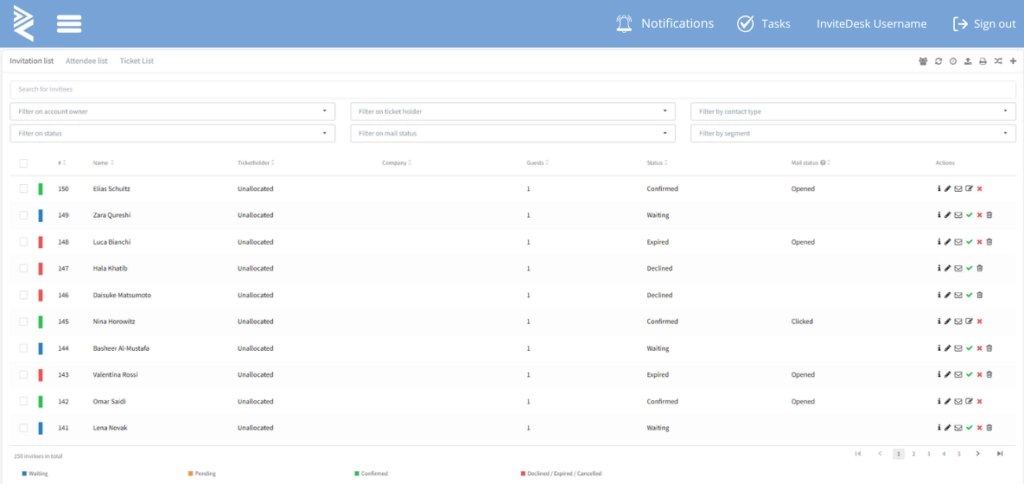
This matters more when Sales need to invite guests personally, while Marketing still needs one live view of capacity, responses, reminders, ticket delivery and attendance. How InviteDesk helps:
1. Keep Seat Ownership and Guest List Control in One Workflow
In InviteDesk, Marketing can allocate a capped number of seats to each relationship manager. The relationship manager can then invite the clients, prospects or partners they’re responsible for, without taking the guest list out of the event team’s control.
This way, the relationship owner can still manage their guests, while Marketing sees which seats are confirmed, which are pending, and which should return to the pool.

This is how HR company Select runs its hospitality programme at Royal Antwerp FC’s stadium — around 50 events a year, from a 12-customer box at a match to gatherings of 200, organised across offices that aren’t in daily contact with the sales teams inviting the guests. “Everyone with access to the system has immediate insight into the status of registrations,” their team says. The seats stay owned by the people who know the guests, and the guest list stays in one place.
2. Let Account Managers or Sales Reps Invite Their Guests Personally
InviteDesk’s On Behalf Of workflow supports the invitation trade-off we discussed earlier.
Marketing can prepare the branded invitation and reminder flow, and the invitation can still come from the guest’s relationship owner. The guest sees a familiar name and all responses are tracked in the event workflow.
This keeps the invitation personalised and Marketing can still track who accepted, declined, hasn’t responded, and the seats to be reoffered.
3. Reuse Responses, Attendance and History for the Next Guest List
InviteDesk is most valuable after the first invitation because the guest record doesn’t end with the RSVP.
The same workflow can connect invitations, confirmations, reminders, cancellations, check-in and follow-up. If a guest cancels, the seat can be reoffered automatically if you have a wait-list. And if a guest attends, you can record the attendance via ScanApp (which automatically notifies the account manager when their VIP checks in), and if someone confirms and fails to attend repeatedly, that history can help you filter your next event’s guest list.
This is the difference between filling seats one event at a time and managing hospitality as a recurring relationship programme. The team can see who has already attended, the no-shows, the accounts that have been over-invited, and priority relationships that still need attention.
You can also sync all relevant data to your CRM so Sales can have everything in one system for follow-ups.
When InviteDesk May Not Be the Right Fit
InviteDesk may not be a fit when you need a ticket-management platform for seat-level assignment or ticket resale.
It’s also not designed for teams that want to treat guests as already registered without requiring a confirmation step. The workflow works best when each guest is invited, confirms their attendance, receives event details or ticket information, and leaves behind a record the team can use for future hospitality decisions.
To see how account managers can invite priority guests while Marketing keeps one live view of every invitation, response and attendance record.
FAQs
What guest details should you collect before sending hospitality tickets?
Collect enough information to welcome the guest properly and report accurately afterwards. That usually includes name, company, role, email, mobile number where appropriate, relationship owner, dietary requirements, accessibility needs and any plus-one or substitute details.
What should happen when a senior stakeholder asks for extra seats late?
Late requests should go through a clear exception rule. The event owner should check whether there are returned seats, whether the requested guest is more important than someone already on the backup list, and whether adding the person would affect hosts, catering or ticket limits. This keeps senior requests from quietly disrupting the allocation plan.
Should hospitality attendance be added to the CRM?
Yes, if the data will help Sales or account teams follow up better. Attendance history can show which clients were hosted, which accounts received attention, and which relationship owner was involved.
But the CRM should not become a dumping ground for event noise. Add the details that help the commercial team understand the relationship: attendance, host, event type, follow-up action and any relevant account note.