![Whova vs Cvent Comparison: Which One is Best for B2B Events [6 Stages Reviewed]](https://invitedesk.com/app/uploads/2026/06/Whova-vs-Cvent-1.webp)
Whova and Cvent are two of the most recognised B2B event management platforms on the market. Instead of juggling spreadsheets, email threads, and separate tools for registration and communication, both give you a single place to plan, run, and follow up on events.
If you’re deciding which one is right for your team, this article walks through both platforms across the full B2B event lifecycle — from registration setup to post-event ROI.
You’ll learn:
- Which platform is easier to get up and running without a dedicated implementation team
- Which one is harder to budget for, and why the final cost is rarely what you expect at the outset
- How each platform handles communication, on-site check-in, and CRM reporting in practice
Short on time? The following summary helps you quickly understand which option fits your programme before diving into the full comparison.
What’s the key difference between Whova and Cvent
Whova and Cvent provide essential event management features. The key difference is that those features work best for different event types:
- Whova is built for community-driven conferences and association events where attendee networking and fast setup are the priority.
- Cvent is built for enterprise event programmes requiring complex registration logic, venue sourcing, deep Salesforce integration, and large-scale on-site operations.
What’s the cost difference between Whova and Cvent?
There is no clear cost difference between Whova and Cvent because they use different pricing models.
- Whova charges you per-event; with a base fee and optional add-ons for things like enhanced branding and advanced communication tools.
- Cvent operates on an annual contract. The entry cost, according to data from Vendr, can be up to $5,500; with brands spending up to $75,000 on the platform yearly.
Key note: Whova’s entry cost is likely lower than Cvent, but your total spend is unpredictable without a quote.
Are there any trade-offs when choosing between Whova and Cvent?
Yes, there are at least three trade offs you should consider when choosing between Whova and Cvent for B2B events.
- Whova’s integrations are limited: If you need branding that reflects your organisation rather than Whova’s, or CRM connectivity beyond basic Zapier syncing, you’ll hit those limits early and feel them repeatedly.
- Cvent is more complex to use. Cvent gives you all the tools to run complex multi-location events. But getting your team to the point where they can run an event independently takes months of practice. If your Cvent-trained coordinator leaves, you’d likely start that clock again.
- Key capabilities B2B revenue teams need are absent: Whova and Cvent lack native tools for B2B teams using events for pipeline and relationship development rather than ticket sales or community building.
- There’s no native way for your sales reps to nominate the prospects most likely to convert
- No shared visibility into who from a key account has been invited or confirmed
- CRM integration on both platforms is designed to log what happened after the event — not to help your team act on it while the event is still running.
Neither a clean fit? See how you can get the right guests and the room and measure event impact with InviteDesk.
A Quick Note On Transparency
InviteDesk builds event management software for B2B organisations, which means we compete with both platforms in this article. It also means we’ve spent a lot of time understanding how Whova and Cvent actually work — not just what their websites say.
We’re not going to pretend we’re neutral. But we’re also not going to tell you our product is right for everyone, because it isn’t. For some teams, Whova or Cvent is the better call. This article will help you figure out if that’s you.
The analysis draws on 100+ user reviews across G2, Capterra, and TrustRadius, official product documentation, and contract pricing data from trusted sources.
How Whova and Cvent Compare Across the B2B Event Lifecycle
Stage 1: Event Setup and Registration Management
If you need a registration setup that reflects your brand, segments your guest list by client tier or account ownership, and goes live without stalling your timeline — Whova gets you there fast but hits a ceiling on customisation, while Cvent gives you deep comprehensive registration features but may requires months before your team can run it independently.
Here’s where those differences actually show up:
Whova: Fast Setup, Limited customisation
Whova gets you there fast. You can build a registration page, configure ticket types, and publish in a single sitting.

Image: Whova registration
On Capterra, the praise sounds the same: “easy to navigate, easy to use, and easy to build.” If you’re running a conference with a standard registration flow, that speed is real; you’ll have a working page before the end of the day. It gets harder when B2B-specific needs come in.

Image: Whova Capterra review describing ease of use
Conditional logic exists but is basic, and there’s no native way to manage curated guest lists where different people on your team own different segments of the invite list.
If your registration is straightforward, that won’t matter. If you’re segmenting by client tier, partner type, or account ownership, you’ll feel the limits early.
Cvent: Complex Registration Logic, Steep Learning Curve
Cvent’s registration engine is built for complexity. It supports up to 50 audience segments per attendee, branching registration paths, and conditional logic that handles multi-track programmes with different experiences per attendee type.

Image source: Cvent event registration dashboard
“The registration features”, as one Capterra reviewer noted “are incredibly customisable.”

Image: Capterra Cvent review on customisable registration features
That depth exists because Cvent’s ecosystem is broad and layered; reviewers often note that it requires certification-level training to navigate.
If you’re onboarding a new coordinator, as an event manager on Capterra described, “you need many months of continuous practice,” which means that if your Cvent-trained coordinator leaves, the next person needs months before they can run an event independently.

Image: Cvent Capterra review setup time it takes
Stage 2: Attendee Communication and Marketing Automation
After registration setup, the next question is communication: who sends the invitations and how personaliseded outreach is managed.
Whova: Simple Communication, No Sender Routing
Whova’s communication tools cover the basics: email invitations, reminders, in-app push notifications, and attendee announcements. For conference-format events where the organiser is the natural sender, that workflow is clean.

Image: Whova product image of exhibitor communication
It breaks down when your events require personalisedpersonaliseded outreach at scale. An event manager on Capterra described the friction directly: “It was difficult to send customised messages to buyers.”
Another flagged that email templates were locked: “canned Whova messages that cannot be edited.”

Image: Whova Capterra review on customised messages
If your communication plan includes sequenced, personalisedpersonaliseded invitations from different senders, sales reps inviting their own contacts, and account managers reaching out to key clients, Whova doesn’t have the architecture to support it. Emails go out from the organiser’s address, not the one who owns the relationship.
Cvent: Advanced Segmentation with Higher Workflow Overhead
Cvent’s email marketing supports branded templates, segmented audience lists, A/B testing, and automation sequences. For organisations with a dedicated marketing ops team, the toolset is capable.

Image: Cvent email marketing dashboard
In practice, the execution is rougher than the feature list suggests: email audience targeting is unintuitive, and multiple users report that pre-scheduling emails requires workarounds that should be built in.
Where Cvent pulls ahead for B2B is its Salesforce integration. Through the native Salesforce connector, invitations can be routed so the email appears to come from the contact owner rather than a generic event address.
Cvent’s documentation argues that engagement improves when invitees receive an email from someone they know. That capability exists, but it requires Salesforce, admin configuration, and an organisation already invested in that pipeline.
Stage 3: Sales Team Involvement and Guest List Coordination
In most B2B organisations, marketing runs the event while sales owns the relationships. Neither Whova nor Cvent was designed for a sales-managed guest list.
Whova: organiser-Centred Lists with No Sales Access
Whova’s event management is structured around a single organiser role. The organiser builds the guest list, sends the communications, and manages registrations. There’s no way for sales reps to manage their own sublists, see who from their accounts has been invited, or track confirmations at the contact level.

Image: Whova attendee list
If your sales team needs to contribute names, review the list, or manage their own invitations, that coordination happens outside the platform through shared spreadsheets or email threads that the event organiser manually consolidates.
Cvent: CRM-Connected Coordination That Requires Salesforce
Cvent offers more infrastructure through its Salesforce integration. Nomination workflows allow contacts to be surfaced from the CRM, and invitation status can sync back to Salesforce, so reps have visibility within the tool they already use. For organisations with mature Salesforce environments and admin resources, that pipeline works.

Image: Cvent-Salesforce integration dashboard
But outside of Salesforce, Cvent doesn’t provide a native portal where sales users can log in, manage their guest segment, or track who’s attending from their accounts.
If your sales team doesn’t live in Salesforce, or your Salesforce instance isn’t configured for event workflows. The coordination gap is the same as Whova’s.
Stage 4: Mobile App and Attendee Experience
Both Whova and Cvent offer dedicated mobile apps for attendees. Whether your attendees will use them depends on the type of event you’re running.
Whova: Strong Conference App, Noisy for Smaller Events
Whova’s app is its strongest product. It’s consistently the highest-rated feature across review sites, and for community-driven conferences and association events, it delivers: session browsing, agenda personalisationpersonalisedation, attendee networking, live polls, and an activity feed that creates a shared experience across the event.

Image: Whova mobile app
For that use case, it works well. The problems show up at the edges. A first time user on G2 recalled the experience as “a bit overwhelming, and I was not sure how to interact.”
Another was more direct: “The amount of notifications made it difficult to know when a notification was from someone trying to make contact or just an announcement.”

Image: Whova G2 review of their mobile app notifications
A Reddit user went further, saying the app felt “too focused on trying to nudge users to stay on the app.” For conference attendees seeking networking and community, that engagement model is the point. For B2B relationship events where the guest is a senior client, that level of app activity can feel like noise.
Cvent: Broad Feature Coverage, Dated Interface
Cvent replaced its legacy CrowdCompass app with Attendee Hub at the end of 2022. The new app handles event information, agenda management, and session check-in, meaning that Cvent competes on operational complexity and enterprise-grade control, not on attendee engagement as a primary value driver.

Image: Cvent Attendee Hub
One TrustRadius reviewer raised a sharper question: “Do attendees even want apps anymore? Usage, usage is going down.” For large enterprise events with complex agendas, a mobile app still serves a practical role.

For smaller B2B events with curated guest lists, asking attendees to download a dedicated app may create more friction than value.
A 500-person conference needs networking features, live polls, and session management. A 60-person client dinner doesn’t. If your event programme includes both, the app needs to scale down as easily as it scales up, and neither platform is optimized to get out of the way for simpler formats.
The app shapes the attendee experience before they arrive. But the moment that matters most for B2B relationship events is the arrival itself, when the guest walks in, and the sales team either knows they’re there or doesn’t.
Stage 5: On-Site Check-In and Arrival Operations
Check-in is the first moment guests experience the event operationally. Long lines, missing badges, or unnoticed arrivals quickly expose gaps in how the event is run.
Whova: Fast Check-In for Standard Formats
Whova offers QR code check-in, self-check-in kiosks, and badge printing integration. For conference-format events with high volume and straightforward credentialing, the workflow is efficient.

Image: Whova attendee check-in
Attendees scan a code, receive a badge, and move into the event. The toolset handles throughput well for standard formats.
Cvent: Enterprise On-Site Control with Heavier Setup
Cvent’s OnArrival system is built for enterprise-scale on-site operations. It supports QR codes and contactless check-in (reducing queue times at scale), session-level attendance tracking (so you know which breakouts drew the most attendance), and variable-data badge printing (each badge auto-populates with the attendee’s name, role, and session track).

Image: Cvent OnArrival app
If you’re running multi-day conferences with hundreds or thousands of attendees, complex credentialing requirements, and on-site session scanning, OnArrival is purpose-built for these needs.
Stage 6: Post-Event Reporting and ROI Measurement
After the event, you should be able to connect the event activities to tangible business outcomes. Know which accounts attended and whether any relationships actually moved forward.
In that regard, Whova and Cvent serve you differently:
Whova: Readable Reports with Limited Account Context
Whova’s reporting covers event-level metrics: registration numbers, session attendance, app engagement, community activity, and attendee interaction data. For conferences and association events where success is measured in participation and engagement, those reports tell the story.

Image: Whova post-event report
They’re less useful when leadership wants to know which of your top 50 accounts were represented, whether the prospect your sales team has been working with showed up, or how this event compares to the last three in terms of relationship coverage. Whova’s reporting is built around the event as the unit of analysis, not the account.
Cvent: Deep Reporting Behind a Steep Learning Curve
Cvent’s reporting infrastructure runs deeper. It connects to Salesforce through Data Bridge, allowing event data to flow into CRM records where it can be tied to pipeline and revenue.

Image: Cvent session overview report
If your data operations are mature, that pipeline enables the kind of reporting that justifies event budgets to leadership.
There is one limitation though:
Both platforms can tell you what happened at the event. Neither is built to answer the question B2B event teams get asked most often: what happened across events? Which accounts have attended consistently? Which stopped coming? Which contacts showed up once and never returned?
In fact, one case study described Cvent’s integration as “primarily focused on passing information into Salesforce and then Salesforce disseminating that out.” The capability is there, but so is the dependency.
Probably why a reviewer described the reporting as the weakest parts of the event management experience, citing limited flexibility and difficulty creating the specific reports their team needed.

Image: Cvent Capterra review on reports
That longitudinal view of attendance patterns tracked at the account and contact level over time is where event reporting becomes relationship intelligence rather than event recap. And it’s the layer neither platform provides natively.
Whova and Cvent Pricing Comparison: How Much Do You Actually Pay
Neither Whova nor Cvent publishes pricing on its website. Both require a sales conversation to get a quote. That opacity makes comparison harder and means the cost figures cited here come from third-party procurement data and verified buyer reports, not the platforms themselves.
Whova Pricing: Accessible for Smaller Organisations, But Unpredictable
Whova uses a per-event pricing model with a base fee and optional add-ons. Exact pricing requires a custom quote, and Whova does not appear in procurement databases like Vendr at a volume sufficient to establish a reliable median.
What’s clear from user reviews is that the base price is accessible for smaller organisations and teams running a limited number of events per year. On GetApp, the sentiment is similar: “The price point was ideal for a small organisation, and their à la carte pricing helps keep within any budget.” That flexibility is genuine for teams that only need core features.
But add-ons make the pricing unpredictable. Whova’s à la carte model means that features beyond the base, such as additional communication tools, premium engagement features, and expanded branding options, come at an incremental cost.
The pattern earned a label on Capterra: “a little nickel and dime-like.” Another reviewer on GetApp shared a similar view, noting that “add-on features can quickly increase the total cost, making it less transparent.”

Image: Whova GetApp review on price and value
Summary: Whova’s per-event model keeps entry costs low, but total spend depends on how many features you activate and how many events you run. Without published pricing, there’s no way to forecast total cost without going through sales.
Cvent Pricing: Expensive Entry Plan, Suitable for Enterprise Teams
Cvent’s pricing is module-based and scales with the breadth of features deployed. According to Vendr data drawn from 132 verified purchases, the median annual contract value is $19,550, with an average annual uplift of 9% built into renewal terms. Standard contracts include a 90-day opt-out window before renewal.

Image source: Cvent pricing data from Vendr
That price point reflects the enterprise positioning. For organisations running large-scale, multi-day event programmes with deep Salesforce integration and on-site operational requirements, the cost aligns with the capability.
One GetApp reviewer was direct about the tradeoff: “The cost is significantly higher than other event management platforms, making it prohibitive for smaller organisations.”

Image: Cvent review on GetApp on price and value
The pricing structure also creates a lock-in dynamic. The module-based model means you’re paying for the platform’s full ecosystem, even if your team uses only a portion of it.
Training resources that help teams extract full value are concentrated in Cvent’s annual conference and community webinars rather than readily accessible on demand.
The combination of high baseline cost, annual uplift, and a steep utilisation curve means the gap between what you’re paying for and what you’re using can widen over time, especially if your event volume doesn’t grow at the same pace as the contract.
What This Means for Your Budget
The two platforms operate on different pricing models, each structured to reward a specific type of event programme and volume profile
- Whova’s pricing is most suitable for organisations that run fewer events with selective feature needs. The per-event model keeps the baseline manageable, but costs become harder to predict as your programme grows and you add features across multiple events.
- Cvent rewards organisations that run enough events at scale to justify the annual investment and can dedicate internal resources to extract full value.
Cost increases vary across platforms.
With Whova, you risk accumulating add-on costs that erode the pricing advantage. With Cvent, you risk paying enterprise rates for a feature set your team never fully adopts. One team that switched from Cvent to Whova summed it up on Capterra: “Cvent was more expensive and far more comprehensive than we needed.”

Image: Whova review on Capterra on switching
Final Decision: How To Choose Between Whova and Cvent
Whova works best when the event organiser is the natural center of the workflow building the list, sending the invitations, and managing the experience. If that describes your operation, Whova delivers without requiring the enterprise infrastructure your team doesn’t need.
In summary choose Whova for your next event if:
- Your events are primarily conferences, association gatherings, or community-driven programmes where attendee engagement is the core metric.
- You need registration pages to go live quickly without a long configuration runway.
- You’re comfortable with Zapier-mediated CRM integration rather than native Salesforce connectivity.
- Your communication model is organiser-to-attendee rather than rep-to-contact.
- You run a limited number of events per year and prefer a per-event cost structure that scales down for smaller programmes.
Choose Cvent for your next event if
- Your team runs large-scale, multi-day programmes with complex registration requirements, enterprise-grade on-site operations, and a mature Salesforce environment.
- You have dedicated event operations or marketing ops staff who can manage the configuration overhead.
- Your reporting model requires event data flowing into CRM records for pipeline attribution and revenue tracking.
- You need session-level attendance tracking, variable badge printing, and hardware-integrated check-in at scale.
Cvent is the wrong choice if your team doesn’t have dedicated platform administrators, your event volume is low enough that a per-event model would materially reduce cost, or your CRM environment isn’t Salesforce.
The platform’s capabilities are real, and so is the investment required to use them. As one Capterra reviewer put it after onboarding a new team: “It takes many months of continuous practice.”
Consider The Following Whova and Cvent Competitors if Both Platforms Don’t Fit your Needs
Here are the Whova and Cvent alternatives that may suffice:
See our Cvent alternatives article.
- InviteDesk — Best for B2B teams running curated, relationship-driven events where sales and marketing need to coordinate guest lists, personalisedpersonalisede outreach from account managers, and track ROI beyond headcount.
- Bizzabo — Best for mid-to-large enterprise marketing teams running multi-event programmes that require portfolio-level analytics, native CRM attribution, and a polished attendee experience app.
- Eventbrite — Best Whova alternative for organisations running public-facing or semi-open events where the primary need is ticket sales, broad reach, and fast setup without guest curation.
- RSVPify — Best for teams that need a clean, simple online RSVP and registration tool for smaller events without the overhead of a full event management platform.
- Hopin — Best for organisations whose event mix is primarily virtual or hybrid, with a need for live-streaming, digital networking, and attendee engagement across remote audiences.
- vFairs — Best for trade shows, career fairs, and large-scale virtual expos where exhibitor management, virtual booths, and high-volume online attendance are the central requirements.
- EventMobi — Best for conference organisers who want a configurable event app and session management tools without committing to an enterprise contract.
See our Whova alternatives article.
Invitedesk: The Whova & Cvent Alternative for Relationship-focused Event Teams
InviteDesk is a B2B event management platform built for organisations where events exist to build relationships with clients, move prospects forward, and generate revenue. If you’re currently losing visibility the moment a guest list leaves marketing and lands with sales, or struggling to prove to leadership which events actually moved the needle, InviteDesk helps you run tighter, more accountable events by:
- Making it easy for sales and marketing to work together: Sales reps get their own accounts, see their guest list in real time, and send invitations that appear to come from them personally — not from a marketing alias. Marketing keeps full control over branding, timing, and communication flow. Sales control accounts and ticket quotas.

Image: Invitedesk guest management
- Keeping the right people informed and engaged: When a VIP guest checks in at the door, their account manager gets a real-time notification. The relationship owner knows their client has arrived before the guest reaches the room.

- Giving you event history that actually informs the next one: Attendance patterns are tracked at the contact level across events, so you can see which accounts engage consistently, which guests register and never show, and what that means for your next guest list.
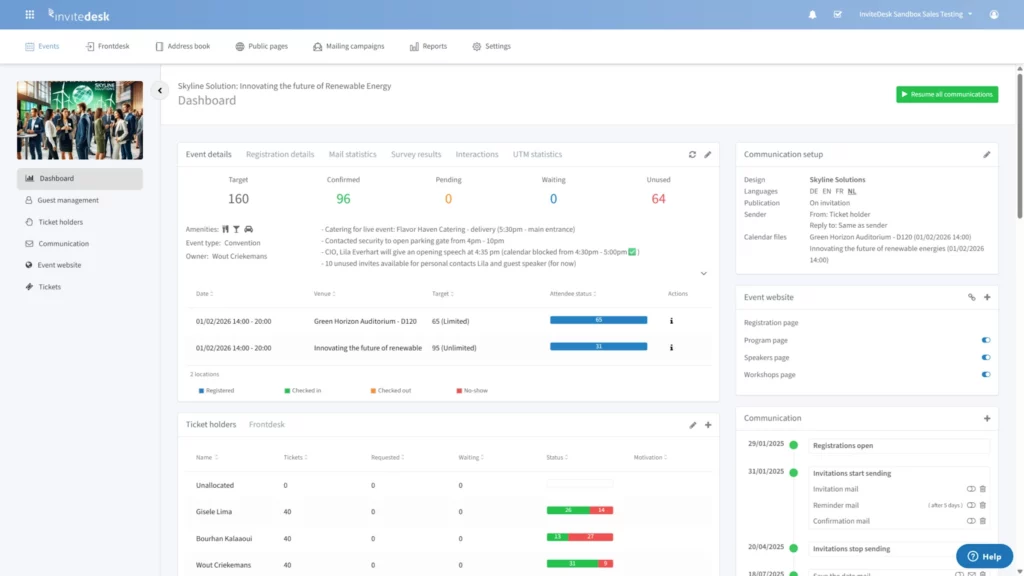
Image: InviteDesk attendance tracking dashboard
Pricing is based on the number of users and events rather than per-registrant fees, so costs stay predictable whether you’re running ten events a year or two hundred.
Neither a clean fit? See how you can get the right guests and the room and measure event impact with InviteDesk.