
If you’re looking for an event management software with analytics, it’s likely because manual and disconnected systems are already limiting your ability to generate real pipeline from events.
- Scattered data capture is slowing follow-up: Badge scans sit in spreadsheets, conversation notes live on business cards, and survey responses arrive separately. By the time sales gets clean contact information, warm leads have gone cold.
- Manual CRM updates are blocking attribution: You’re spending hours after every event cleaning attendee lists, tagging contacts, and merging data from multiple sources. Marketing can’t show which events influenced the pipeline, and sales chase leads with zero context.
- Lead quality is unclear until it’s too late: Your current event marketing platform tracks registrations and attendance, but it doesn’t distinguish between casual attendees and decision-makers. Sales wastes time on unqualified contacts while high-value prospects slip through the cracks.
To solve these issues, the right event management platform must offer:
- CRM integration depth: Event data syncs automatically without manual merging.
- Attribution tracking: Events connect directly to pipeline and revenue, not just attendance counts.
- Historical analysis: Guest behaviour tracks across multiple events, not treated as isolated interactions.
- Lead context: Sales sees engagement details before calling, not just a name and email.
- Export flexibility: Data moves into systems where decisions happen, not locked inside the platform.
Each platform below includes analytics features, pricing, and where it fits best—so you can shortlist the two or three worth checking out and stop drowning in post-event spreadsheet chaos.
1. InviteDesk: Event marketing analytics built for B2B sales and marketing collaboration
Best for: B2B sales and marketing teams running customer events, hospitality events, roadshows, and executive dinners where proving impact matters more than counting attendance.

InviteDesk helps B2B event marketing teams capture accurate, structured attendee data without the stress of spreadsheets or the limitations of generic event tools.
Through its CRM-integrated event analytics system, teams can:
- Scan and sync attendance instantly to Salesforce, HubSpot, Dynamics, or Marketo
- Track VIP and key-account arrivals in real time while the event is live
- Build a consistent engagement history across multiple events
That way, B2B teams avoid manual data cleanup, sales get reliable intelligence to prioritise outreach, and event results are based on verified engagement, not scattered notes or superficial ticketing metrics.
Skip the spreadsheet cleanup after your next event with InviteDesk.
Why we chose InviteDesk
Three analytics capabilities set InviteDesk apart from other platforms.
- Bi-directional CRM integration: Instead of exporting attendee lists, cleaning them, and re-uploading them to HubSpot or Salesforce, InviteDesk automatically updates contact records as guests register, decline, or arrive. Sales reps see exactly who engaged and how, so they can focus outreach on accounts that matter.

- Historical guest tracking: Sales teams can access complete event history within their CRM, including sessions a prospect attended over the past year, invitations they declined, and changes in engagement patterns. That way, sales follow-up is more specific, personalised, and more likely to convert.

- Analytics without enterprise fees: You don’t need to pay premium tiers for basic reporting; teams get real-time dashboards and attribution data as standard features.
As a result, B2B teams like Nagelmackers have gone from immeasurable event costs to automated ROI tracking across 200+ annual events, without going over budget or stressing over manual exports and analysis.
Key features
- Invitation mail statistics: Identify high-priority leads at risk of non-attendance with detailed, real-time event invitation tracking that shows who opened, clicked, and responded to your event messages.
- UTM tracking: Attribute registrations to specific campaigns and channels without losing the source when someone lands on your landing page.
- Real-time registration dashboards: See who’s confirmed, pending, or declined as responses come in, without refreshing spreadsheets or chasing RSVPs manually.
- Attendance tracking: Know exactly which VIP customers checked in, so you can prioritise conversations with top prospects while they’re still in the room.
- CRM integration: Sync every check-in to Salesforce, HubSpot, Dynamics, or Marketo instantly, without spending hours on manual data entry after the event.
- Post-event surveys: Capture feedback while the experience is fresh, without chasing responses days later when engagement drops.
- Event data export: Export clean, enriched attendee lists with engagement history, without dumping raw badge scans into spreadsheets for sales to ignore.
- Event history tracking: See which contacts engaged across multiple events over time, without treating every touchpoint like a first interaction.
InviteDesk Pros
- Export only the fields stakeholders need instead of a default 47-page report. Pick invitee fields at export, so each team gets a lean, relevant report.
- Real-time check-in sync across all devices prevents duplicate entries at multiple entry points.
- One event guest history in one place. Teams can use InviteDesk as their event CRM rather than maintaining separate contact databases.
- Sold-out events won’t spike your bill. Get pricing is based on users and events, not per-registrant fees, for predictable costs.
InviteDesk Cons
- Built for relationship events with 20-200 attendees, not 5,000-person conferences requiring industrial-scale throughput.
See how InviteDesk connects check-ins to closed deals without spreadsheet cleanup.
2. Whova: All-in-one event platform for conferences and associations
Best for: Conference organisers, associations, and nonprofits running multi-day events where attendee engagement analytics and automated post-event reporting matter more than pipeline attribution.

Whova built its reputation on attendee experience using its mobile event app, which consistently earns high ratings for ease of use and networking features. The analytics follow that focus: strong on engagement metrics, session popularity, and sponsor impressions, with less emphasis on connecting event data to CRM systems and revenue attribution.
For teams whose primary goal is understanding how attendees interacted with the event itself, Whova delivers. For teams that need to prove pipeline impact to justify budgets, the attribution gap requires additional integration work.
Why we chose Whova
Whova scores 4.8/5 on G2 with over 1.807 reviews, one of the highest-rated platforms in the category. Users consistently praise the intuitive interface, robust networking features, and responsive customer support.
The automated post-event reporting also stands out because Whova compiles engagement metrics into professional brochure-style reports ready to share with stakeholders without manual assembly.
Key features
- Automated post-event reports: Engagement metrics compile into presentation-ready brochures; networking activity, session popularity, and sponsor impressions without manual assembly.
- Real-time event statistics: Monitor ticket sales, check-ins, live polling, and gamification as they happen; adjust programming while attendees are still in the room.
- Agenda webpage analytics: Track visitor traffic to event pages, including geographic distribution and device types, to optimise promotion targeting.
- Attendee engagement tracking: View individual activity, including session attendance, networking connections, and community participation for personalised follow-up.
- Custom data exports: Filter and export attendee data by check-in status, survey responses, and registration answers for targeted post-event campaigns.
Pros
- Award-winning mobile app with 4.8/5 ratings across app stores
- AI-powered attendee matchmaking for networking
- Comprehensive post-event reporting without manual compilation
- Lower ticket fees (3.0% + $0.99) compared to enterprise platforms
- Dedicated event assistance from customer support
Cons
- Add-on features can increase costs beyond initial quotes
- Notification volume can overwhelm attendees without proper configuration
- Not suited for small events under 50 attendees
- Limited CRM integration depth means that attribution to the pipeline requires external work
Pricing
- Specific pricing requires you to request a quote from the sales team.
3. Eventify: Cloud-based event app platform with real-time analytics
Best for: Mid-sized organisations seeking a customisable mobile event app with engagement analytics at competitive pricing particularly those running high-volume events where per-attendee fees would add up.

Eventify focuses on making custom-branded event apps accessible without enterprise budgets. Organisers can build apps in under 30 minutes using drag-and-drop tools, track attendee engagement in real-time session performance, networking activity, and sponsor interactions.
It provides real-time visibility into what’s happening at your event. For teams whose analytics needs center on engagement rather than pipeline attribution, Eventify delivers at a lower price point than enterprise alternatives.
Why we chose Eventify
Eventify scores 4.9/5 on G2. Users praise the intuitive admin panel, responsive support, and transparent pricing with no per-attendee fees.
For organisations running high-volume events on limited budgets, the cost predictability is a genuine differentiator.
Key features
- Real-time analytics dashboard: Track attendee engagement, session performance, and networking metrics as your event unfolds, not days later in a spreadsheet.
- Speaker and session insights: See which sessions attract attention and how attendees interact with content; identify top performers for future programming.
- Exhibitor and sponsor performance: Track booth visits, ad clicks, and lead-capture results so sponsors see concrete ROI, not vague impressions.
- Networking activity metrics: Monitor connection requests, messages exchanged, and meeting bookings to prove attendee value beyond session attendance.
- Device and adoption tracking: See app installation rates and device distribution to optimise push notification timing and troubleshoot engagement drops.
Pros
- No per-attendee pricing keeps costs predictable for large events
- Full white-labelling for branded app experiences
- Quick setup with intuitive admin interface
- SOC 2 Type II compliant and GDPR adherent
- Gamification features to drive engagement
Cons
- Users report needing deeper analytics capabilities for complex reporting
- Limited ready-made email templates
- Occasional technical issues during live events
- Fewer third-party integrations than enterprise platforms
Pricing
Eventify has four pricing tiers:
- Register: $249/event for up to 250 attendees. Gets you the basics: A microsite, registrations, ticketing, badge printing, and check-ins.
- Engage: $799/event with 400 attendee credits. You get the event app, 1-1 meetings, agenda builder, push notifications, gamification, and analytics.
- Advance: $1199/event for 400 attendees. Built for bigger events that need networking tools, lead scanning, exhibitor management, and email campaigns.
- Ultimate: Custom pricing. Everything plus AI features, advanced analytics, and white-labeling. Worth a conversation if you’re running enterprise-scale events.
4. EventPro: Venue and event management for complex logistics
Best for: Venue managers and event planners managing complex multi-space bookings where resource utilisation and operational analytics matter more than attendee engagement or pipeline attribution.
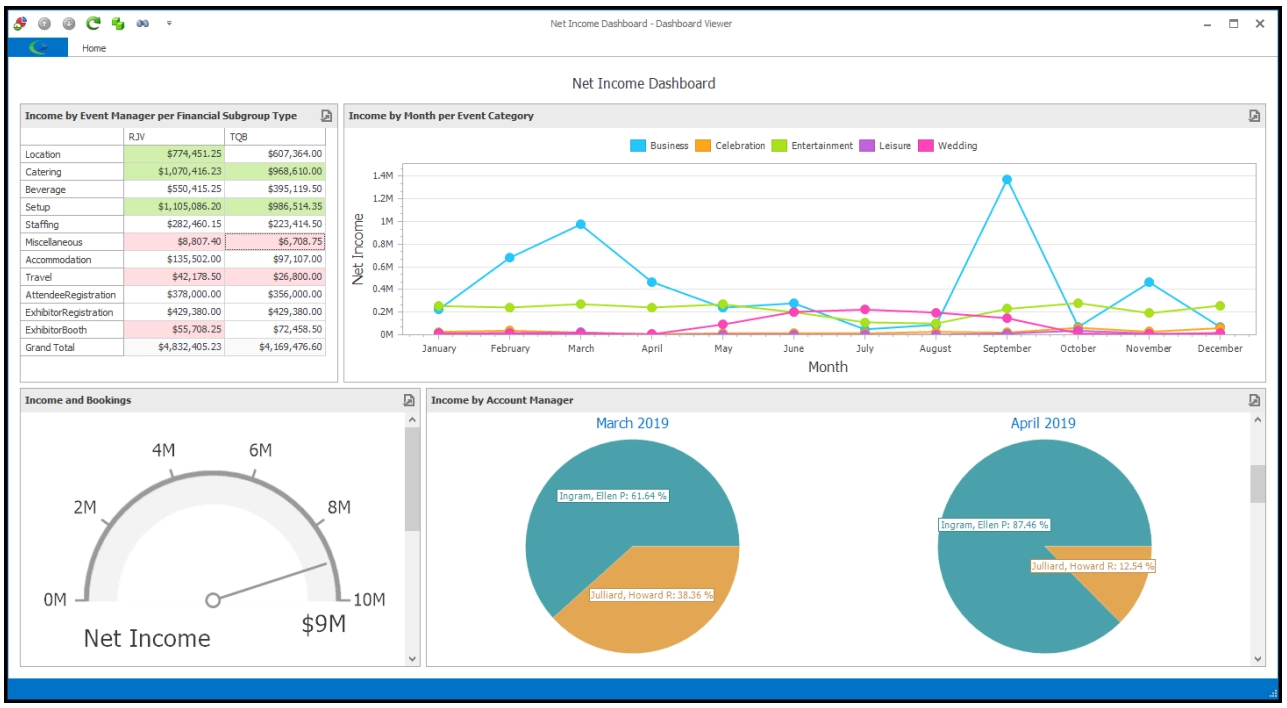
EventPro approaches event management focused on booking calendars, catering management, and resource tracking.
Analytics center on operational efficiency: space utilisation, budget versus actuals, and equipment allocation.
For teams whose challenge is “Are we using our venues and resources effectively?” EventPro provides answers. For teams whose challenge is “can we prove this event-generated pipeline?” won’t get the answer from EventPro.
Why we chose EventPro
EventPro receives consistent praise for its depth of venue management and adaptability across different workflows. The graphical booking calendar prevents double-bookings and maximizes space utilisation.
Key features
- Customisable KPI dashboards: Track key performance indicators across events with views tailored to operations, finance, or executive reporting needs.
- Budget vs. actuals tracking: Compare event budgets against actual costs with detailed breakdowns; catch overruns before they become surprises.
- Resource utilisation reporting: Analyse venue, equipment, and staff allocation to identify underused assets and optimize scheduling.
- Custom report generation: Build tailored reports with extensive filtering and sorting; export data in formats stakeholders actually use.
- Sales pipeline tracking: Follow leads from initial enquiry through confirmed booking with visibility into conversion rates and revenue forecasting.
Pros
- 40+ years of venue management software development
- Highly adaptable to organisation-specific terminology and processes
- In-house support team
- Both cloud and on-premise deployment options
- Comprehensive catering management module
Cons
- Customised reports incur additional costs
- Floor plan design tools are basic
- Steeper learning curve than simpler platforms
- Less focus on attendee engagement or pipeline attribution analytics
Pricing
Pricing varies based on modules, users, event spaces, and deployment type (cloud vs on-premise). Contact sales for a complimentary needs assessment and customized quote.
5. Bizzabo: Event experience OS for enterprise B2B marketing
Best for: Enterprise B2B marketing teams running large-scale conferences and multi-event programmes with a budget for premium analytics and innovative tracking like smart badges.

Bizzabo positions itself as an Event Experience Operating System with enterprise-grade tools for in-person, virtual, and hybrid events at scale.
The analytics capabilities reflect that ambition: deep integration with CRM and marketing automation, cross-event portfolio reporting, and SmartBadges that enable passive attendee tracking.
The SmartBadges are the standout innovation as it allows passive session attendance tracking without manual check-ins. For enterprise teams with a budget for the hardware, they close part of the attribution gap automatically.
Why we chose Bizzabo
Bizzabo was named a Leader in the 2025 Gartner Magic Quadrant for Event Technology and the only Customer Favorite in the 2024 Forrester Wave. The platform scores 4.3/5 on G2 with particular strengths in event creation (8.8) and ease of use (8.7).
Key features
- Event intelligence dashboards: Real-time activity streams automatically flag configuration issues, so you can spot problems before attendees notice them.
- Advanced reporting: Build customisable reports on registration, attendance, engagement, and ROI without waiting for analyst support.
- SmartBadges for passive session tracking: Capture attendance data automatically as attendees enter rooms; no manual check-ins, no missed data points.
- Lead capture with real-time CRM sync: Contact information flows to Salesforce, HubSpot, or Marketo instantly; sales follow up while conversations are fresh.
- Cross-event portfolio analytics: Aggregate data across multiple events for programme-level insights; prove cumulative impact, not just single-event wins.
Pros
- Gartner Magic Quadrant Leader with strong analyst recognition
- SmartBadges for innovative passive tracking
- Unlimited events model eliminates per-registration costs
- 99.99% uptime with enterprise-grade infrastructure
- AI-centric roadmap with planned agentic features
Cons
- Premium pricing excludes mid-market teams
- Landing page customisation limitations reported by some users
- International shipping costs for physical badges add up
- Some users note that reporting could be deeper
Pricing
Annual subscription starting at approximately $17,999/year for unlimited events. Per-seat pricing (roughly $499/user/month billed annually) with add-ons for customized branding, API access, advanced virtual features, and SmartBadges. Enterprise pricing is customised based on portfolio size.
6. Cvent: Enterprise event platform for large-scale conferences
Best for: Large enterprises managing complex multi-day conferences and trade shows requiring comprehensive logistics, global supplier management, and feature depth with teams who can absorb the learning curve.

Cvent is the incumbent enterprise platform with comprehensive feature depth for events of all types, sizes, and complexities. Registration, session tracking, on-site check-in, mobile apps, supplier sourcing, sponsor management, and analytics across the board.
The analytics capabilities match the scope: detailed dashboards, cross-event reporting, and integration with Salesforce, HubSpot, and other enterprise systems. The trade-off is complexity.
Teams report a steeper learning curve, and configuring custom reporting can be challenging. For organisations with dedicated event teams who can invest in mastering the platform, Cvent delivers. For lean teams, the time-to-value may be longer.
Why we chose Cvent
Cvent scores 4.3/5 on G2 with over 2,100 reviews. Users highlight powerful attendee management, highly customisable registration paths, and 24/7 customer support from a 1,800+ person team.
Key features
- Comprehensive reporting dashboards: Track registration metrics, attendance patterns, engagement scores, and financial performance in centralised views.
- Real-time analytics: See live check-in counts, session attendance, and engagement data as your event unfolds; adjust staffing and resources on the fly.
- Attendee Hub insights: Monitor how attendees interact with content, sessions, and networking features to identify high-engagement prospects.
- Cross-event reporting: Aggregate data across your entire event programme for portfolio-level analysis and trend identification.
- Native CRM and marketing automation integration: Sync with Salesforce, HubSpot, Marketo, and other enterprise systems for closed-loop attribution tracking.
Pros
- Industry-leading feature depth for complex requirements
- 24/7 customer support with 1,800+ person team
- Powerful attendee management and registration customisation
- Integrated venue sourcing through Cvent Supplier Network
- Robust virtual and hybrid capabilities
Cons
- Steeper learning curve due to feature complexity
- Higher cost than mid-market alternatives
- Key features (badge printing, branding packages) are additional costs
- Custom reporting can be challenging to configure
Pricing
Consultative pricing with customised quotes based on event volume, features, and organisation size. The professional tier provides core tools; the Enterprise tier adds advanced features and integrations. Implementation, training, and event execution services are available at an additional cost.
Looking for Cvent alternatives? Compare your option here.
7. Swoogo: Flexible event platform with per-user pricing
Best for: Marketing and events teams seeking unlimited events and registrations with transparent pricing and native HubSpot/Salesforce integrations, particularly those frustrated by per-attendee fee models.

Swoogo differentiates on pricing transparency: per-user fees with unlimited events and registrations, avoiding the per-attendee costs that make budgeting unpredictable. The platform handles in-person, virtual, and hybrid events with strong customisation for registration flows and event websites.
For analytics, Swoogo provides real-time dashboards, cross-event reporting, and native CRM integrations that push event data into Salesforce and HubSpot. The attribution gap can be closed through these integrations, though the depth of analytics varies by use case.
Why we chose Swoogo
Swoogo scores consistently high for customer support, an in-house team with initial responses within 15 minutes during business hours. Users praise the registration form builder’s flexibility and the transparent pricing, which makes budgeting more predictable.
Key features
- Real-time event dashboards: Track registration, check-ins, and engagement as they happen; catch no-show patterns and adjust outreach mid-event.
- Cross-event reporting: Aggregate data across your entire portfolio with global attendee records; identify which accounts engage consistently versus one-time attendees.
- Custom report builder: Create tailored reports with password-protected stakeholder views; share sponsor results without exposing sensitive attendee data.
- UTM and web analytics integration: Connect marketing channels to registrations through Google Analytics; prove which campaigns drove actual attendance.
- Native HubSpot and Salesforce integration: Push event data directly into CRM records for ROI measurement; attribution happens automatically, not manually.
Pros
- Unlimited events and registrations with per-user pricing
- In-house support with 15-minute response time
- Highly customisable registration forms with conditional logic
- No payment gateway percentage fees
- PCI-DSS Level 1 and GDPR compliant
Cons
- Advanced customisations may require design or development resources
- Learning curve for complex configurations
- The mobile app requires an additional subscription
- Pricing may be high for smaller organisations
Pricing
Per-user pricing with unlimited events and registrations. Full Users (for build events and sending communications) and Reporting Users (for admin tasks and reports) are licensed separately. Report Viewers access password-protected reports without a license. Premium add-ons include a mobile app, 24/7 support, and professional services.
Comparison of Event Management Software With Real-Time Analytics
Here’s a quick reference table organised by positioning and how each platform addresses the attribution gap:
| Platform | Best For | Standout Feature | Key Consideration |
|---|---|---|---|
| InviteDesk | B2B teams who need to prove event ROI through pipeline attribution and sales-marketing collaboration | Bi-directional CRM sync with historical guest tracking | B2B focus; less suited for public ticketed events |
| Whova | Conferences prioritising attendee engagement analytics and automated post-event reporting | Award-winning mobile app with automated post-event reports | Add-on costs can increase the total investment |
| Eventify | High-volume events needing affordable real-time engagement tracking without per-attendee fees | No per-attendee fees with real-time engagement analytics | Users report a need for deeper analytics |
| EventPro | Venue managers focused on resource utilisation and operational analytics | 40+ years of venue management with resource tracking | Custom reports incur additional costs |
| Bizzabo | Enterprise teams with budget for portfolio analytics and smart badge tracking | SmartBadges with passive session tracking | Premium pricing; badge shipping costs |
| Cvent | Large-scale conferences requiring comprehensive feature depth and global support | Industry-leading feature depth with 24/7 support | Steep learning curve; complex pricing |
| Swoogo | Teams wanting unlimited events with cross-event reporting | Unlimited events with cross-event reporting | The mobile app requires an additional subscription |
Which Event Management Analytics Software is Best for You?
The right platform depends on what your analytics need to accomplish—and every approach involves trade-offs.
But while most platforms force you to choose between engagement analytics or pipeline attribution, affordable pricing or enterprise features, ease-of-use, CRM integration depth, InviteDesk bridges these trade-offs.
Its bi-directional CRM sync delivers pipeline attribution without sacrificing usability. Enterprise-grade analytics come standard across all pricing tiers, not as costly add-ons. Real-time engagement tracking connects directly to sales context, so your team gets both event insights and revenue proof.
While other platforms answer ” Was the event successful?” InviteDesk answers the question leadership actually asks: “What business impact did this create?”
Book a demo to see how InviteDesk connects your events to revenue
If you’re considering more options, here how to choose:
- For engagement metrics and session tracking, Whova’s 4.8/5 rating across 1,700+ reviews proves its mobile app analytics work. Eventify delivers similar real-time engagement visibility without per-attendee pricing, scaling with larger events.
- For venue optimisation and resource management, EventPro’s four decades of development are evident in operational analytics, space utilisation, budget tracking, and equipment coordination that venue managers actually use.
- For enterprise conferences requiring comprehensive logistics support, Cvent and Bizzabo offer feature depth that matches complex requirements. Both platforms require significant learning investment, and their enterprise pricing reflects their positioning.
Key questions about event analytics
What is event marketing analytics?
Event marketing analytics is the collection, measurement, and analysis of data generated throughout the event lifecycle, pre-event metrics (invitation performance, registration trends), live event data (attendance, session engagement, networking activity), and post-event insights (feedback, follow-up conversion rates).
The goal is to transform event activities into measurable outcomes. The gap most teams face is that activity metrics are easy to capture; connecting them to business outcomes requires intentional system design.
What matters most for event management analytics?
The analytics that matter connect event activities to business outcomes—not just count attendees. Look for CRM integration (so event data populates sales systems automatically), attribution tracking (linking events to pipeline and revenue), real-time visibility (enabling adjustments during events, not just post-mortems), and historical tracking (showing guest behaviour across multiple events over time).
Which platforms are best-rated for multi-session event analytics?
For large conferences with concurrent sessions: Bizzabo’s SmartBadges enable passive session attendance tracking without manual check-ins. Cvent offers comprehensive session management with detailed attendance reporting across multi-day programmes. Whova’s mobile app tracks session engagement and attendance, generating automated reports on popularity.
For teams prioritising sales collaboration alongside session analytics, InviteDesk’s attendance tracking integrates session data with CRM records for a unified customer view across the event lifecycle.


