Cvent is a comprehensive event management platform designed for organisations managing complex, large-scale events across multiple channels and formats.
And, is best suited for:
- Large enterprises with dedicated event teams and substantial budgets
- Organisations running complex conferences with 500+ attendees
- Teams that need extensive project management features alongside event registration
Key features at a glance
| Feature | Cvent Capability |
|---|---|
| Event registration | Highly customisable workflows and conditional logic |
| Integrations | 80+ native integrations, including Salesforce & Marketo |
| Mobile App | Event app builder with networking and session features |
| Reporting | Cross-event analytics and advanced reporting |
| Customer support | 24/7 phone and chat support |
| On-site check-in | Kiosks and badge printing |
| Pricing model | Tiered, enterprise pricing |
Pros
- Powerful all-in-one platform with extensive functionality
- Strong CRM integrations for enterprise stacks
- Advanced reporting and analytics
- 24/7 customer support availability
- Handles large-scale, complex events well
Cons
- Steep learning curve with long onboarding time
- Expensive for mid-sized organisations
- Feature overload for routine B2B events
- Cluttered interface and navigation friction
- Time-consuming setup, even when cloning events
Why you can trust this review
At Invitedesk, we live and breathe event marketing management every day. Our founders, Jan and Mark, spent years in the corporate trenches as sales and marketing professionals, just like many of you. So, we understand what event managers really need from their software.
Our goal here is simple: cut through the noise and give you a clear, honest review you can actually use. Here’s how we approach reviews like this one:
- Looking closely at features: How does it work day-to-day? We want to see how features perform in practice, not just how they sound on a sales page.
- Hearing from real users: We’ve analyzed 350+ of the latest and most detailed real user reviews from G2 and Capterra to understand what actual users are saying out there.
- Being real about strengths and limits: We’ll tell you where a tool shines. But we’ll also point out, factually, where it might not quite hit the mark for everyone. We don’t call these ‘flaws’—it’s more about finding the right match for you.
This review presents strengths and limitations objectively. Cvent is a powerful platform, but power does not automatically equal fit for every organisation or every type of B2B event. We want you to walk away feeling informed and ready to make a smart, confident decision that benefits your team and your clients.
See if InviteDesk fits your event in a live demo.
What is Cvent Event Management?
Cvent is one of the most established names in enterprise event management. Founded in 1999, the platform has grown into a broad ecosystem covering nearly every part of the event lifecycle.

At its core, Cvent offers:
- Event registration and website creation
- Email communication and attendee messaging
- Venue sourcing through the Cvent Supplier Network
- On-site solutions including badge printing and kiosks
- Mobile event applications
- Post-event survey and analytics
Cvent positions itself as an all-in-one solution for managing events at scale. Its typical use cases include large conferences, trade shows, roadshows, and corporate meetings where logistics volume, and stakeholder complexity are high.
This broad scope is both Cvent’s strength and its challenge. The platform is designed to serve almost every event type imaginable, which means teams inherit a large number of features and configuration options, whether they need them or not.
Cvent Pricing: what you’ll actually pay
Pricing Model Overview
Cvent does not publish pricing publicly. All contracts are custom enterprise agreements based on factors such as:
- Number of events per year
- Total attendee volume
- Required modules and add-ons
- Support, onboarding, and service levels
This means two organisations using Cvent pay very different amounts to the platform, even if they appear similar in size.
Based on user reviews, reported costs typically range from $5.000 to $50.000+ per year, depending on scale and configuration. Several reviews also mention per-event fees, which can further increase the total spend as event volume grows. Karolina, a Director of Communications and Operations, said, “It [Cvent] can also get pricey depending on the features you need”.

For organisations planning a long-term event strategy, this pricing model requires careful forecasting. Costs are not only tied to today’s needs, but also to how many events, attendees, and internal stakeholders you expect to support over time.
Hidden costs to watch for
Beyond the base subscription, reviewers frequently point to additional cost drivers that are not always clear upfront:
- Professional services for initial setup, configuration, support and training
- Add-on modules such as mobile event apps, badge printing, or on-site kiosks
- Integration costs for advanced CRM workflows or custom data sync
- Annual auto-renewals unless contracts are explicitly canceled in writing
One review summarises this experience clearly:
“The agreement and work order were very misleading. The subscription renews automatically unless you opt out in writing.”
While these costs are not unique to Cvent, they do contribute to the perception that the platform requires ongoing budget oversight and contract management, especially for teams without dedicated procurement or legal support.
Is Cvent worth the investment?
For large organisations running complex, high-volume events, Cvent often justifies its costs. The platform excels when logistics, scale, and cross-event reporting are critical, and when teams fully use its broader project management and on-site capabilities.
For routine B2B seminars, webinars, executive dinners, or hospitality events, many teams find that Cvent’s pricing includes capabilities they rarely use. In these scenarios, the investment can feel disproportionate to the actual operational benefits delivered.
This is where the decision becomes less about whether Cvent is powerful and more about whether that power aligns with your specific event use case.
InviteDesk advantage: InviteDesk uses transparent, predictable pricing designed specifically for B2B event teams. There are no hidden modules, no auto-renew traps, and no enterprise sales process required to get started. Teams can start small and scale based on real usage.
Book a demo and see how InviteDesk fits your event!
Real user reviews: what are customers actually saying about Cvent
To understand how Cvent performs outside of marketing and product demos, we’ve analysed more than 350 verified reviews on G2 and Capterra. These reviews come from event managers, marketers, and operations teams using Cvent in a real production environment, often across multiple events and years.
Average ratings:
At a high level, these scores show that most users consider Cvent a strong and capable platform. However, the written reviews reveal a clear pattern: users tend to either value Cvent deeply for its power or struggle with it because of that same complexity.
What users love about Cvent
1. All-in-one functionality – One of the most frequently mentioned positives is that Cvent centralizes many event tasks in one system. Users value having registration, email communication, on-site check-in, and reporting under a single roof instead of stitching together multiple tools.

“It streamlines every stage of the event lifecycle.”
For large teams managing large conferences or multi-day events, this consolidation reduces the need to export data between systems and helps maintain a single source of truth.
2. Integration capabilities – Cvent’s integration ecosystem is another strong point. Reviewers often highlight native integrations with tools such as Salesforce, HubSpot, and Marketo, as well as API access for custom setups.

“I love how many APIs are built in to integrate with other systems and CRMs”
Cvent’s integration ecosystem is another strong point. Reviewers often highlight native integrations with tools such as Salesforce, HubSpot, and Marketo, as well as API access for custom setups.
3. 24/7 Customer Support – Support availability is consistently mentioned as a positive, particularly for global teams or events running across time zones.
“Cvent support is available 24/7 and can troubleshoot with you over the phone or via chat.”
This round-the-clock access is reassuring for mission-critical events where issues cannot wait until business hours.
4. Reporting depth – Many users praise Cvent’s reporting capabilities, especially for organizations running multiple events per year. The ability to compare performance across events and export structured data is seen as a major advantage.
“Reporting is easy, and I like that it’s always accessible.”
For teams that need standardized reporting across regions or business units, this depth matters.
Where users get frustrated
1. Steep learning curve – By far the most common complaint is complexity. New users frequently describe Cvent as overwhelming, with too many settings and configuration options to absorb quickly.
“Overwhelming due to its complexity, especially for new users.”
Several users mention that becoming comfortable with the platform requires months of hands-on use, not days.
2. High cost – Pricing is another recurring point of friction. While large enterprises often accept the cost as part of doing business, mid-sized organizations regularly describe Cvent as expensive relative to their needs.
“Better for larger organisation with deep pockets”
This reinforces the idea that Cvent is designed first for scale, not for efficiency at smaller volumes.
3. Feature bloat – Because Cvent supports nearly every event type, many users feel burdened by features and settings they never use. This contributes to a cluttered interface and slows down everyday tasks.
“So many features that it can feel overwhelming.”
This feedback appears repeatedly, especially from teams running simpler B2B events.
4. Bugs and glitches – Some users report technical issues, particularly around newly released features or updates.
“ Products being released while still buggy.”
While not universal, these comments suggest that complexity can increase the likelihood of friction during updates.
5. Manual setup effort – Even experienced users mention that setting up events, including cloned ones, often requires significant manual adjustments. This adds to preparation time and increases reliance on internal experts.
“While the variety and customization of Cvent is great, the amount of customization can make the first couple of events tedious and time-consuming.”
InviteDesk advantage: InviteDesk is built specifically for B2B event teams. It removes feature bloat by focusing on invitation ownership, real-time RSVP visibility, and CRM-synced follow-up. InviteDesk also consistently maintains a high NPS, reflecting strong adoption and satisfaction among B2B users.
Book a demo and see how InviteDesk fits your event!
Cvent Features: what can I actually do?
Event registration and Website builder
Cvent offers highly customisable registration forms with conditional logic, session selection, and payment processing. However, design flexibility is limited without HTML or CSS, and templates can feel restrictive.
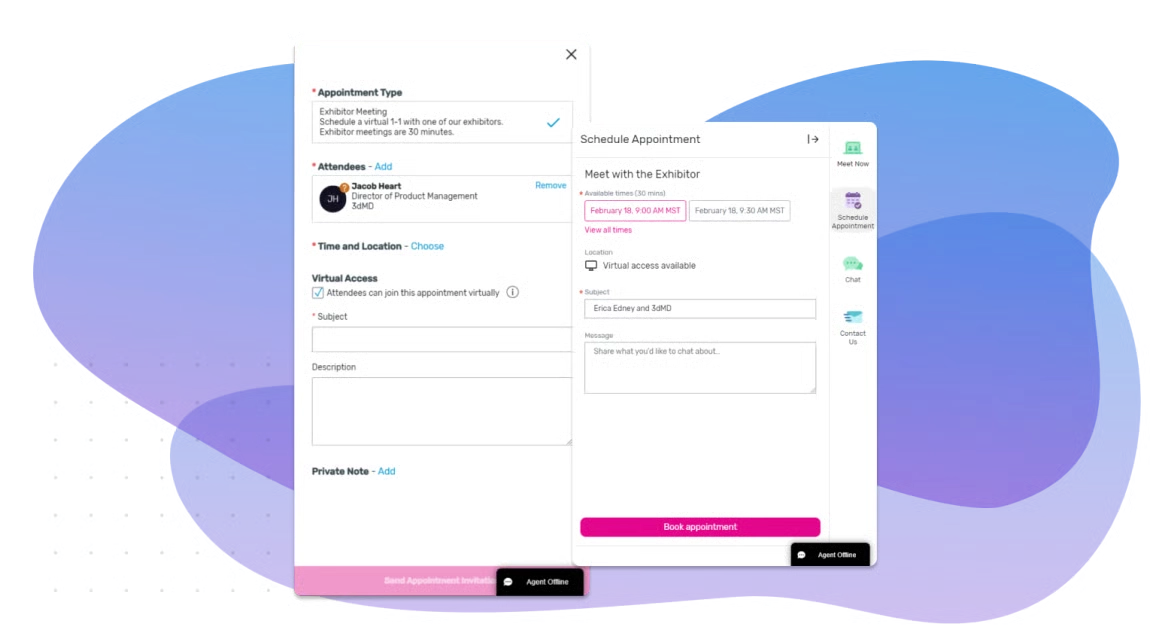
InviteDesk focuses on getting the right guests registered, rather than a full website builder. Event websites are created without code using a word-like editor, giving teams exactly the pages they need such as registration, program, and gallery pages.

Email marketing and Communication
Cvent includes a drag-and-drop email builder with automation and segmentation. Users report challenges maintaining a consistent design across events.
When using InviteDesk, marketing controls templates, while emails and invitations are sent in the name of account managers. Additionally, account managers can always access RSVP-status in real-time via mobile access.
Integrations
Cvent supports 80+ integrations and offers API access. While powerful, advanced workflows often require additional tools.
InviteDesk provides plug-and-play CRM connectors for Salesforce, Marketo, Hubspot and MicroSoft Dynamics. An open API is also available, making connection to any other platform possible.
Want to send event attendee data to Hubspot without losing out on the key details? See how Invitedesk connects to Hubspot for autoated event reporting.
On-site Solutions
Cvent OnArrival Kiosks and badge printing are robust but often incur additional costs.
InviteDesk relies on its ScanApp to run fast on-site event check-ins from a smartphone, including last minute registrations, and different scan points across your event for entry control and attendance tracking per area.

Related: InviteDesk ScanApp
Reporting and Analytics
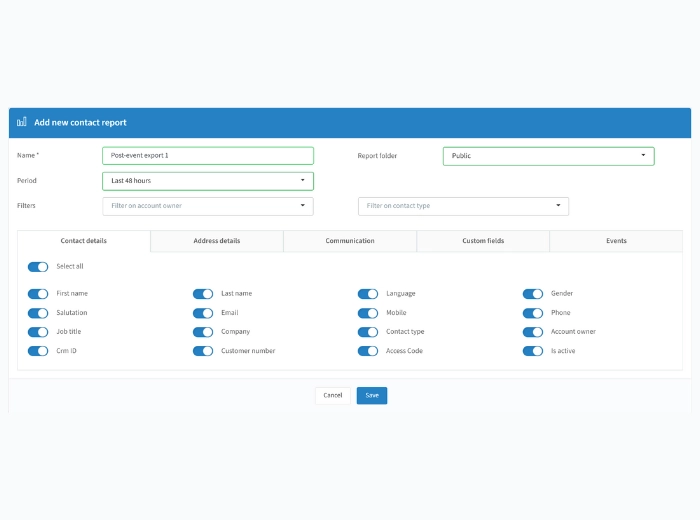
Cvent offers deep reporting exports, though users describe custom dashboards as “clunky”. InviteDesk an event management software with analytics, focuses on ROI reporting, tying event participation directly to CRM pipeline and revenue impact.
Cvent Ease of Use: Can your team actually use it?
The Reality: Training Takes Months
Ease of use is the most frequently mentioned concern in Cvent user reviews. While users often acknowledge the platform’s power, many also describe a long ramp-up period before teams feel confident working independently.
Multiple reviewers report onboarding periods of three to six months before reaching full productivity. This applies not only to junior users, but also to experienced event professionals who are new to Cvent. Early events typically take longer to prepare, and efficiency improves only after repeated use.
In practice, this means teams often rely on a small number of trained power users who support others internally. Knowledge builds over time, but it is rarely intuitive from the interface alone.
Why Cvent Is Complex
Several structural factors contribute to this learning curve:
- Built to serve every event type
Cvent supports everything from internal meetings to large public conferences. As a result, users are exposed to many settings and workflows they may never need, but still have to navigate around. - Busy interface where key features can be hard to find
Important settings are spread across multiple menus. Users often need to know in advance where a feature lives, rather than being guided to it through the interface. - Manual configuration for many tasks
Even when cloning events, teams frequently need to review and adjust multiple settings. Registration logic, email behavior, and reporting options often require manual checks to avoid errors.
What This Means for Your Team
This complexity has direct operational consequences:
- Significant training investment
Teams often invest in professional services, internal documentation, or extended onboarding time to get up to speed. - Slower onboarding for new hires
Productivity depends on experience with the platform, not just role familiarity. New team members take longer to contribute independently. - Opportunity cost
Time spent learning, configuring, and troubleshooting the platform is time not spent on event strategy, attendee experience, or post-event follow-up.
For organisations running large, highly complex events, this trade-off may be acceptable. For teams running frequent B2B seminars, client events, or hospitality programs, it often feels like unnecessary overhead.
Over time, teams develop internal rules like “always double-check this setting” or “never touch that field,” knowledge that is learned through experience rather than through the product itself.
InviteDesk Advantage
InviteDesk is designed to minimise this friction. Most teams run their first event within two hours, following two focused onboarding sessions. The platform is purpose-built for B2B events, so teams only interact with features they actually need.
By offering everything required for B2B workflows and nothing more, InviteDesk reduces training time, speeds up onboarding, and enables both marketing and sales teams to work confidently in the system from day one.
“InviteDesk’s software simplifies every step involved in organising an event. From initially collecting the right customer data to processing data for marketing analysis afterwards. While I enjoy the extensive desktop version, our commercial colleagues can get started with a user-friendly application.”
Anke Souvereyns,
Event Coordinator at Sterck Magazine
Book a demo and see how InviteDesk fits your event!
Cvent vs InviteDesk: Purpose-built for B2B events
Cvent is designed to handle every possible event scenario. InviteDesk is designed to handle B2B relationship events exceptionally well.
| Feature | Cvent | InviteDesk |
|---|---|---|
| Primary focus | All event types | B2B relationship events |
| Invitation flow | Generic marketing emails | Emails sent in name of relationship manager |
| Sales collaboration | Limited | Real-time mobile access for sales |
| Learning curve | Months | 2-hour training |
| Pricing | Enterprise custom | Transparent and predictable |
| CRM Integration | Customisable | Plug-and-Play |
| GDPR | US-based | European, ISO27001 certified |
When do you need InviteDesk, not Cvent
Choose InviteDesk if:
- Your events are relationship-driven
- Sales and marketing must collaborate closely
- Real-time visibility matters
- You run 10 – 50 events
- Compliance and data governance matter
Cvent Customer Support: what to expect
The good: 24/7 phone and chat support with dedicated account managers for enterprise clients
The mixed: response quality varies depending on issue
The limitation: Support cannot eliminate product complexity
InviteDesk offers hands-on onboarding from a European team, combined with a platform that requires minimal ongoing support. If support is needed, the Customer Success team handles tickets within the hour.
Book a demo and see how InviteDesk fits your event!
Final Verdict: Is Cvent Right for Your B2B Events?
Cvent is a powerful, feature-rich event management platform. It excels in environments where event complexity, scale, and logistical coordination justify a significant investment in tooling, training, and ongoing administration. For organisations that truly need its breadth, Cvent delivers strong capabilities across the full event lifecycle.
That said, power alone does not determine fit. The real question for most B2B teams is not whether Cvent can handle their events, but whether they actually need everything it offers and are willing to absorb the operational overhead that comes with it.
Choose Cvent if
Cvent is likely the right choice if your organisation meets most of the following criteria:
- You are a large enterprise with dedicated event operations staff
- You run complex, large-scale conferences with 500 or more attendees
- Your events involve multi-track agendas, room management, badge printing, and on-site logistics
- You can invest heavily in training, tooling, and internal expertise
- You value having one platform that can support nearly every possible event scenario
In these cases, Cvent’s depth and flexibility can outweigh its learning curve and cost.
Choose InviteDesk if
InviteDesk is a better fit if your events are primarily relationship-driven and focused on business outcomes rather than logistics:
- You run B2B seminars, executive briefings, client events, or hospitality programs
- Sales and marketing must collaborate closely, from invitations through follow-up
- Real-time visibility into guest status matters for relationship owners
- You value efficiency over feature overload
- You want predictable pricing and fast adoption, without a long enterprise sales cycle
In these scenarios, the ability to move quickly, stay aligned internally, and measure impact often matters more than having every possible feature available.
The Bottom Line
Cvent is a Rolls-Royce. It is impressive, powerful, and built to handle the most demanding event environments. But like a Rolls-Royce, it comes with a price and requires a skilled driver to operate it effectively.
For most B2B event teams, especially those running recurring, relationship-focused events, a purpose-built platform like InviteDesk delivers better results with less operational friction. By focusing on what B2B teams actually need and removing everything they do not, InviteDesk allows teams to spend less time managing software and more time building meaningful connections through events.
Ready to see if InviteDesk fits your B2B events?