Key takeaways
- Event personalisation helps you make each stage of the event more relevant to different guests, from the invitation they receive to the follow-up sent afterwards.
- You don’t need to personalise everything. Focus on the guest information that should change what they receive or how your team responds.
- For B2B events, Marketing can keep control of the event process while Sales and relationship owners contribute the guest knowledge needed for more personal communication and interactions.
If you’re like most event teams, you already personalise parts of the guest experience. Segmenting invitation lists and adding personal details to event emails are probably familiar practices.
The bigger question is: are those individual touches enough to make the entire experience relevant? 90% of working professionals want personalised content or experiences at business events. From our work with B2B event teams, we’ve found that meeting this expectation requires more than adding a first name or creating a few audience segments.
It requires clear answers to three questions:
- Do you know what information about a guest is actually worth using?
- Can you tell which part of their event experience that information should change?
- How do you make those changes consistently without managing every guest by hand?
This guide explains how to answer those questions and use guest information to create a more relevant journey before, during and after an event.
What you’ll learn
- How to use guest, account and relationship data to personalise invitations, registration and reminders before the event.
- How to use guest needs and engagement signals to personalise the experience during the event.
- How to use attendance, commitments and CRM context to personalise post-event follow-up.
Want to get more relevant guests to your business events?
Get practical tips to optimize your event strategy and get more high value guests to attend.
What is event personalisation, and what do teams often get wrong?
Event personalisation is the process of tailoring an event experience based on what you know about your guests. This can include the invitation they receive, the registration options they see, the content recommended to them, how they are welcomed and what happens after the event.
Done well, personalisation makes the event more relevant to each guest instead of forcing everyone through the same journey. But meaningful event personalisation goes beyond adding a first name to an email. It connects what you know about the guest, the decision that information informs and what changes as a result.
For instance, a guest’s preferred language might determine the language of their invitation and registration page. Their relationship with your organisation might determine who sends the invitation. Their interests might shape the sessions recommended to them, while their attendance might determine the follow-up they receive.
The first opportunity to make those decisions comes before the event begins.
Before the event: use guest information to personalise invitations, registration and reminders
Most of what makes an event feel personal is decided before the guest arrives. At this stage, you need to identify which differences between guests matter and determine how those differences should change their experience.
Here’s what to do:
- Identify the guest information that should shape the experience
- Collect additional information to fill the gaps
- Send personalised invitations when 1-to-1 communication matters
- Automate pre-event reminders based on guest status
1. Identify the guest information that should shape the experience
Start with the information your organisation already has about each guest. This helps you identify the details that can help you make a particular part of the event more relevant.
Here’s what that can look like:
| Guest context | Why it’s important | How you can use it |
|---|---|---|
| Language | Guests need to understand the invitation and practical information you send them. | Send invitations, registration pages and confirmations in their preferred language. |
| Customer type | Customers, prospects, partners and VIPs may have different reasons for attending and different relationships with your organisation. | Adjust the message, information or level of personal outreach to suit the guest. |
| Account relationship | A guest who already knows someone in your organisation may expect that relationship to carry into the event. | Decide who should invite, welcome or follow up with them. |
| Event history | Previous attendance gives you context about how familiar someone is with your events and how they’ve responded in the past. | Give first-time guests additional information, recognise repeat attendees and approach previous no-shows differently. |
| Topic interest | Knowing what someone wants to learn helps you avoid giving them generic recommendations. | Recommend relevant sessions, resources or follow-up content. |
| RSVP status | Someone who’s registered needs different information from somebody who hasn’t responded or has declined. | Send the appropriate reminder, confirmation or acknowledgement. |
| Priority level | Some relationships may warrant more deliberate attention during the event. | Plan personal outreach or make sure the right person is ready to welcome the guest. |
You don’t need to use every field you have about every guest. Focus on details that will help you make a relevant decision or improve that guest’s experience.
Still deciding who you should invite for your B2B events? Read our guide to guest management for corporate hospitality events.
2. Collect additional information to fill the gaps
There are helpful details that may not already be covered in your CRM or relationship contexts. You can ask for them through the registration form, and you can also get them from phone conversations or typical email correspondence.
The goal here is that you only ask for additional information when you know why you need it. For example:
- Dietary or accessibility needs: Ask so you can make the necessary arrangements before the guest arrives instead of making them explain the same requirement again onsite.
- Preferred language: Ask when you don’t already know it and need to make event communication easier for the guest to understand.
- Topic interests: Ask so you can recommend sessions, activities or resources related to what the guest actually wants to get from the event (this depends on your type of event).
- Whether they’d like to speak with someone during the event: Ask so you can arrange a relevant introduction or make sure the request reaches the appropriate person.
- Other practical requirements: Ask when the answer will affect seating, access, transport, check-in or another part of the guest’s experience.
- Consent preferences: Ask so any communication after the event reflects what the guest has agreed to receive.
Again, before piling questions on your registration form, ask if you’ll do anything differently because you have that information. If there’s no clear action or benefit to the guest, you probably don’t need that information.
Handling guest data such as dietary or accessibility needs? Make sure you collect and manage it in line with GDPR requirements. Read our guide to GDPR compliance for corporate events.
3. Send personalised invitations when 1-to-1 communication matters
Broad campaign messages still have their place. But when an existing relationship is part of why a guest may care about the event, a 1-to-1 invitation can make more sense.
For example, you can decide:
- Which guests should receive the general branded campaign.
- Which customers should hear from their account manager.
- Which priority prospects should receive personal outreach from Sales.
- Which VIPs should receive an invitation from the executive, adviser or host they already know.
- Which guests shouldn’t receive another invitation because they’ve already declined or aren’t relevant to the event.
The goal here is to make it easier for Marketing to manage the communication centrally and control event branding while still using the right sender for guests who need a more personal invitation.
With InviteDesk, for example, Marketing can prepare the branded invitation and reminder flow and send invitations on behalf of the guest’s account manager or executive sponsor. The guest receives the message from someone familiar, while Marketing can continue managing the campaign and guest responses. Your Sales team also gets visibility into registrations and responses so they can see who’s expected to attend, as seen below.

This helps everyone on your team gain visibility into what’s happening as they plan for the event.
4. Automate pre-event reminders based on guest status
A reminder should help the guest take the next relevant action, not ask them to do something they’ve already done. That’s why your reminder flow should change as guests respond:
| Guest status | What to send | Why |
|---|---|---|
| Invited but no response | A reminder that restates the event value | They may still need a reason to decide whether the event is relevant to them. |
| Opened but not registered | Clearer agenda, timing, location or practical information | Missing information may be stopping them from making a decision. |
| Registered | Confirmation, calendar details and practical information | Their next need is preparing to attend, not another registration prompt. |
| Declined | Acknowledgement or a relevant future-event option | Continuing to ask them to register ignores the response they’ve already given you. |
| Priority guest hasn’t responded | Ask the relationship owner to follow up personally | The existing relationship may be more appropriate than another automated reminder. |
This keeps communication relevant to where the guest is in the process and prevents repetitive emails that make automated personalisation feel impersonal.
By event day, your team should have enough context to know who’s expected, who needs additional attention and who should be involved when priority guests arrive.
At arrival: give priority guests a timely, warm welcome
For priority guests, decide before the event how the front-desk team will recognise them and who should be told when they arrive. For example:
- If a VIP arrives, the front desk can alert the designated host so the guest isn’t left waiting or welcomed like an anonymous attendee.
- If an important customer arrives, their account manager can be told while the guest is still onsite, giving them an opportunity to continue an existing relationship in person.
- If a guest has already shared an accessibility or special requirement, the arrival team can provide the necessary support without making them explain it again at the desk.
This is where your check-in process can support event personalisation. If the front desk is working from a basic paper list, they may know that somebody registered without knowing why the person matters or what should happen when they arrive. Giving the team the right context helps them trigger the welcome or support you’ve already planned for specific guests.
For larger arrival setups, that information may need to move between platforms. Vivium, the Belgian insurance provider, for example, uses InviteDesk with fielddrive so registration data flows into self-service check-in and on-demand badge printing, with real-time updates between both systems.
This means attendees don’t have to repeat information already provided during registration, while staff don’t have to reconcile another guest list at the door.
You can also use InviteDesk’s ScanApp to alert account owners when their guests check in, so the relationship owner knows their guest is onsite in time to welcome them.

During the event: adapt the experience to what guests need and do
During the event, guest information is only useful if your team can act on it in time. When someone needs support, wants an introduction or shows interest in a topic, respond while you can still improve their experience.
The two primary things you should consider at this stage are: Make guest needs visible to the people who can act on them and use engagement signals when they can make something more relevant.
1. Make guest needs visible to the people who can act on them
Knowing what a guest needs only helps if the right person can see that information while there’s still time to act on it. For context:
- If someone asks during registration to speak with a specialist, assign that request to the right person so the introduction can happen during the event.
- If a guest tells a host they’re interested in a particular subject, the host should know where to direct them, whether that’s a session, resource or relevant person.
- If someone raises a practical issue onsite, give staff a clear way to pass it to the person who can resolve it instead of leaving the guest to find help themselves.
New needs may also come up during the event. When they do, capture only the information somebody needs to act on in an event management tool and pass it to the appropriate person while the guest can still benefit from the response.
2. Use engagement signals when they can make something more relevant
Guests may also show you what they care about through what they do during the event. The activity itself isn’t personalisation. It becomes useful when it gives you enough context to make something else during the event more relevant.
| Guest activity | Why it may be useful | What you can change during the event |
|---|---|---|
| Attends a technical session | It may indicate a topic they want to explore further. | Recommend a related session, expert or resource available at the event. |
| Joins a workshop or specialist session | They’ve chosen to spend more time on a particular subject. | Point them towards another relevant activity or person if there’s a useful next step. |
| Responds to a poll | Their response may reveal a preference, challenge or area they want to understand better. | Adapt the discussion or recommend something relevant where appropriate. |
| Takes part in Q&A | Their question gives you direct context about what they want to learn. | Make sure they get an answer or direct them towards someone who can provide more detail. |
| Chooses particular sessions or activities | Their choices can show which parts of the event are most relevant to them. | Recommend similar content without assuming those choices mean they want a Sales conversation. |
Be careful not to infer more than the activity tells you. Someone attending a session on a particular subject may be interested in the topic, but that doesn’t automatically mean they want to speak with Sales.
If you need richer in-event engagement features to collect these signals, you can use a tool like LineUpr alongside InviteDesk. LineUpr is a self-service app builder for non-technical event organisers to show event agenda, allow attendees to create a personal agenda, live polls, Q&A, surveys, and even provide real-time updates.
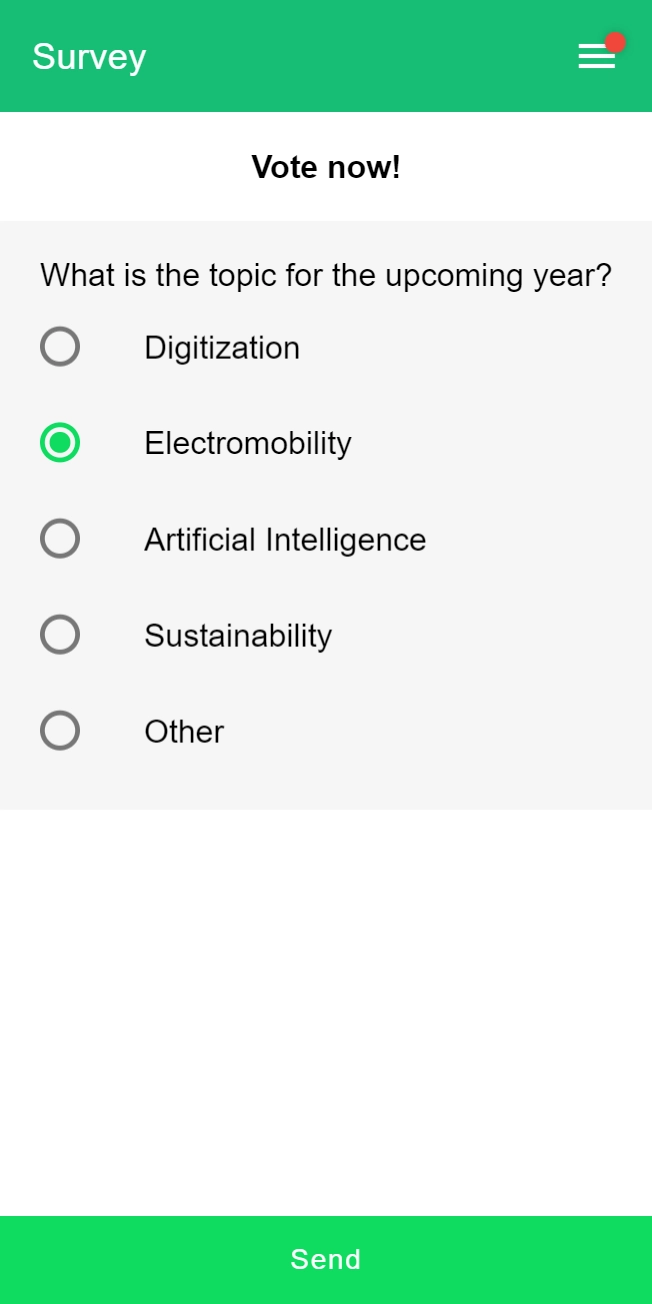
This lets you capture responses to polls, Q&A and other in-event interactions without relying on manual notes. InviteDesk supports the invitation, registration, check-in and attendance side of the workflow, while LineUpr helps you personalise more of the experience while guests are at the event.
After the event: personalise follow-up based on what happened
Once the event is over, you have a more complete picture of the guest’s experience. You know whether they attended, whether your team agreed to do anything for them and whether there’s a specific relationship or next step that needs to continue.
Use that context instead of treating everyone on the registration list as though they had the same experience.
| What happened | Why the follow-up should differ | Better next action |
|---|---|---|
| Registered and attended | They experienced the event, so your message can acknowledge that and continue from it. | Thank them and share any genuinely useful event resources. |
| Registered but didn’t attend | They never had the attendee experience, so writing as though they were there will feel disconnected. | Send a recap, recording or relevant future-event option. |
| Your team promised something | The guest is expecting a specific response rather than another general campaign email. | Send what was promised or assign it to the person responsible. |
| An individual next step was agreed | There’s already a clear continuation to the interaction. | Record the action and owner so the right person follows through. |
| Attended without meaningful engagement | Attendance alone doesn’t prove strong interest or justify an aggressive Sales response. | Send a lighter thank-you or continue normal Marketing nurture. |
If a guest asked a question, expressed an interest or requested a meeting during the event, you should already have captured the useful details at that stage. And after the event, make sure the appropriate next action happens.
For individual follow-up, record:
- What happened;
- Anything the guest asked for;
- Anything your team promised;
- Who owns the next action; and
- When it needs to happen.
Move those details into the CRM or another system the responsible person already uses. This helps them know which guest requires attention, why they require it and what should happen.
You can use InviteDesk to sync relevant event data to CRMs like Salesforce, Microsoft Dynamics 365, Hubspot and others. This will help your team carry event context into the systems where follow-up happens with ease.
You also don’t need a completely unique email for every attendee. Guests with similar outcomes can still be grouped into sensible follow-up flows. The important thing is that the message reflects what happened, which makes every message relevant based on their experience.
Read more: Post event follow-up checklist for B2B events.
How InviteDesk helps you personalise B2B events

InviteDesk helps B2B event teams use guest and relationship context across invitations, registration, arrival and follow-up without requiring Marketing and Sales to manage separate versions of the event.
Marketing can manage the event and communication centrally while Sales or account managers contribute what they know about their own guests. This way, Marketing can send invitations on behalf of the relationship owner, keep guest responses and attendance visible to the event team, alert relationship owners when their guests arrive and carry useful event information into CRM workflows afterwards.
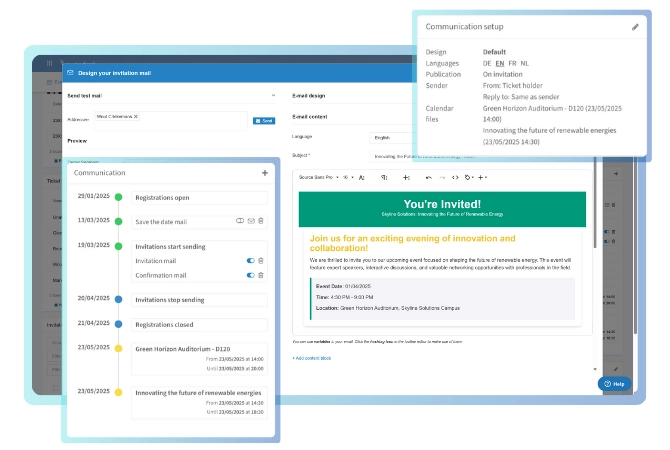
This is how companies like Tectum Group use InviteDesk to divide event responsibilities between Marketing and Sales. Marketing creates the invitations, landing pages, reminders and thank-you emails, while Sales invites the right customers and monitors registrations.
The goal here is to use the context that matters to make the right moments more relevant to the guest. And with InviteDesk, you can record those contexts and make it visible to the teams that need it.
Book an InviteDesk demo to see how the workflow works for your team.
Frequently Asked Questions
Related Reading
- Increase B2B Event ROI with Sales Involvement: Learn how to involve Sales before, during and after your event so guest ownership does not disappear after the invitation.
- Attracting More Relevant Guests to Your Business Events: Use this e-book to improve the guest-selection stage before you personalise invitations, reminders and follow-up.
- Event Marketing Trends, Challenges & Solutions: Explore current event marketing trends, including smaller in-person events, attendee engagement, automation and AI.
- Guest Management for Corporate Hospitality Events: See how relationship owners, guest selection and attendance tracking work together for invite-only B2B events.
- Post-Event Follow-Up: The B2B Checklist to Turn Attendees Into Pipeline: Build a stronger follow-up process based on who attended, what happened and who owns the next step.
Make your next event experience easier to personalise
You don’t need to create a completely different event for every guest.
Start with the information you already have, collect anything else that’ll help you improve the experience, use 1-to-1 communication where the relationship calls for it, prepare the right welcome experience and respond to useful signals during the event.
Want The result is an event where guests are more likely to feel supported, which can help move the relationship forward.