Have you ever filled an event, only to discover that few of the attendees were people your Sales team needed to meet? Or handed over a registration list after the event without being able to explain which guests represented genuine commercial opportunities?
You’re not alone. B2B marketers continue to see events as an effective way to generate opportunities. According to EMARKETER, 60% of B2B marketers say in-person events are an effective lead-generation tactic. But attendance alone doesn’t tell you whether an event reached the right accounts, strengthened important relationships or nurtured leads.
For B2B teams, event lead generation should be a connected process for attracting, identifying, engaging and following up with people whose event activity may become a commercial opportunity. This guide explains how to build that connected event lead-generation process across the entire event journey.
You’ll learn:
- How to define the commercial outcome and choose the accounts, contacts and event format most likely to support it.
- How to connect invitations, registration, attendance and engagement so Sales knows who matters and why.
- How to turn event context into useful follow-up and measure pipeline without treating every attendee as a lead.
Want to know the ROI on your next event?
InviteDesk’s ROI calculator can help you estimate potential time and budget gains from a more connected process.
Before the Event: Plan Around the Commercial Outcome
This stage is where you figure out the reason for your event, who you want to invite, and how the event can help you achieve those commercial goals.
1. Define the commercial outcome before choosing tactics
Don’t begin with the format, topic or number of registrations you want. First, decide what meaningful progress the event should create for the business. That might mean:
- Advancing an existing opportunity.
- Reopening a conversation with dormant accounts.
- Creating follow-up meetings with decision-makers from target accounts.
- Capturing and qualifying net-new trade-show contacts.
- Educating customers on a product, service or regulatory change.
- Improving partner relationships.
- Strengthening customer relationships before renewal or expansion.
The clearer the outcome, the easier it is to decide who should attend, what the event should offer and what Sales should do afterward.
2. Identify the audience most likely to create that outcome
Go beyond targeting broad personas such as “marketing leaders” or “finance decision-makers.” Your team needs to know which accounts, contacts and relationship types are most relevant. Questions to ask include:
- Which accounts are already active opportunities?
- Which customers would benefit from deeper education or relationship development?
- Which dormant accounts are worth re-engaging?
- Which prospects are showing interest in this topic, product or service (for webinars and workshops respectively)?
- Which seniority level needs to be in the room for the event to matter commercially?
- Which contacts already have a relationship owner in Sales?
You’d need Sales and Marketing alignment to answer these questions. Your CRM can show account status and past activity (for invite-only events) while Sales know which relationships need attention. Marketing, on the other hand, knows which segments respond to certain topics or formats.
When everyone in your team is able to come together and decide who specifically to invite based on the context you already have, you have a better chance at achieving the commercial outcome of your event.
3. Choose the event format that fits the goal and relationship stage
Forrester’s Q1 2026 State Of B2B Events Survey found that the majority of B2B event teams planned to host small, repeatable event formats; such as intimate networking events and sub-200-attendee in-person events, in 2026.
But that doesn’t guarantee those events would work for your team. A webinar may attract many registrants, but it’s probably not the best format for a sensitive enterprise account discussion or workshop. A private dinner may generate fewer names, but it’s only a valuable event lead generation tactic when it brings the right senior buyers into the room.
This is why event format should follow the event goal and audience and should be judged by the kind of commercial signal it can create. Here’s how we think about event formats at InviteDesk:
| Event format | Best fit | Lead-generation role |
|---|---|---|
| Webinar | Scalable education | Attracts topic-relevant prospects and creates engagement data |
| Workshop | Practical problem-solving | Reveals needs, readiness and follow-up opportunities |
| Roundtable | Senior relationship-building | Creates high-value conversations with selected accounts |
| Customer seminar | Retention or upsell opportunities | Develops existing relationships and account insight |
| Trade show | Net-new discovery | Captures new contacts and qualification context |
| Hospitality event | Relationship development | Strengthens priority customer or prospect relationships |
4. Decide what progress should look like before the event
Before you invite the guests, your team should agree on which signals matter and how they will be used. For a webinar, this can include registrations from target accounts, questions asked during the event, poll responses and requests for a follow-up session. For a customer seminar, it can be attendance from priority accounts, upsell interest, and even follow-up requests with the account-manager.
Before invitations go out, specify:
- Which accounts or personas matter most?
- What makes someone a priority attendee?
- Which actions show buying interest or relationship value?
- What information Sales needs after the event?
- Which data should be passed into the CRM?
- Who owns follow-up for each important guest?
- Which metrics will be reviewed after the event?
These measures prevent your team from treating registration volume as the only sign of success. They also make follow-up easier because your team knows what each step is meant to show. For example:
- Registration shows interest.
- Attendance shows commitment.
- Questions or poll responses show engagement.
- Follow-up requests can show buying intent or interest in continuing existing relationships.
For teams running recurring B2B events, this planning stage is also where having the right tools matter. It’s harder for Marketing and Sales to see who was invited, who attended and what should happen next when guest lists, invitations, registration status, and attendance are handled in different places. You’d have to manually coordinate the live view with spreadsheets, which can create version control issues at the very least.
InviteDesk helps B2B teams keep Marketing x Sales team sync. Marketing can manage guest lists, send branded, personalised invitations, handle registration, check-in and reporting, while Sales are allowed to choose the guests, view responses from personalised invitations, and also connect their CRM for follow-ups.
For a deeper look at the planning stage, read about building a B2B event marketing strategy.
Build the Guest List Around Account Priorities
A useful event guest list shows why each person belongs at the event, which account they represent, who owns the relationship and what kind of follow-up may be needed if they attend.
1. Start with known accounts, CRM data and Sales nominations
Once the event goal is clear, check what you have to get started with those to invite. A first pass might look like this:
| Source | What to look for |
|---|---|
| CRM data | Known contacts, account stage, previous activity, industry, region or product interest |
| Sales nominations | Accounts worth inviting, relationship strength, deal context or personal follow-up needs |
| Previous event data | Past attendees, no-shows, repeat registrants, declined invitations or topic interest |
| Marketing segments | Personas, campaign engagement, content interest or newsletter behaviour |
| Customer data | Renewal moments, expansion potential, training needs or relationship-development opportunities |
This keeps the team from relying only on broad personas and gets super specific on those you can invite. Your sales team should also be involved because they know things like the influential contact, the accounts they’ve blocked, what each account prefers, etc.
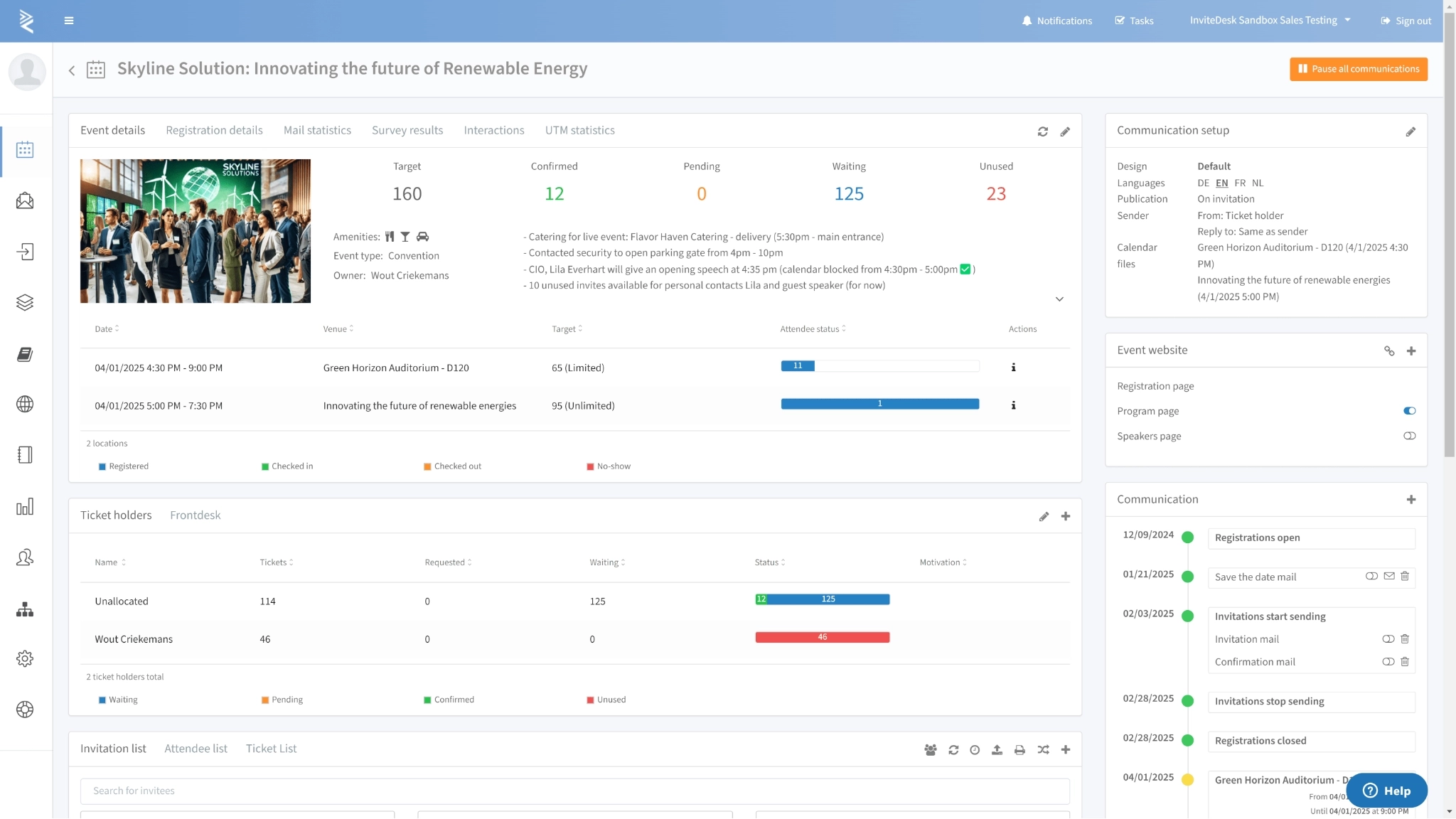
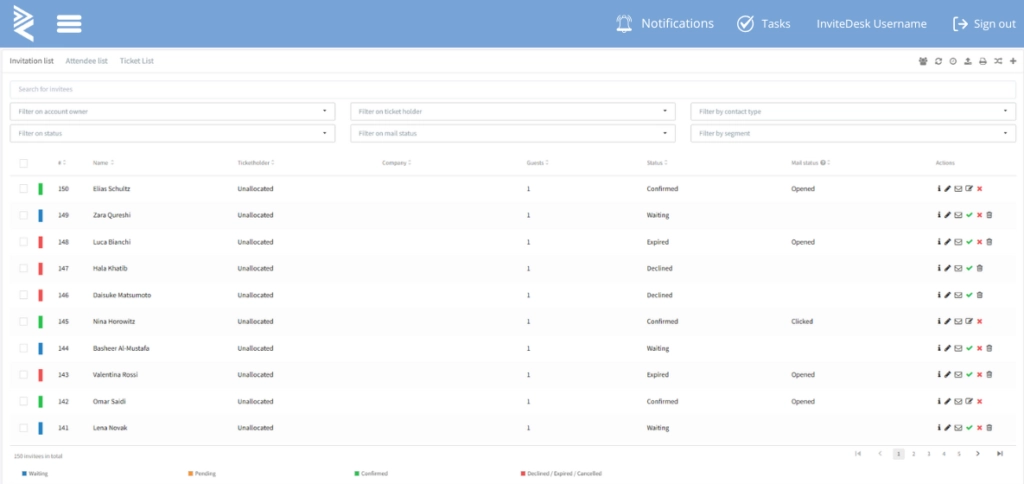
That doesn’t mean Sales should control the whole list. Marketing still needs to manage capacity, messaging, and the overall event journey. The strongest process gives both teams a shared view of who should be invited and why, so you get a shared dashboard like the below.
2. Use a guest ownership ledger to connect each guest to a reason and owner
Once you have a guest list, add an ownership layer. This doesn’t have to be complicated; the goal is to stop treating every name as equal (in terms of their relationship quality) so you can prioritise guests to invite. For each important guest, record:
|
Field |
Why it matters |
|---|---|
|
Contact name |
Identifies the individual, not just their company |
|
Account |
Shows the commercial relationship behind the person |
|
Guest type |
Separates customer, prospect, partner, existing opportunity or net-new contact |
|
Reason for invite |
Explains why this person belongs at the event |
|
Relationship owner |
Shows who in Sales or account management owns the relationship |
|
Priority level |
Helps the team protect limited capacity |
|
Desired next step |
Defines what should happen if they attend |
|
Status |
Tracks whether they are invited, registered, declined, attended or no-show |
This structure ensures that when Marketing receives a list of names, they have enough contexts into why those names matter. This is exactly the type of workflow Tectum Group uses. Marketing used InviteDesk to manage invitations, registration pages and follow-up communications, while Sales selected guests and tracked responses in the app. Sales & Marketing Director Steven Peetermans says the shared workflow reduced unnecessary emails and calls, helping the team achieve “bigger turnouts and fewer no-shows.”
Wondering how InviteDesk can help your B2B event team, invite-only events?
3. Prioritise quality when capacity is limited
Many B2B events have limited space or budget for the event. High-value events like executive breakfasts, hospitality events, and workshops often depend on inviting the right people to reduce costs and stay within capacity.
When capacity is limited, prioritise guests using clear criteria that can include:
- Account value
- Opportunity stage
- Relationship importance
- Seniority or buying influence
- Fit with the event topic
- Likelihood of attending
- Need for personal relationship development
- Previous event behaviour
- Sales follow-up potential
This should be agreed before you send invitations. Otherwise, you may fill the event with easy-to-reach contacts while more commercially important guests are left out. Bank Nagelmackers, the oldest bank in Belgium, for example, uses InviteDesk to automate the entire process of inviting, registering, and confirming 20-30 guests for their “walking dinners” which often includes activities such as “cognac or caviar tasting,” according to Bart Beeusaert, Responsible Marketing & Communication officer.
This way, they’re able to network with guests who matter because they’re able to prioritise them in the invitation stage.
See how InviteDesk helps teams manage guest ownership, invitation quotas and response visibility through its Sales and Marketing alignment features.
Turn Target Contacts into Registered Attendees
With all the above done, now, you need to be able to get them to attend your event. Here’s how:
1. Make the event promise specific enough to earn attention
Once you know who should attend, the invitation should make them understand why the event is worth their time. A good event promise should answer:
- Who the event is for.
- What problem, opportunity or decision it’ll help with.
- Why the topic is relevant now
- Who they’ll hear from or meet.
- What they’ll leave with.
- Why this format is worth attending live.
For example, scrap a positioning like “join our finance transformation webinar” for something like “Learn how finance teams can prepare for new reporting requirements before Q4 planning,” because the latter provides a clearer, specific context into the relevance of the event.
This is especially important for events where there is usually less friction to register and less pressure to attend, which is also why your events should match the content to the guests, then keep them committed with the right communication flow before the event.
Running a webinar as part of your lead-generation mix?InviteDesk’s mini-guide covers how to choose the right guests, improve engagement and use webinar data to support your wider event lead-generation process.
2. Use relationship-led invitations without losing central visibility
For B2B events, the sender matters as much as the message. A generic event invitation from @Marketing or @company may be efficient, but it can feel impersonal to a senior buyer or important customer.
An invitation from the account manager, on the other hand, carries more credibility. But if every salesperson sends their own email manually, Marketing loses visibility into who was invited, who responded and who still needs a reminder.
The better model is to combine both:
- Marketing controls the event brand, invitation design, landing page, and communication flow.
- Sales or account managers provide relationship knowledge and credibility.
- Guests receive communication connected to someone they know.
- The event team keeps one central view of invitation and registration status.
This is the InviteDesk workflow. We help Marketing personalise invitations using the account manager’s name and create branded, consistent communication flow. Your Sales team is also able to recommend who to invite and see guest status, which keeps them involved without taking the event out of Marketing’s control. 
This helps you work with all teams involved without manually providing the context they’ll need to understand the stage where you are in the event lifecycle.
3. Send reminders based on each guest’s response status
Not every guest should receive the same follow-up message. A person who hasn’t opened the invitation needs a different message from someone who clicked but didn’t register. A useful communication flow may include:
|
Guest status |
Useful next message |
|---|---|
|
Selected contact |
Initial invitation with clear event value |
|
Invited but no response |
Reminder focused on relevance and limited availability |
|
Opened but didn’t register |
Short follow-up that removes friction or answers common questions |
|
Registered |
Confirmation, calendar link and practical details |
|
Registered VIP |
Optional personal note from the relationship owner |
|
Declined |
Thank-you note, content offer or future-event option |
|
No-show |
Replay, recap or personal follow-up depending on account priority |
This keeps communication helpful rather than repetitive. It also prevents common mistakes, such as chasing someone who already declined or sending the same reminder to a guest who has already registered.
4. Keep the registration form focused and compliant
The registration form is often the first place where you can collect structured lead context. But asking too much too early can reduce completion. The form should capture only what the team needs, which also helps you with GDPR compliance for events. Useful registration fields may include:
- Name, company and role
- Business email
- Account or customer type
- Topic interest
- Current challenge
- Dietary or accessibility needs, where relevant
- Consent preferences
- Interest in a follow-up conversation
The goal is to collect enough context to shape the event experience and make follow-up more relevant.
Next, turn the guest list into attendance and engagement for your lead generation process.
During the Event: Capture Attendance and Engagement Signals
In event lead generation, lead capture should help you understand what happened at the event and what it means for follow-up. To do that, start with:
1. Separate registration, attendance and qualification
Mixing these stages can weaken your follow-up process because Sales may treat every badge scan like a qualified opportunity while ignoring high-value attendees who showed buying signals.
But by keeping the below separate, you’re able to track the leads from your events properly:
- Registrant: someone who signed up.
- Attendee: someone whose presence was confirmed.
- Engaged attendee: someone who asked a question, joined a session, completed a poll, booked a meeting or shared useful information.
- Lead: someone who showed enough interest or intent to justify a sales action.
This helps the team report honestly and follow up intelligently. Instead of saying “we captured 200 leads,” you can say, “200 people registered, 140 attended, 38 showed strong engagement and 12 were passed to Sales for priority follow-up.”
2. Treat check-in as proof of attendance, not proof of sales readiness
Check-in is valuable because it confirms who actually attended but doesn’t prove they’re sales-ready. A person can attend because they’re an existing customer or because the topic is generally useful. Your team still needs context before deciding what kind of follow-up makes sense. For this, you need to ask:
- Who attended,
- Why did we invite them,
- Who owns the relationship, and
- What should happen next?
This helps you know what to do next based on what they did during the event.
3. Capture signals that help Sales continue the conversation
Useful event signals may include:
- Which sessions the person attended
- Questions asked during a webinar or seminar
- Poll responses
- Product or topic interests
- Registration form answers
- Survey responses
- Meeting requests
- Conversation notes
- Agreed next step
- Relationship owner
For example, for a customer seminar, useful signals may include product interest, expansion questions, satisfaction feedback, training needs or account risks raised during discussion.
For a roundtable or executive breakfast, the most valuable signal may be the relationship context captured by the account owner: what the guest said, what challenge they mentioned, and whether there’s a next conversation to arrange.
The point is to make follow-up more specific. Sales should be able to say, “I saw you joined the session on reporting workflows and asked about CRM integration, here’s what to do next,” not “Thanks for attending our event.”
4. Handle trade-show scans differently from hosted-event check-ins
Trade shows need a slightly different capture process because many contacts are discovered onsite. The team may meet someone who wasn’t invited or registered in your company’s system. Here, the goal isn’t just to scan their badge but to create enough context for proper follow-up.
A useful trade-show capture record may include:
- Name, company and role
- Product or topic discussed
- Business challenge
- Buying role
- Urgency or timeline
- Existing solution or supplier
- Consent status
- Sales owner
- Agreed next step
This is where badge scanning, QR codes, business-card scanning or mobile lead-capture tools can help. But the scan is only the start. Without notes, qualification fields or a clear next action, Sales receives a list of contacts rather than a useful set of leads.
5. Avoid calling every attendee a sales-ready lead
Not everyone who attends an event should be treated the same way afterwards. Some guests are existing customers who need education or relationship development while some are senior decision-makers from target accounts who may deserve personal follow-up even if they did not ask a public question.
This is why event lead generation should combine attendance data with account fit, role, engagement and relationship context. A practical post-event status could look like this:
|
Status |
What it means |
Likely next step |
|---|---|---|
|
Priority follow-up |
Target account, strong fit or clear interest |
Sales call or meeting request |
|
Nurture |
Relevant contact, but not ready for Sales |
Send useful content or invite to future event |
|
Customer success follow-up |
Existing customer with product, training or account need |
Account-manager follow-up |
|
No-show re-engagement |
Registered but did not attend |
Send recording or summary |
|
Low priority |
Weak fit or unclear relevance |
Keep in database if consent allows |
This keeps follow-up focused. Sales won’t waste time chasing every attendee, and Marketing won’t lose useful contacts that need a longer nurture path.
Capture event context without losing the relationship
InviteDesk helps teams manage the journey from invitation and registration to check-in, reporting and CRM-connected follow-up. Explore how InviteDesk supports event registration and check-in and CRM-connected workflows.
After the Event: Measure Lead Quality Across the Whole Event Journey
Measuring event success starts with knowing the numbers of invitations sent and comparing it with total attendance. You can also consider other operational metrics that matter to your event (say follow-up tasks created or completed). This, alongside commercial signals, helps you know whether the event created useful sales or relationship movement.
These commercial signals may include:
- Attendance from target accounts.
- Senior decision-makers in the room.
- Questions that reveal buying interest.
- Follow-up requests.
- Qualified conversations.
- Sales-accepted leads.
- Partner or account-development opportunities.
Afterwards, use CRM activity to assess the pipeline. You should be able to see who registered, who attended, what they engaged with and what was passed to Sales. The CRM can then show whether those people became leads, opportunities or customers.
All these contexts can help with your next event. You’re able to know
- The audience segment to focus on based on follow-up data.
- The event format created the strongest conversations.
- The topics that attracted the right people.
- The reminder sequence that improved attendance.
- The no-shows that should be re-engaged, etc.
- Which data was missing when Sales needed to act?
These help you cherish event data more as it tells you what resonated with your audience, which can help improve the next event. With InviteDesk, you’re even able to see event activity per account holder then decide whether they should be invited to another event. Without historical data, you won’t be able to make that call.
Make Event Lead Generation a Repeatable Sales and Marketing Process
Event lead generation works best when the commercial goal, audience, relationship owner, event activity and next action remain connected throughout the process. That gives your team more useful information than registration totals or a spreadsheet of badge scans alone.
The goal isn’t to turn every attendee into a lead. It’s to know who matters, why they were invited, what happened at the event and whether the resulting context justifies a Sales, Marketing or customer-success action.
InviteDesk helps B2B teams keep that invitation-to-attendance journey visible. Marketing can manage guest selection, invitations, registration, check-in and reporting while Sales contributes relationship knowledge and receives useful event context for follow-up. It doesn’t replace your CRM or Sales process; it helps ensure the information created around the event can continue into them.
For recurring B2B events such as customer seminars, webinars and hospitality events, that visibility helps you plan future events easily. You’re able to know who attended, the steps they took, and who their relationship managers are. It’s also how Bank Nagelmackers, which operates in a high-volume B2B event environment, was able to use InviteDesk to manage events from registration to survey and reporting. They were also able to run automated campaigns, surveys and to support a programme of more than 200 events per year.
Planning recurring B2B events around named accounts and customer relationships?
To see how the full invitation-to-attendance workflow can help Marketing and Sales work from one connected event process.
Frequently Asked Questions
What is the difference between an event lead and an event attendee?
An attendee joined the event. An event lead is someone your business has enough context to treat as a possible commercial opportunity, based on fit, intent, account value, engagement or a requested next step.
How do you qualify leads from an event?
Qualify event leads by looking at fit, intent and context. Ask whether the person matches your target audience, shows meaningful interest, belongs to a relevant account and has a clear next step for Sales or Marketing.
How should event lead generation work for hybrid events?
Hybrid events should track physical and virtual participation separately. In-person check-in proves onsite attendance, while virtual engagement may include live attendance, questions, polls, chat activity or replay views. Both need context-rich follow-up.
What tools do you need for event lead generation?
Most B2B teams need tools for guest-list management, invitations, registration, check-in or lead capture, CRM integration and reporting. InviteDesk is useful when Sales and Marketing need one connected invitation-to-attendance workflow.
Related Content
- Build a B2B event marketing strategy – Plan your event objectives, target audience, responsibilities and measurement before invitations go out.
- Compare event lead capture systems – See the tools available for capturing attendee and trade-show lead information onsite.
- Learn how to measure event success – Strong follow-on from your final measurement section because it goes deeper into lead quality, pipeline and event outcomes.