In its 2026 survey of 781 participants, Oniva asked event organisers to name their biggest challenge. The most common answer, from 44% of respondents, was time and resource constraints. Events keep coming, budgets for extra staff don’t, and the admin around each event lands on the same few people. That is the case for event management automation: cutting the recurring work so your team can run more events with the resources it already has.
The same survey found that people with the official Event Manager title handled event management in 45% of cases. In the other cases, events sit with marketing managers, sales support, office managers and communication leads, who fit them around a different day job. (Oniva research) A process that only works when one specialist watches over it falls apart in that setup. It has to stay manageable for someone who touches events two days a month.
Most of the lost time goes on the same tasks, event after event. Someone copies registrations from a form into a spreadsheet. A colleague emails sales to ask who has replied. Somebody else rebuilds last quarter’s report by hand. Each handoff between tools or people adds a delay and another chance for a mistake. Repeatable processes fix that, because you design the steps once and run them for every event.
This guide covers six event management processes you can automate, the triggers, rules and connections each workflow needs, and where AI can help without taking decisions away from your team.
What you’ll learn
- Identify the event management processes worth automating.
- Understand the rules, information and connections each workflow needs.
- Recognise where AI can help and where human decisions remain important.
What is event management automation?
Event management automation means setting up your event tools so that one action starts the next steps without anyone doing them by hand.
Storing information digitally is a different thing. A registration form that drops submissions into a spreadsheet is digital, but someone still exports the list, sends the confirmations and updates each guest record. With automation, a completed registration sends the confirmation, issues the ticket or access details and updates the attendee record in the same moment. Nobody on your team touches it.
Every workflow in this article has three parts:
- A trigger: the action or condition that starts the workflow, such as a registration, a cancellation or a date.
- Rules: the conditions that decide what happens next, such as “only guests who haven’t replied” or “only Dutch-speaking guests”.
- Actions: the steps that follow, such as an email, a status change or a new task for a colleague.
Automation can run inside one platform, for example your event management software, or across connected systems, such as your event platform passing attendance data to your CRM (the customer relationship management system your sales team works in).
That also answers a common question. Buying event software doesn’t automate anything by itself. You get automation when you configure the triggers and rules, and when the software holds the information those rules need.
What are the benefits?
Each benefit comes from a specific mechanism:
- Less repeated data entry. Information moves between systems, so nobody retypes a registration into the CRM or copies a guest list from one spreadsheet to another.
- More consistent communication. You approve an email sequence once, and it runs under the conditions you set. Every guest gets the right reminder at the right time, whoever is on holiday that week.
- Fewer coordination handoffs. Updates reach the person responsible for acting on them, so fewer “has anyone heard from this client?” emails go round the office.
- Faster reporting. Collection and consolidation happen on a schedule, so the numbers are ready before the meeting instead of after a late night in Excel.
Automation still takes work. Someone has to design the workflow, test it and check it runs. Someone has to handle the exceptions the rules don’t cover, such as the CEO’s assistant who registers on behalf of three people from one email address. Plan for that time at the start, and it shrinks with every event you reuse the setup for.
Quick overview of the six processes
| Process | Examples of work to automate | Benefits |
|---|---|---|
| 1. Invitation management | Assigning guests to relationship owners, sending scheduled invitations, tracking responses, reminding non-responders | Sales and marketing work from one guest list, with fewer status requests |
| 2. Registration and capacity management | Confirmations, ticket issuance, capacity limits, waitlist offers, guest record updates | Accurate headcounts and no double-booked seats |
| 3. Event operations and team coordination | Updating tasks and records when a schedule or headcount changes | Everyone works from the same approved information |
| 4. Vendor and financial administration | Routing approval requests, updating commitment records, invoice reminders | Clear view of what each event costs |
| 5. Post-event handoffs | Pushing attendance and feedback to the CRM, creating follow-up tasks | Sales follows up while the conversation is still fresh |
| 6. Performance reporting | Compiling registration, attendance, survey and spend data into recurring reports | Reports in minutes, and a cleaner base for ROI discussions |
1. Invitation management
In B2B events, the guest list rarely lives in one place. Account managers know which clients matter and who signed a contract last month. Marketing owns the template, the timing and the brand. Replies land in personal inboxes, and the master list sits in a spreadsheet three versions behind. Sending emails faster won’t fix that. The invitation process has to share the relevant information with everyone involved.
An automated invitation workflow looks like this:
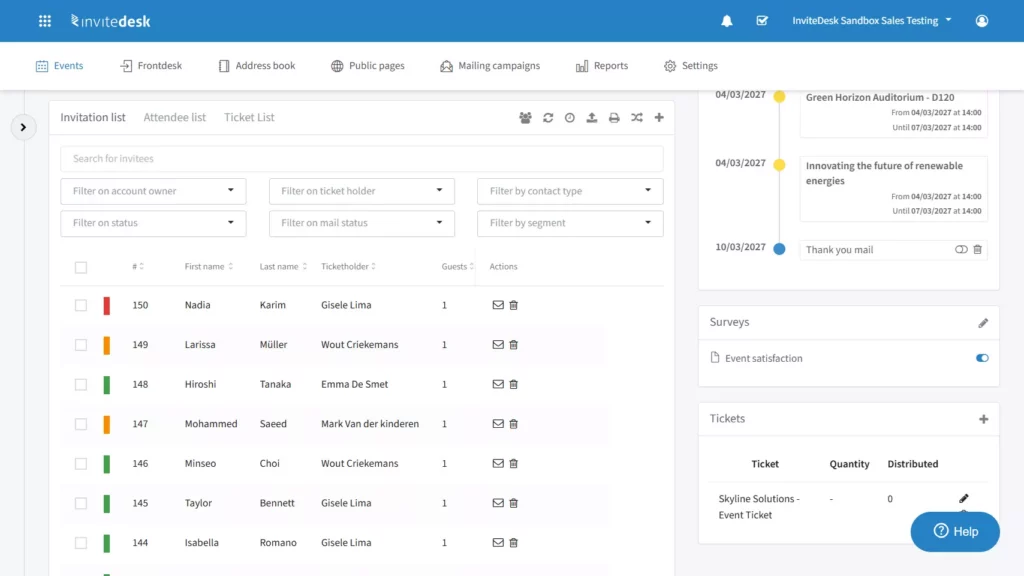
- Marketing approves the guest list and loads it into the event, from a CRM sync or an Excel import.
- Each guest gets a relationship owner, the account manager who knows them best.
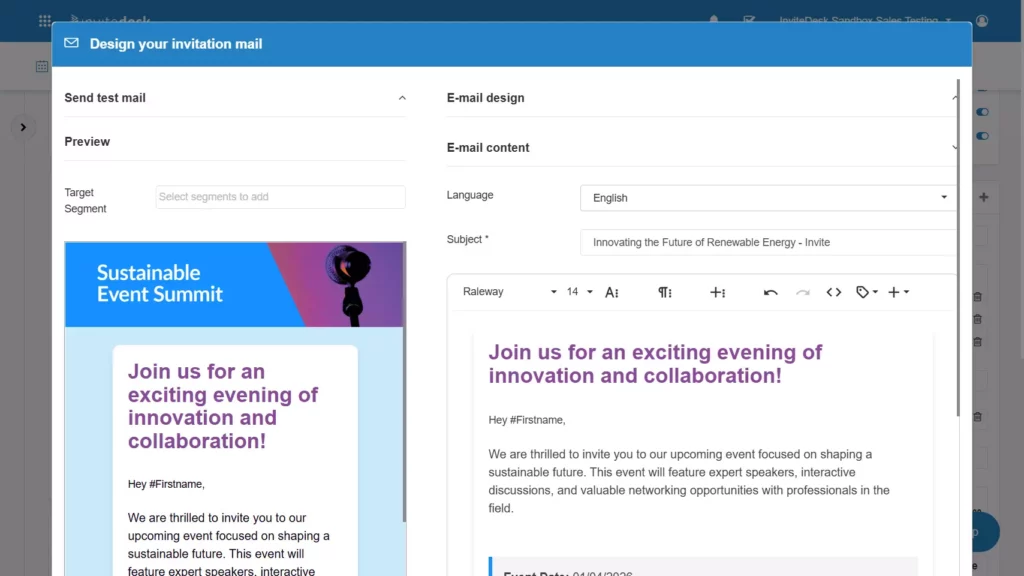
- The rules pick the right message for each guest, based on fields such as language or segment.
- Invitations go out on schedule, signed by the relationship owner.
- Responses update the list in real time, so everyone sees who has accepted, declined or stayed silent.
- Reminders go only to guests who haven’t replied. When a guest registers, the reminders stop and the confirmation sequence takes over.
Tectum Group saw the coordination benefit first-hand. Its sales team could check registration status themselves, while marketing kept control of the communication. Steven Peetermans, Sales & Marketing Director, put it this way:
“The synergy between marketers and representatives is very satisfying. It saves us a lot of emails and phone calls.”
Steven Peetermans, Sales & Marketing Director, Tectum Group (read the Tectum case)
This is where InviteDesk’s on-behalf-of communication does its job. Marketing builds one invitation and sets the timing. InviteDesk then sends each email in the name of the guest’s account manager, so the client receives a personal invitation from someone they know instead of a newsletter from a marketing alias. Marketing keeps central control of branding and timing, and each rep sees their own guests’ status without asking for an update.
Some decisions stay with people. Relationship owners decide who makes the list, and they make the personal call to the client who might need a nudge. The automation handles everything around that call.
2. Registration and capacity management
A registration is more than a form submission. One sign-up can change a confirmation, a payment status, a ticket, access rights, the remaining capacity and the guest record. Each of those is a step someone does by hand when the form only collects data.
Illustrative example: a client seminar with 80 seats. The rules below show how each trigger starts its own set of actions.
A guest registers. The system sends a confirmation with a calendar invite and a QR ticket, marks the guest as registered and reduces the remaining capacity by one.
The seminar reaches 80 registrations. The form stops accepting new sign-ups and offers a waitlist place instead.
A registered guest cancels. The system frees the seat and offers it to the first person on the waitlist, with 48 hours to accept.
The waitlisted guest accepts. They receive the standard confirmation and ticket. If the deadline passes without a reply, the offer moves to the next person in line.
The worked diagram below shows the same flow, including where the system hands over to people and to other tools.
A simplified illustration of how it works. See the real platform in a demo.
Bank Nagelmackers described this kind of connected process in an account InviteDesk first published in 2021, when the bank reported running more than 200 customer events in the previous year. Pieter De Scheper, Head of Customer Experience, said:
“InviteDesk is a high-performance tool that automates the entire process from the invitations, registration, and confirmation, to and including the satisfaction survey.”
Pieter De Scheper, Head of Customer Experience, Bank Nagelmackers (read the Nagelmackers case)
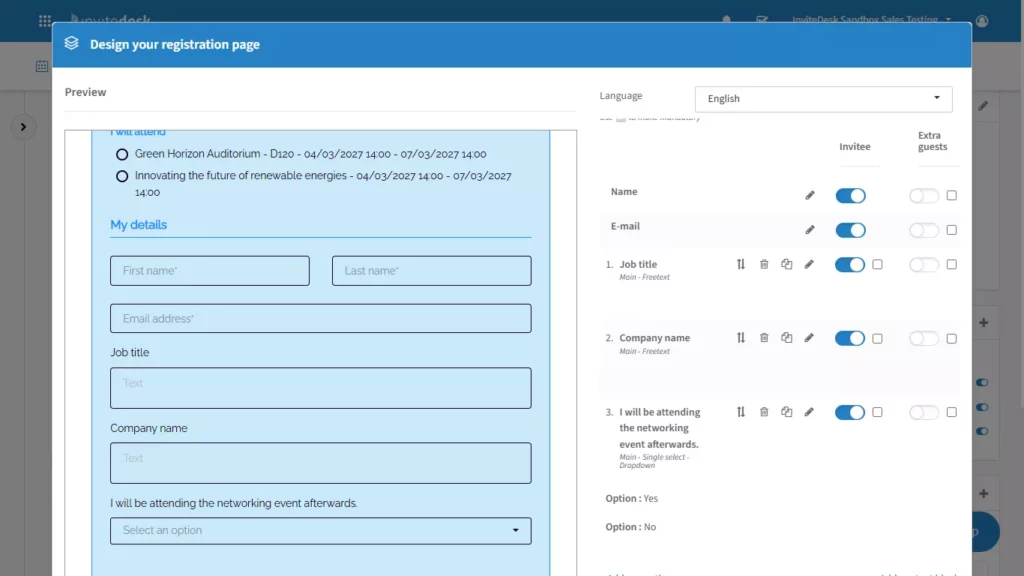
In InviteDesk, you set capacity limits, time slots and registration periods on the registration page, and every registrant gets a confirmation email and ticket automatically, with a self-service link to update or cancel.
Your workflow also needs rules for three exceptions:
- Incomplete submissions. Required fields and conditional questions stop a guest from submitting without the details you need, such as dietary requirements for a dinner.
- Duplicates. A guest registers twice, or a colleague forwards the link and registers with a shared address. Decide which record wins and who reviews a possible match.
- Waitlist deadlines. Without a deadline, a seat can sit unclaimed until the day before the event. Set the response window and a final cut-off date.
3. Event operations and team coordination
Momentus asked senior venue and event professionals which operational burden they would eliminate first. The most common choice, from 42%, was manual coordination across teams. (Momentus research)
A shared planning board helps, but it only holds information. Someone still has to notice a change, work out who it affects and tell them. A configured workflow acts when approved information changes, so the right people hear about it without anyone chasing.
Take a confirmed headcount change. Registrations close on Thursday with 112 guests instead of the planned 90. In a coordinated workflow, that final number updates the catering task with the new cover count, flags the room layout for review, adjusts the badge print run and notifies the venue contact. Each owner sees a task with the new number, so nobody works from last week’s figure.
The workflow needs one authoritative source for each piece of information. If the headcount lives in the registration platform, every other tool reads it from there. When the event manager, the caterer’s spreadsheet and the project board each hold their own number, the updates conflict and nobody knows which one is right.
Project management tools such as Asana and monday.com let you set rules that create, reassign or update tasks when a field changes. Workflow builders such as Zapier, Make and Microsoft Power Automate connect those boards to your other systems, for example to push the final headcount from your event platform into the task. For changes that arrive late, see our guide to handling last-minute changes in event management.
4. Vendor and financial administration
Around 35% of respondents in Oniva’s 2026 survey could not say what share of their marketing budget went to events. (Oniva research) When nobody can find the spending, nobody can judge whether an event was worth it.
A connected administrative flow keeps that information in one trail:
- A request enters the system, for example a quote for AV equipment, with the event name and cost centre attached.
- The request reaches the right approver, based on rules such as amount or budget owner.
- The approval creates or updates a commitment record against the event budget.
- The invoice connects to that record when it arrives, and the status moves from committed to invoiced to paid.
Each step can start the next one. An approval creates the purchase order task. An invoice record updates the event budget, so the remaining amount is always current. An overdue status sends a reminder to the person who owns the supplier relationship.
Approval tools such as Microsoft Power Automate can route requests to the right approver, and your accounting or procurement software holds the commitment and invoice records. The key design choice is the shared event identifier: if every request, purchase order and invoice carries the same event code, the budget view builds itself.
Keep the decisions with people. Your team chooses suppliers, signs contracts and authorises payments. The automation moves the paperwork between those decisions and keeps the records current, so the budget owner can answer “what did this event cost?” without asking finance for an export.
5. Post-event handoffs
Swoogo’s 2025 Eventscape report found that 44% of event organisers did not have their event management platform connected to their CRM, and 69% had no connection to their marketing automation platform. (Swoogo research) In those teams, someone exports an attendee list after every event and somebody else imports it, often days later.
A usable handoff needs five pieces of information:
- the correct contact, matched to the existing record
- the event identity, so the CRM knows which event this was
- the attendance status: attended, registered but absent, or declined
- relevant context, such as feedback scores, sessions attended or questions asked
- an owner for the next action
With those in place, approved rules can do the handover. A key account who attended gets a follow-up task for their account manager, due within two working days. A registered guest who didn’t show up receives a “sorry we missed you” email with the recording or the slides. A low satisfaction score sends an alert to the account owner before the next renewal call.
Be clear about which system performs each action. The event platform records attendance at check-in. The CRM connector transfers that status to the contact record. The CRM creates the sales task, and the marketing automation platform sends the nurture email.
InviteDesk connects to HubSpot, Salesforce, Marketo and Microsoft Dynamics 365 out of the box, with an Open API for other systems. Because ScanApp records check-ins in real time, account managers can get a notification when a key client arrives, before the guest reaches the room. For a deeper look at connecting event and customer data, read our guide to event management software with CRM integration.
A simplified illustration of how it works. See the real platform in a demo.
6. Performance reporting
In the Momentus survey, 29% of venue and event professionals picked post-event reporting and reconciliation as the burden they would eliminate first. (Momentus research) Reporting deserves its own workflow because it pulls together everything the other five processes produce.
Swoogo’s 2025 report, based on a survey of 500 organisers in November 2024, found that 50% considered demonstrating ROI a top stressor. (Swoogo research) That points to two separate jobs. One is producing reports efficiently. The other is proving what the event contributed commercially. Automation handles the first job and gives you a cleaner base for the second.
Recurring reports can draw on registration data, attendance from check-in, survey results, spending records and CRM records. For the numbers to line up, set four things up front:
- Consistent event identifiers, so a dinner in Antwerp has the same name in the event platform, the budget and the CRM.
- Agreed metric definitions. Decide whether “attendance rate” means attendees divided by registrants or by invitees, and use it every time.
- Refresh timing, for example a report that updates daily during registration and once a week after the event.
- Checks for missing information, such as attendees without a company or events without a cost centre, so gaps show up before the numbers reach leadership.
Automated compilation removes the preparation work. Your team no longer spends a day merging exports. The commercial assessment still needs spending data, CRM opportunities and the sales team’s view of the deals each event touched.
InviteDesk’s extended reporting (part of the Platinum plan) tracks contacts across events, so you can see which accounts attend consistently and which register and never show. It also covers invitation reports, survey results and registration sources through UTM tracking. For more on what to measure, see our guide to event management software with analytics.
A simplified illustration of how it works. See the real platform in a demo.
Where does AI fit into event management automation?
AI appears at 53% in Oniva’s chart of important event trends for 2026, which makes it the trend most teams are watching. (Oniva research)
Interest and use are far apart, though. Momentus found that 64% of venue and event professionals rated AI as highly significant, yet only 7% were piloting or scaling AI use cases. The same research shows what respondents want from it: 75% wanted help with data entry and administration, and 66% preferred human-led operations supported by technology. (Momentus research) Teams want AI to take on the admin, while people keep the judgment calls.
The practical place for AI is inside a workflow, as one step with a clear trigger and a clear next step:
- Interpreting an incoming request. A supplier quote or an internal request arrives by email. The arrival triggers an AI step that reads it and fills in the event, amount and category. The structured request then goes to the right approver, who checks the details before approving.
- Drafting a communication. An event manager marks a session as rescheduled. That change triggers an AI step that drafts the update email to affected guests. A person reviews and edits the draft, and the approved version goes out at the scheduled time.
- Categorising feedback. The survey closes. The closing date triggers an AI step that sorts open answers into themes such as venue, content and catering. The event manager checks the summary before it goes into the post-event report.
In each case, the workflow defines what goes in and what happens after. A person reviews anything that reaches a guest, a supplier or leadership. That review step is what keeps AI useful in a B2B setting, where one wrong name or date in a client email costs more goodwill than the time it saved. Start with the admin tasks your team already finds tedious, and keep the relationship decisions with the people who own the relationships.
Why event automations often break
Most failures trace back to four causes: missing inputs, duplicate records, conflicting rules and failures that nobody owns. One scenario shows all four.
A bank invites 300 clients to a year-end reception. A client forwards her invitation to a colleague, who registers through the forwarded link. The system creates a second record for him without a company name, because the form didn’t require it (missing input). The colleague later registers again from his own invitation, so he now exists twice (duplicate record).
Meanwhile, two rules overlap. One sends a reminder to every invitee without a registration. Another sends a “last places available” email to the same segment. The client’s colleague receives both emails, plus a reminder on his first record, three days after he registered (conflicting rules).
After the event, the CRM sync rejects his attendance because the record has no company. The error goes to a shared inbox nobody checks (unassigned failure). His account manager never gets the follow-up task.
Each break has a fix. Make the fields your downstream systems need mandatory. Decide how the platform matches and merges records. Review all active rules together before launch, so you spot overlaps. Most importantly, give every failure alert a named owner who checks it within a set time.
Choosing your first process and conclusion
Pick your first process by scoring each candidate on five points:
| Criterion | Good first candidate |
|---|---|
| Frequency | Happens for every event, or every week |
| Manual effort | Takes hours each time, not minutes |
| Rule clarity | You can write the rules in a few sentences |
| Data quality | The inputs already exist and are reliable |
| Exception risk | A mistake is easy to spot and fix |
Start with a bounded process that has one owner and an outcome you can observe, such as invitation reminders or registration confirmations.
Check your data before adding AI. Momentus found that 55% of venue and event professionals reported limited or incomplete operational measurement. (Momentus research) AI on top of unreliable data produces confident errors faster.
A practical starting sequence:
- Map the current process, step by step, including who does what.
- Mark the steps that repeat the same way every time.
- Assign an owner for the workflow and for its failures.
- Test normal cases and exceptions, such as a cancellation or a duplicate, before going live.
- Compare the manual effort afterwards with what it took before.
If your main need is connected B2B invitation and guest management, InviteDesk brings processes 1, 2 and 5 together in one platform: invitations sent on behalf of account managers, registration with automatic confirmations and tickets, and attendance data flowing to your CRM. Anoek Brekelmans, Senior Partnership & Event Manager at ABN AMRO Private Banking, described the result:
“Thanks to InviteDesk, our events are much more professionalised and our internal collaboration runs more smoothly.”
Anoek Brekelmans, Senior Partnership & Event Manager, ABN AMRO Private Banking (read the ABN AMRO story)
Native automation versus connected tools: Which one is better for you?
Native automation runs inside one platform. Your event software sends the confirmation, updates the guest record and closes registration when the event is full. You configure it in one place, the vendor maintains it, and when something fails, you see the error in the same tool where you set the rule.
Connected tools come in when a workflow crosses system boundaries. Your event platform passes attendance to the CRM through a native connector, or a workflow builder such as Zapier, Make or Power Automate links tools that have no direct integration. That gives you flexibility, at a cost. Your team maintains the connections, and an update on either side can break a flow without warning. Failures can also sit unnoticed in a log that nobody opens.
| Native automation | Connected tools | |
|---|---|---|
| Best for | Workflows inside one process, such as invitations, registration and reminders | Workflows that cross systems, such as CRM handoffs, finance and project boards |
| Who maintains it | The software vendor | Your team, or the vendor of each connector |
| Failure visibility | Errors show in the same platform | Errors can sit in a separate log or inbox |
| Setup effort | Configuration in one tool | Mapping fields and testing between tools |
A good rule of thumb: keep the core guest journey native, and use native CRM connectors before building custom flows. Reserve workflow builders for the gaps. If you’re ready to compare platforms, our guide to the best event management software for B2B corporate events walks through the options.
FAQ
Is event marketing automation the same as event management automation?
Event marketing automation usually refers to the communication side: invitations, reminders and follow-up emails. Event management automation covers the wider process, including registration, capacity, coordination, finance and reporting. Invitation management sits in both.
What still needs human approval?
Guest selection, personal outreach to key clients, supplier choice, contracts, payment authorisation and any AI-drafted message before it goes out. Automation moves the work between those decisions.
What information and integrations do you need to start?
A clean guest list with consistent fields (name, company, language, relationship owner), one event identifier used across systems, and a connection between your event platform and your CRM. Add finance and project tools once the guest workflow runs reliably.
Running invitations and registrations by hand at the moment? InviteDesk automates the guest journey from the first invitation to the CRM handoff, while your account managers stay in charge of their own clients.