Key takeaways
- Attendee management is the guest-facing part of event management, covering invitations, registration, check-ins, attendance, and post-event follow-ups.
- The best attendee management platform depends on your event type. Cvent and Bizzabo suit complex enterprise programs, Whova excels at attendee networking, while Eventbrite is designed for public ticketed events.
- InviteDesk is best suited to relationship-led B2B events, where sales and marketing teams manage curated guest lists rather than open registrations.
Your search for event attendee management software probably started because your guest list is in spreadsheets, RSVPs come through Google Forms, and Sales has had to chase priority customers so they show up for your events.
That process can work for one small event. It gets harder when you run multiple client dinners, hospitality events, or networking-led experiences with different attendee needs.
The confusing part is that many tools appear under the same “attendee management” label. Some help you sell tickets. Some manage large conferences. Others are built for curated B2B events where guest ownership, check-in, and follow-up matter more than broad event planning.
This guide compares six event attendee management tools by event type and budget. First, let’s clarify when you need attendee management software and when full-suite event management software is more than you need.
How to Choose Event Attendee Management Software by Event Type and Workflow Depth
Almost all event management platforms include some attendee management features. They can collect registrations, send emails, check people in, and show basic attendance data.
Those features matter, but they don’t tell you the platform that’s the best fit for your event type.
- For a large conference, attendee management may include session selection, badge printing, exhibitor access, and on-site logistics. For this, a full-suite event management platform may be the right fit because the attendee workflow connects to the whole event operation.
- For a public ticketed event, the priority is usually ticket sales and capacity management. A ticketing or registration platform may be enough for that.
- For curated B2B events, corporate hospitality and customer events, you already know the guests to invite. The major concern is deciding who should invite each guest, tracking responses, avoiding unused seats, checking people in, and giving Sales the attendance data needed for follow-ups.
That’s why this comparison looks beyond basic registration and check-in. We evaluated each platform based on the event model it’s best for, including:
- Event type and size: Is the platform built for small curated events, large conferences, public ticketed events, or networking-led experiences?
- Attendee workflow: Can the team manage invitations, RSVPs, check-in, and post-event follow-up without rebuilding the process across separate tools?
- Audience and access model: Can sales reps or account managers invite their guests, or does every action sit with a central events team?
- On-site requirements: Does the event need simple QR-code check-in, badge printing, lead capture, hotel logistics, or a mobile attendee app?
- Communication: Can the platform support the messages your event needs, from ticket confirmations and session updates to personal reminders for priority guests?
- Data and reporting: Does event data details including attendance and engagement data sync with the CRM and help track event ROI?
- Pricing and organisational fit: Is the pricing model a good fit based on the number and type of events you run, and does the platform meet relevant security and data-protection requirements?
With that context, here are the six event attendee management platforms we recommend by event type.
The Best Event Attendee Management Software at a Glance
Strapped for time? Here’s an executive overview of the six tools we reviewed:
1. InviteDesk: Best for B2B teams who use events to build client relationships

InviteDesk is designed for curated B2B events where you have a guest list before the event. Think client dinners, executive roundtables, corporate hospitality, customer events, and seminars.
For these events, the main attendee management problem isn’t public registration. It’s getting priority guests to confirm their attendance, making sure all seats are filled, and giving Sales the attendance data they need for follow-up.
InviteDesk helps by keeping each guest connected to their account manager. Marketing can manage the event campaign and capacity, while Sales invite, track, and follow up with their clients from the same guest list.
How InviteDesk works:
Invite priority guests through your account manager/sales rep
For B2B events, a generic company invitation (email) can be easy to ignore. A message from the guest’s account manager is more personal, but it can also create a tracking problem if every salesperson sends their own emails.
InviteDesk solves that trade-off with its On Behalf Of workflow. Marketing creates the invitation and reminder flow, but the email is sent from the relevant account manager’s name and email address.
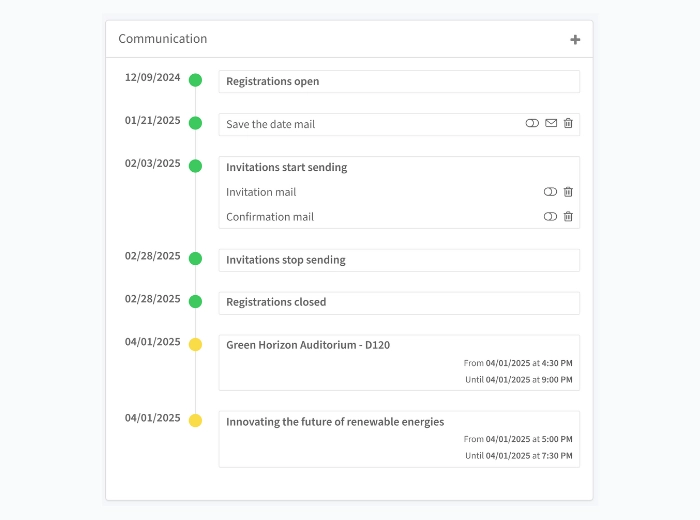
Give Sales ownership without losing control of the guest list
Sales often knows which client should be invited to company relationship events based on their relationship with said clients. The problem is that Sales involvement can quickly turn into scattered spreadsheets, forwarded names, and last-minute changes.
InviteDesk gives sales reps or account managers controlled access to their own invitees. Marketing can allocate ticket quotas, monitor available capacity, and track registrations in one dashboard.
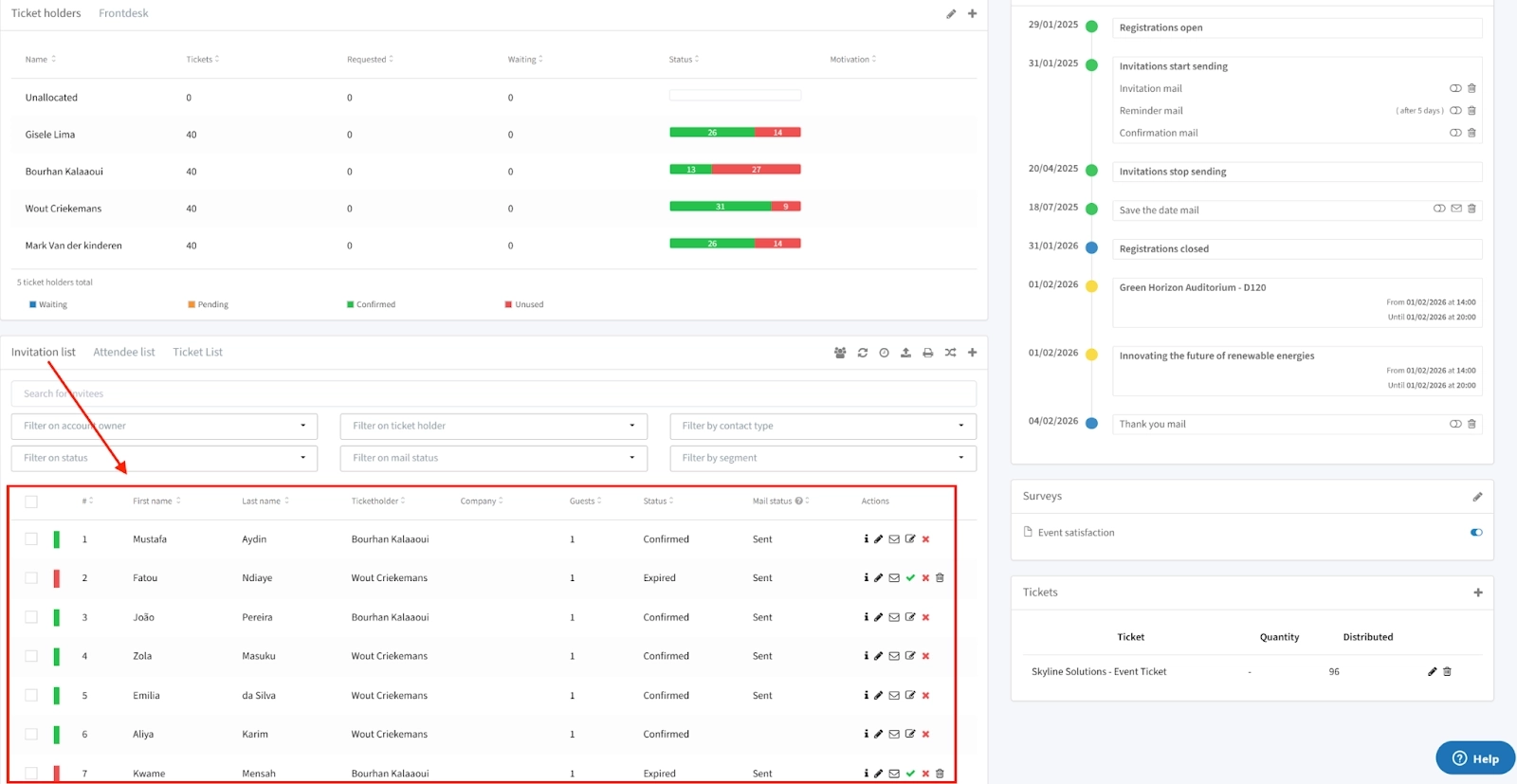
This helps the team see who has confirmed, who declined, who has not responded, and which seats still need to be filled.

And once an invitee cancels, InviteDesk has a workflow that helps you auto-invite the next guest on a wait-list so you don’t have empty seats on event day.
Sales and marketing team can also see an overview of all events on their mobile phone, which STERCK Magazine’s event coordinator Anke Souvereyns and commercial advisor Serge Wailly says is a user-friendly application that “automatically links to our event coordination.”

Reduce unused seats and repeated no-shows
For hospitality events and executive dinners, an empty seat is a missed opportunity to improve a client or partner’s relationship with your company. It’s worse when you invite people who keep confirming but fail to attend.
InviteDesk keeps guest history across events, so you can see previous invitations, registrations, and no-shows. That helps Sales make better invite decisions for the next event instead of repeating the same guest list.
Connect check-in to follow-up

InviteDesk’s ScanApp lets your team check guests in with a smartphone. The app immediately notifies the account manager when their client checks in so they can give them priority tours or start warming them up from the door — if they want to.
The attendance data is also synced with your CRM so you can easily follow up with attendees after the event and avoid chasing people who didn’t show up.
This InviteDesk workflow has helped reduce no-shows and increase attendance among senior decision-makers.
Steven Peetermans, Sales and Marketing Director at the Tectum Group, for example, after more than 30 events through InviteDesk, reports that the system reduced the amount of email and telephone coordination required between sales and marketing. Before InviteDesk, events “always involved a lot of time and effort: creating invitations, sending reminders”, but now, “everything runs much faster and better. Attendance is higher, and no-shows are lower.”
InviteDesk’s Attendee Management Features
- On Behalf Of invitations: Send branded invitations from the guest’s account manager.
- Sales access and ticket quotas: Let Sales manage invitees within ticket limits allocated by Marketing.
- Shared attendee dashboard: Track invitees, registrations, declines, pending responses, and available capacity.
- Automated reminders: Send confirmations, reminders, thank-you emails, and surveys.
- Mobile check-in: Scan QR codes from a smartphone without dedicated hardware.
- CRM Connector: Sync registration, attendance, and survey data with Salesforce, HubSpot, and Microsoft Dynamics 365.
Pros
- Strong fit for recurring B2B events with known guest lists.
- Helps Sales and Marketing manage one attendee workflow.
- Keeps guests tied to the person responsible for the relationship.
- Syncs with your CRM for follow-ups after the event.
- Useful for organisations that need EU hosting and security controls.
Cons
- Less suitable for public events selling tickets to unknown attendees.
- Less suitable for large conferences that need hotel logistics or complex session operations.
- May be more than teams need for one or two simple events per year.
- Advanced ROI reporting may still depend on CRM or BI tools.
Pricing (billed annually)
- Plus: €232/month for up tp 10/events/year
- Premium: €286/month for up tp 10/events/year
- Platinum: €424/month for up tp 10/events/year
- Single-event package: €1,320 (5 seats)
See how it works for your next relationship-led event.
2. Cvent: for large, complex conferences and trade shows
Cvent is an enterprise event management platform for large, operationally complex events. It’s a strong fit when attendee management involves more than invitations, registration, and check-in.
For large conferences and trade shows, Cvent’s attendee management workflow usually includes ticket categories, session choices, badge printing, exhibitor access, hotel logistics, and on-site movement across multiple tracks.
Cvent helps teams manage that complexity in one enterprise event platform. Attendees can register, choose sessions, receive event communications, check in on site, collect badges, use the mobile app on event day, and generate attendance or engagement data for reporting.
That makes Cvent a better fit for large organisations running multi-day events than for lean teams managing a small client dinner or relationship-led guest list. We did a head-to-head comparison of Cvent vs InviteDesk to see which tool is best for you.
Cvent’s Attendee Management Features
- Registration management: Build registration flows for different attendee types, ticket categories, and event formats.
- Session management: Let attendees select sessions and help organisers track participation across multi-track agendas.
- On-site check-in and badging: Support attendee arrival, badge printing, and attendance tracking at the venue.
- Mobile attendee experience: Give attendees access to agendas, networking tools and engagement features.
- Venue and hotel logistics: Manage attendee needs that connect to venue sourcing, accommodation, and event operations.
- Enterprise reporting: Track registration, attendance, engagement, and session data across large events or event programmes.
Pros
- Strong fit for large conferences, trade shows, and enterprise event portfolios.
- Handles attendee workflows that involve sessions, badges, hotels, and on-site logistics.
- Gives large teams a recognised platform that procurement teams may already understand.
- Offers reporting across registration, attendance, engagement, and event operations.
Cons
- Can be too complex for smaller teams that only need invitations, RSVPs, check-in, and follow-up.
- Requires more setup and training because of its breadth.
- May need dedicated administrators for configuration and on-site operations.
- Not centred on rep-owned invitations or account-manager follow-up.
Pricing
Requires you to get in touch with their sales team. But according to 193 purchases, the median price is $19,550 and can be as much as $94,642.
3. Bizzabo: for enterprise teams running an event portfolio

Bizzabo is an enterprise event platform for branded conferences and summits. It’s a strong fit when you need to capture attendee engagement during the event, especially through its Klik SmartBadges.
For conferences and branded event programs, organisers often need to know who visited sponsor booths, networked, which sessions attracted attention, and how attendees engaged across the venue.
Bizzabo supports that through its event platform and Klik wearable badge technology. Attendees can register, check in, use the mobile app, exchange contact details, and generate on-site engagement data that helps organisers understand event performance after the event.
Bizzabo’s Event Attendee Management Features
- Event registration: Build registration flows for conferences, webinars, roadshows, and branded events.
- Klik SmartBadges: Let attendees exchange contact details and create interaction data through wearable badges.
- On-site engagement tracking: Capture attendee activity across sessions, sponsor areas, networking moments, and other event touchpoints.
- Mobile attendee app: Give attendees access to schedules, notifications, content, and engagement tools.
- Integrations: Connect attendee and engagement data with CRM, marketing, and business systems.
- Portfolio reporting: Track registration, engagement, and attendance data across multiple event formats.
Pros
- Strong fit for enterprise conferences, summits, and branded event programs.
- Captures attendee engagement beyond standard check-in data.
- Klik SmartBadges can support networking, sponsor interaction, and richer on-site reporting.
- Useful for teams that need one platform across several event formats.
Cons
- Can be more than smaller teams need for simple dinners, seminars, or RSVP-only events.
- Setup may take time because the platform supports complex event programs.
- Klik hardware and related services may add cost and planning requirements.
- Not centered on rep-owned invitations or account-manager follow-up.
Pricing
- Starts at $17,999/year, with 3 users minimum
- Klik hardware and related services may carry additional charges.
4. Whova: for conferences where attendees need to network

Whova is an event app and management platform for conferences and networking-led events. It’s a good fit when you need attendees to network and join community discussions in your events.
Whova supports that through its mobile and web app. Attendees can build profiles, receive matchmaking suggestions, join community boards, message other attendees, and access the event agenda in one place.
That makes Whova a better fit for events where attendee-to-attendee engagement matters than for curated B2B events where Sales needs to own each guest relationship.
Whova’s Event Attendee Management Features
- Attendee matchmaking: Suggest relevant people based on profiles, interests, and professional information.
- Community boards: Let attendees start discussions and organize informal meetups.
- Messaging and meeting scheduling: Support one-to-one conversations, group messages, and scheduled meetings.
- Registration and QR check-in: Manage sign-up and arrival within the platform.
- Mobile attendee app: Give attendees access to agendas, updates, content, and networking tools.
- Engagement reporting: Track activity across sessions, discussions, and networking features.
Pros
- Strong fit for conferences where networking is a core attendee outcome.
- Gives attendees more ways to connect before, during, and after the event.
- Combines registration, check-in, agenda access, and engagement in one attendee app.
- Reviews often highlight the app’s ease of navigation and networking features.
Cons
- Networking value depends on attendees actively using the app.
- Less suitable when the event doesn’t need attendee-to-attendee networking.
- Not centered on sales-owned invitations or account-manager follow-up.
- Pricing requires a sales call.
- Ticketing fees may apply for paid registrations.
Pricing
- Custom pricing, but according to 388 deals, median price is $47,546 and can be up to $230,818/year.
- Whova charges a registration fee of 3.0% + $0.99 on every paid ticket
- Add-on costs for features can cost up to $2,000 extra
5. Eventbrite: for public events selling tickets
Eventbrite is a ticketing and event registration platform with a public event marketplace. It’s a strong fit when attendee management starts with public discovery and ticket sales.
For public conferences, workshops, and entertainment events, organisers need people to find the event, book a ticket, pay if needed, receive confirmation, and check in at the door.
Eventbrite supports that workflow through its public marketplace, ticketing tools and mobile check-in app. This makes it a better fit for open public events than for invite-only B2B events where attendance needs to sync back to your CRM for follow-ups.
We did an Eventbrite vs InviteDesk head-to-head comparison to see which is a good fit for your type of events.
Eventbrite’s Event Attendee Management Features
- Public event marketplace: Make events discoverable by location, category, and interest.
- Ticketing and registration: Support free, paid, and multiple-ticket event options.
- Payment processing: Collect payments for paid events through the booking flow.
- Attendee data collection: Capture attendee details during ticket purchase or registration.
- Waitlists and reminders: Manage capacity and send basic event communications.
- Mobile check-in: Let staff scan tickets and monitor attendance from the organiser app.
Pros
- Strong fit for public events that need ticket sales and audience reach.
- Easy for smaller organisers to create and publish an event.
- Public marketplace can help attract attendees beyond an existing contact list.
- No platform fee for free events.
Cons
- Less suitable for invite-only events with a known guest list.
- Doesn’t connect each guest to a salesperson or account manager.
- B2B teams may need exports or integrations for account-level follow-up.
- Per-ticket fees can become expensive for larger paid events.
- Public discovery may be unnecessary for private customer events.
Pricing
Eventbrite doesn’t charge organisers to publish free events. For paid events, its standard US pricing includes:
- Service fee: 3.7% plus $1.79 per paid ticket
- Payment processing: 2.9% per order
6. RSVPify: best for simple invitation and RSVP management

RSVPify is an RSVP and guest-list management platform for private events. It’s a strong fit when you need a simple way to send invitations, collect responses, manage guest details, and check people in.
RSVPify supports that lighter workflow with branded invitations, RSVP tracking, custom questions, seating tools, and QR-code check-in. It works well when the event team needs structure, without paying for a full enterprise conference app workflow.
That makes RSVPify a better fit for simple private events than for recurring B2B programs where Sales needs to manage invitees and follow up from the CRM.
RSVPify’s Event Attendee Management Features
- Branded invitations: Send invitations and track responses from one system.
- RSVP tracking: Monitor who accepted, declined, or hasn’t responded.
- Custom guest questions: Collect meal choices, accessibility needs, and other guest details.
- Guest list management: Keep invitees, responses, and attendance details organised.
- Seating charts: Plan guest placement for galas and other seated events.
- QR-code check-in: Record arrivals at the venue.
- Paid registration: Sell access on relevant plans when needed.
Pros
- Quick to set up for simple private events.
- Stronger fit for RSVP workflows than public ticketing platforms.
- Useful for collecting practical guest information.
- Includes seating tools for events where placement matters.
Cons
- Less suitable for large event programs with complex attendee workflows.
- Limited CRM capability for B2B follow-up and account-level reporting.
- Doesn’t center the workflow on sales-owned guest relationships.
- Event and registration limits may become restrictive for teams running many events.
- Higher tiers become expensive when you need professional-level features.
Pricing (billed monthly)
- Starter at $39/mo
- Plus at $125/mo
- Professional at $409/mo
Final Summary: The Right Attendee Management Platform
If you run large conferences or trade shows, Cvent or Bizzabo may be the better fit. They’re built for complex event operations, attendee flows and enterprise reporting. If the main goal is attendee networking, Whova is the stronger fit. But if you need to sell tickets to the public, consider Eventbrite. However, if you only need a simple private guest list, RSVPify may be enough.
InviteDesk is the strongest fit for invite-only events, including client dinners, corporate hospitality and seminars. These are events where your reps or account managers can invite clients or partners (whose relationship the company wants to improve) and Marketing can manage the invitation, attendance, and follow-up process.
At the end of the event, your attendance data syncs to your CRM so your sales team can send follow-ups, effortlessly.
See how it works for your next relationship-led event.
FAQs
Is attendee management separate from event management?
Attendee management is usually part of event management rather than a completely separate category. Event management covers the complete planning and delivery process, while attendee management concentrates on the people attending and how organisers communicate with, admit and follow up with them.
Can attendee management software send invitations from a salesperson?
Some platforms can, but it’s not a standard feature across the category. InviteDesk’s On Behalf Of workflow allows marketing to create the campaign while sending invitations under individual sales representatives’ names and email addresses. Most general event platforms manage invitations centrally from an event or company account.
Can you manage attendees without a complete event management platform?
Yes. For simple invite-only dinners or private events, a lighter platform such as RSVPify can provide enough invitation, registration and check-in functionality. A platform like InviteDesk becomes more valuable when you need CRM integration and collaboration between departments, while broader tools can be helpful for multi-event reporting, public ticketing or complex conference operations.
Do attendees need to download an app to check in?
Not necessarily. Many platforms allow your staff to scan a QR code from an organiser-facing mobile app. The attendee only needs to present the code contained in their confirmation email or digital ticket. Whether attendees need an app for other activities, such as networking or agenda access, depends on the platform.
Which attendee management software is best for B2B relationship events?
InviteDesk is the best fit for B2B relationship events where Sales and Marketing jointly manage a known guest list. Its advantage is that each invitation, RSVP, check-in, no-show, and follow-up can stay connected to the account manager or sales rep, while Marketing keeps control of the campaign and attendance data returns to the CRM. That makes it a strong fit for recurring client events where getting the right people in the room matters more than selling tickets.